EasyManua.ls Logo

Sony Hyper HAD SPT-M124 - Lens Installation and Cable Modification

Sony Hyper HAD SPT-M124
9 pages
Print Icon
To Next Page IconTo Next Page
To Previous Page IconTo Previous Page
Loading...
iiis/muia
ou
9
mm
or
less
9
mm
ou
moins
9
mm
o
menos
4
mm
or
less
4
mm
ou
moins
4
mm
o
menos
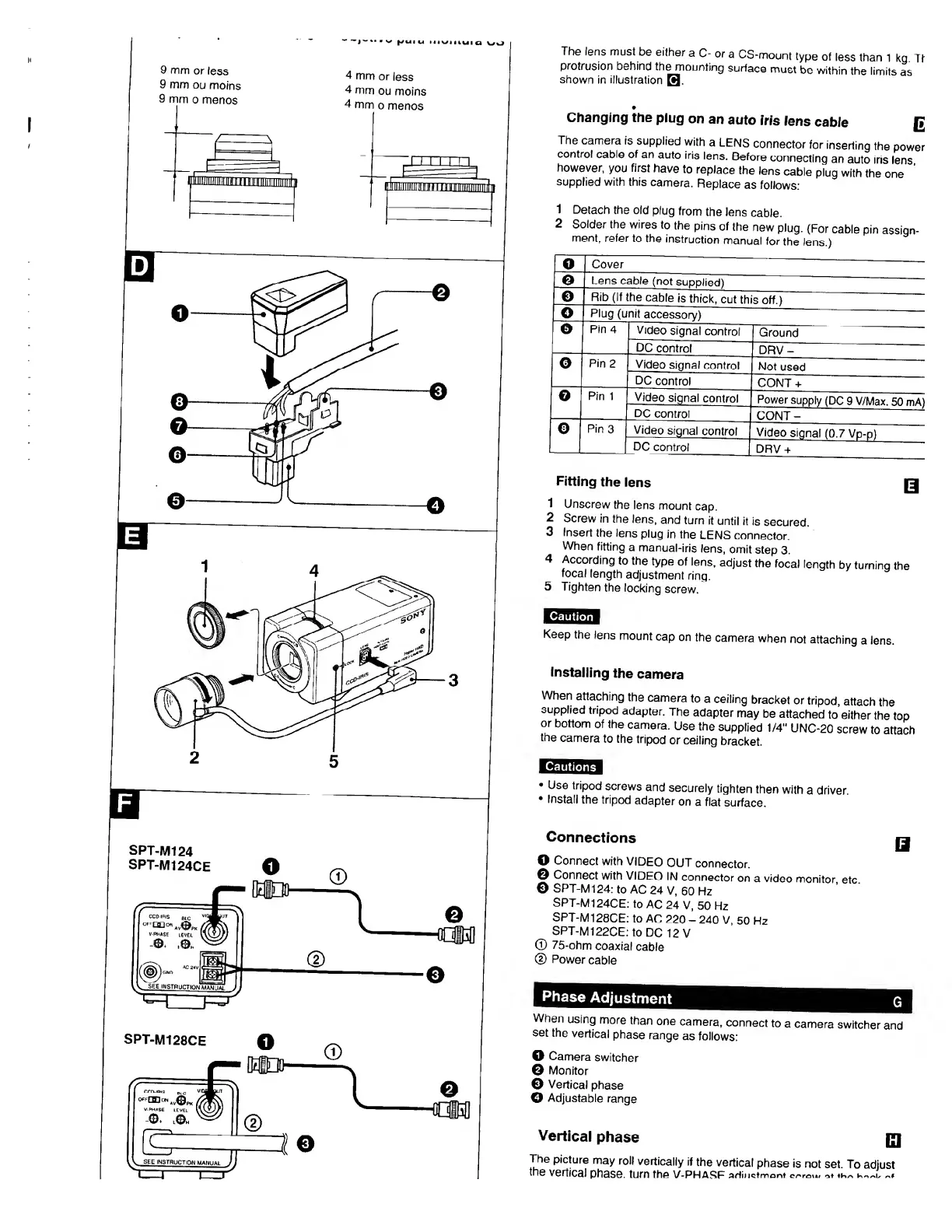
The
lens
must
be
either
a
C-
or
a
CS-mount
type
of
less
than
1
kg.
Tt
protrusion
behind
the
mounting
surface
must
be
within
the
limits
as
shown
in
illustration
B
Changing
the
plug
on
an
auto
iris
lens
cable
The
camera
is
supplied
with
a
LENS
connector
for
inserting
the
power
control
cable
of
an
auto
iris
lens.
Before
connecting
an
auto
Iris
lens
however,
you
first
have
to
replace
the
lens
cable
plug
with
the
one
supplied
with
this
camera.
Replace
as
follows:
1
Detach
the
old
plug
from
the
lens
cable.
2
Solder
the
wires
to
the
pins
of
the
new
plug.
(For
cable
pin
assign-
ment
r
refer
to
the
instruction
manual
for
the
lens.)
o
Cover
©
Lens
cable
(not
supplied)
©
Rib
(If
the
cable
is
thick,
cut
this
off.)
©
Plug
(unit
accessory)
0
Pin
4
Video
signal
control
Ground
DC
control
DRV-
o
Pin
2
Video
signal
control
Not
used
DC
control
CONT
+
©
Pin
1
Video
signal
control
Power
supply
(DC
9
V/Max.
50
mA)
DC
control
CONT-
©
Pin
3
Video
signal
control
Video
signal
(0.7
Vp-p)
DC
control
DRV
+
Fitting
the
lens
Q
1
Unscrew
the
lens
mount
cap.
2
Screw
in
the
lens,
and
turn
it
until
it
is
secured.
3
Insert
the
lens
plug
in
the
LENS
connector.
When
fitting
a
manual-iris
lens,
omit
step
3.
4
According
to
the
type
of
lens,
adjust
the
focal
length
by
turning
the
focal
length
adjustment
ring.
5
Tighten
the
locking
screw.
Keep
the
lens
mount
cap
on
the
camera
when
not
attaching
a
lens.
Installing
the
camera
When
attaching
the
camera
to
a
ceiling
bracket
or
tripod,
attach
the
supplied
tripod
adapter.
The
adapter
may
be
attached
to
either
the
top
or
bottom
of
the
camera.
Use
the
supplied
1/4"
UNC-20
screw
to
attach
the
camera
to
the
tripod
or
ceiling
bracket.
Use
tripod
screws
and
securely
tighten
then
with
a
driver
Install
the
tripod
adapter
on
a
flat
surface.
SPT-M124
SPT-M124CE
Connections
O
Connect
with
VIDEO
OUT
connector.
©
Connect
with
VIDEO
IN
connector
on
a
video
monitor,
etc.
0
SPT-M124:
to
AC
24
V,
60
Hz
SPT-M124CE:
to
AC
24
V,
50
Hz
SPT-M128CE:
to
AC
220
-
240
V
50
Hz
SPT-M122CE:
to
DC
12
V
©
75-ohm
coaxial
cable
(D
Power
cable
SPT-M128CE
Q
When
using
more
than
one
camera,
connect
to
a
camera
switcher
and
set
the
vertical
phase
range
as
follows:
O
Camera
switcher
©
Monitor
Q
Vertical
phase
©
Adjustable
range
Vertical
phase
|JJ
The
picture
may
roll
vertically
if
the
vertical
phase
is
not
set
To
adjust
the
vertical
phase,
turn
the
V-PHASF
adinctnnont

Related product manuals