ICD-UX522F/UX523F
11
SECTION 3
TEST MODE
Setting the test mode allows you to perform various checks and
examinations on this unit.
1. SETTING THE TEST MODE
Setting method:
1. Slide the [POWER] switch to turn the power on.
2. Slide the [DPC (SPEED CTRL)] switch to OFF.
3. While pressing the [STOP/
x
] and [VOL –] keys, slide the
[DPC (SPEED CTRL)] switch to ON.
4. The test mode menu is displayed, and enter the test mode. Re-
lease the [STOP/
x
] and [VOL –] keys.
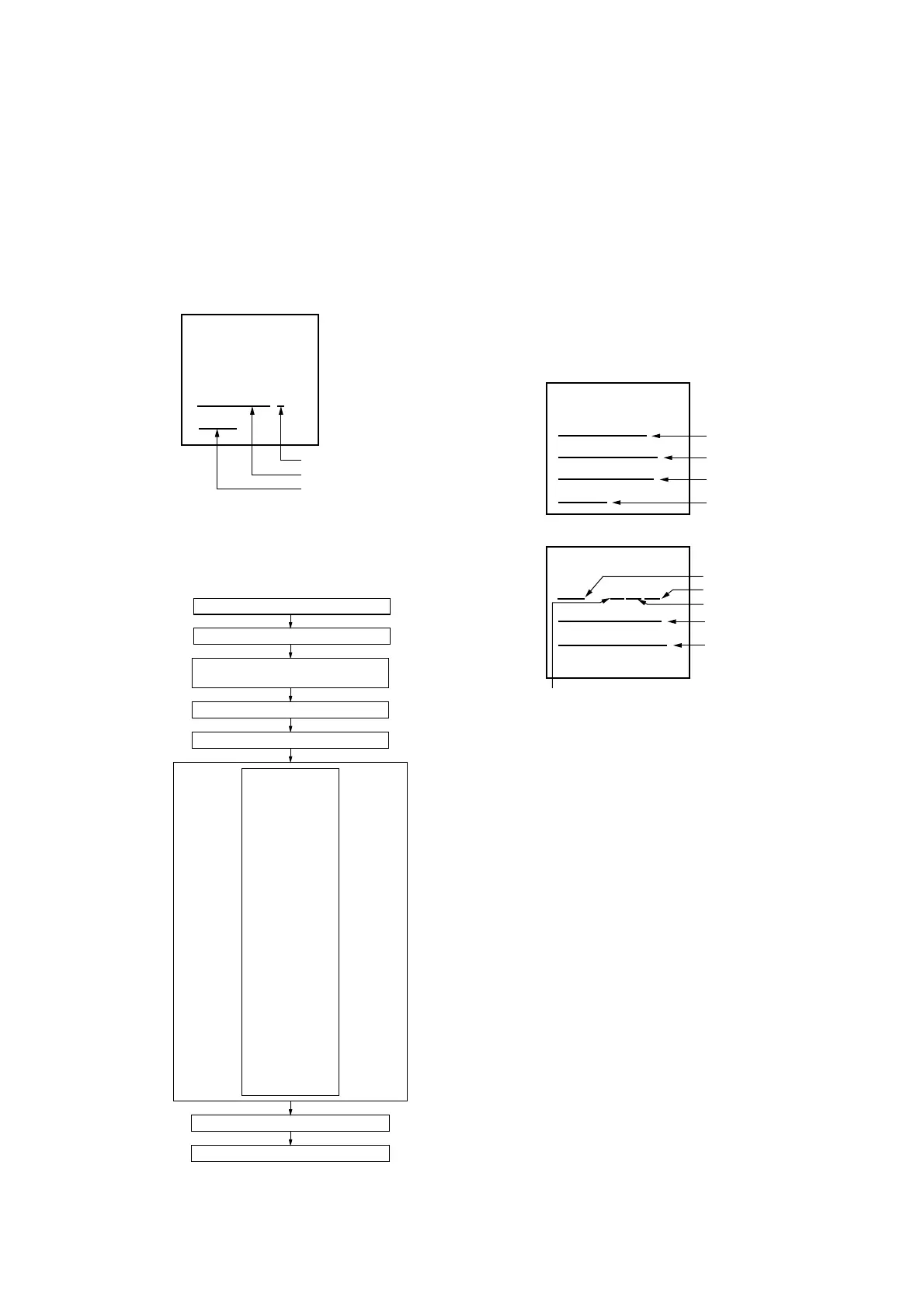
<SERVICE MENU>
Example of Display
ICD-UX523F/E
1.00.00
Destination
Model name
Firmware version
2. RELEASING THE TEST MODE
Remove battery.
3. CONFIGURATION OF THE TEST MODE
[.] key
[
>] key
SERVICE MENU
VERSION
KEY CHECK
AUDIO LOOP
SIN
BEEP
LCD CONT
LCD PATTERN
RTC TEST
BATT A/D
ZLOAD
LOW DET
VBUS
FM TEST
KEY COUNT
SLEEP
BATT LIFE
WRITER VER
CHG LOG
LREC LOG
LREC LOG Clear
MENU INIT
SERVICE MENU
J
j
k
K
TEST MODE
Slide the [DPC (SPEED CTRL)] switch to OFF.
While pressing the [STOP/
x] and [VOL –] keys,
slide the [DPC (SPEED CTRL)] switch to ON.
Release the [STOP/
x] and [VOL –] keys.
Remove battery.
Initial state of test mode
End of TEST MODE
Determine
using
[
N/ENTER]
key
Return using
[STOP
/x] key
4-1. VERSION
Model name, destination, fi rmware version, IPL2 version, CPU
version, initial language, charge function, card function, radio
function, eMMC maker code and eMMC capacity can be con-
fi rmed in this mode.
Procedure:
1. Enter the test mode.
2. Press the [
>
] or [
.
] keys to select the “VERSION”, and
press the [
N
/ENTER] key.
3. Model name, destination, fi rmware version, IPL2 version and
CPU version are displayed (page 1/2 of LCD display). Press
the [
>
] or [
.
] keys, initial language, charge function,
card function, radio function, eMMC maker code and eMMC
capacity are displayed (page 2/2 of LCD display).
<VERSION>
ICD-UX523F/E
MAINFW:1.00.00
IPL2FW:1.00.00
LSI 4252
Example of Display (page 1/2)
<VERSION>
L:02 C1M1R1
eMMC MCode 15
eMMC Capa 04GB
Example of Display (page 2/2)
eMMC maker code
eMMC capacity
Model name/Destination
Firmware version
IPL2 version
CPU version
Initial language
Charge function
Card function
Radio function
C/M/R : 1 = function exists
0 = function non-exists
Releasing method:
Press the [STOP/
x
] key, return to test mode menu.


 To Next Page
 Loading...