EasyManua.ls Logo

Sony ICF-6800W - Page 44

Sony ICF-6800W
60 pages
Print Icon
To Next Page IconTo Next Page
To Previous Page IconTo Previous Page
Loading...
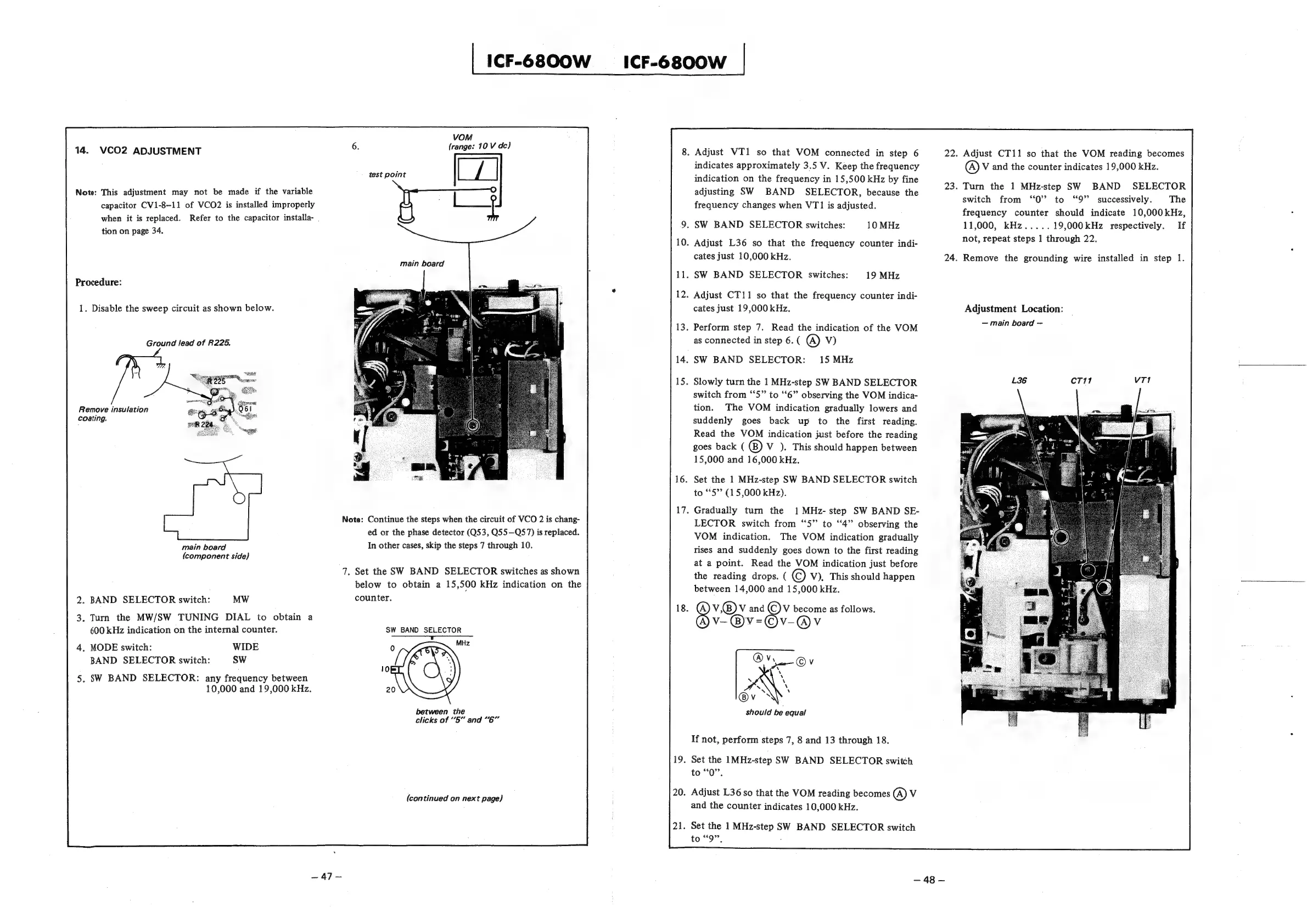
14.
VCO2
ADJUSTMENT
Note:
This
adjustment
may
not
be
made
if
the
variable
capacitor
CV1-8-11
of
VCO2
is
installed
improperly
when
it
is
replaced.
Refer
to
the
capacitor
installa-
.
tion
on
page
34.
Procedure:
1.
Disable
the
sweep
circuit
as
shown
below.
Ground
lead
of
R225.
Remove
insulation
Coating.
main
board
(component
side)
.
BAND
SELECTOR
switch:
MW
.
Turn
the
MW/SW
TUNING
DIAL
to
obtain
a
600
kHz
indication
on
the
internal
counter.
.
MODE
switch:
WIDE
BAND
SELECTOR
switch:
SW
.
SW
BAND
SELECTOR:
any
frequency
between
10,000
and
19,000
kHz.
—~47—
|
ICF-G8OOW
ICF-6800W
|
VOM
(range:
10
V
de)
test
point
main
board
Note:
Continue
the
steps
when
the
circuit
of
VCO
2
is
chang-
ed
or
the
phase
detector
(Q53,
Q55—Q57)
is
replaced.
In
other
cases,
skip
the
steps
7
through
10.
7.
Set
the
SW
BAND
SELECTOR
switches
as
shown
below
to
obtain
a
15,500
kHz
indication
on
the
counter.
SW
BAND
SELECTOR
+
between
the
clicks
of
“5”
and
“6”
(continued
on
next
page)
.
Adjust
VT1
so
that
VOM
connected
in
step
6
indicates
approximately
3.5
V.
Keep
the
frequency
indication
on
the
frequency
in
15,500
kHz
by
fine
adjusting
SW
BAND
SELECTOR,
because
the
frequency
changes
when
VT1
is
adjusted.
.
SW
BAND
SELECTOR
switches:
10
MHz
.
Adjust
L36
so
that
the
frequency
counter
indi-
cates
just
10,000
kHz.
.
SW
BAND
SELECTOR
switches:
19
MHz
.
Adjust
CT11
so
that
the
frequency
counter
indi-
cates
just
19,000
kHz.
.
Perform
step
7.
Read
the
indication
of
the
VOM
as
connected
in
step
6.
(
@)
Vv)
.
SW
BAND
SELECTOR:
15
MHz
.
Slowly
turn
the
1
MHz-step
SW
BAND
SELECTOR
switch
from
“5”
to
“6”
observing
the
VOM
indica-
tion.
The
VOM
indication
gradually
lowers
and
suddenly
goes
back
up
to
the
first
reading.
Read
the
VOM
indication
just
before
the
reading
goes
back
(
V
).
This
should
happen
between
15,000
and
16,000
kHz.
.
Set
the
1
MHz-step
SW
BAND
SELECTOR
switch
to
“5”
(15,000
kHz).
.
Gradually
turn
the
1MHz-
step
SW
BAND
SE-
LECTOR
switch
from
‘5’
to
‘‘4”
observing
the
VOM
indication.
The
VOM
indication
gradually
rises
and
suddenly
goes
down
to
the
first
reading
at
a
point.
Read
the
VOM
indication
just
before
the
reading
drops.
(
©
V),
This
should
happen
between
14,000
and
15,000
kHz.
.
V.®@v
and
V
become
as
follows.
(A)
V-@)V=©v-@v
should
be
equal
If
not,
perform
steps
7,
8
and
13
through
18.
.
Set
the
1MHz-step
SW
BAND
SELECTOR
switch
to
“Q”,
.
Adjust
L36
so
that
the
VOM
reading
becomes
@
Vv
and
the
counter
indicates
10,000
kHz.
.
Set the
1
MHz-step
SW
BAND
SELECTOR
switch
to
sg?
7
22.
Adjust
CT11
so
that
the
VOM
reading
becomes
@)
V
and
the
counter
indicates
19,000
kHz.
23.
Turn
the
1
MHz-step
SW
BAND
SELECTOR
switch
from
‘0’?
to
“9”
successively.
The
frequency
counter
should
indicate
10,000kHz,
11,000,
kHz
19,000kHz
respectively.
If
not,
repeat
steps 1
through
22.
24.
Remove
the
grounding
wire
installed
in
step
1.
Adjustment
Location:
main
board
48

Other manuals for Sony ICF-6800W

Related product manuals