EasyManua.ls Logo

Sony ICF-7600D - Control Panel Details and Settings

Sony ICF-7600D
23 pages
Print Icon
To Next Page IconTo Next Page
To Previous Page IconTo Previous Page
Loading...
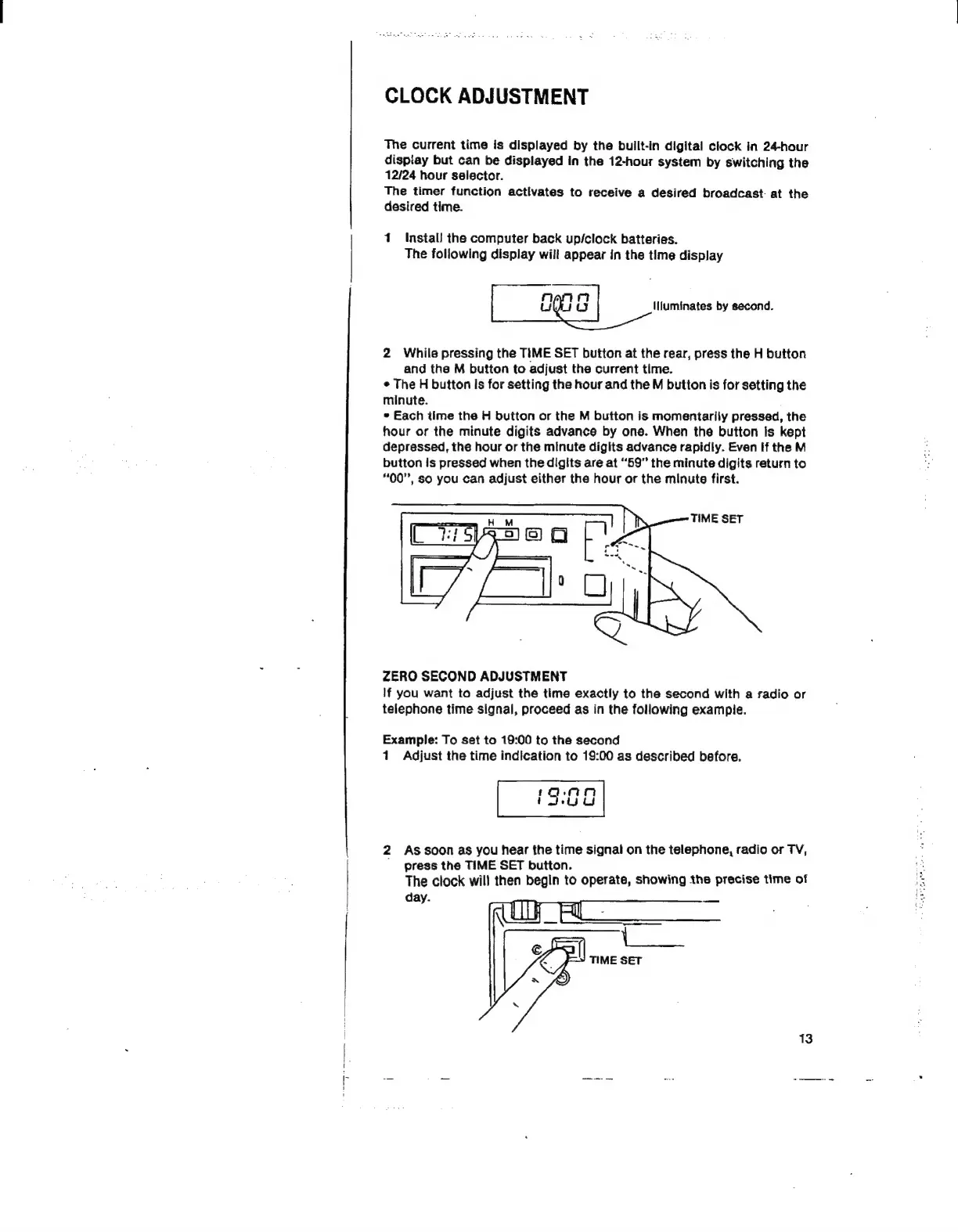
CLOCK
ADJUSTMENT
The
current
time
is
displayed
by
the
built-in
digital
clock
in
24-hour
disptay
but
can
be
displayed
in
the
12-hour
system
by
switching
the
12/24
hour
selector.
The
timer
function
activates
to
receive
a
desired
broadcast
at
the
desired
time.
1
Install
the
computer
back
up/clock
batteries.
The
following
display
will
appear
in
the
time
display
О
И]
g
lliuminates
by
second.
2
While
pressing
the
TIME
SET
button
at
the
rear,
press
the
H
button
and
the
M
button
to
adjust
the
current
time.
*
The
H
button
Is
for
setting
the
hour
and
the
M
button
is
for
setting
the
minute.
*
Each
time
the
H
button
or
the
M
button
is
momentarily
pressed,
the
hour
or
the
minute
digits
advance
by
one.
When
the
button
is
kept
depressed,
the
hour
or
the
minute
digits
advance
rapidly.
Even
If
the
M
button
is
pressed
when
the
digits
are
at
“59”
the
minute
digits
return
to
#00",
so
you
can
adjust
either
the
hour
or
the
minute
first.
ZERO
SECOND
ADJUSTMENT
If
you
want
to
adjust
the
time
exactly
to
the
second
with
a
radio
or
telephone
time
signal,
proceed
as
in
the
following
example.
Example:
To
set
to
19:00
to
the
second
1
Adjust
the
time
indication
to
19:00
as
described
before.
го,
пт
|
2euUL
2
As
soon
as
you
hear
the
time
signal
on
the
telephone,
radio
or
TV,
^
press
the
TIME
SET
button.
The
clock
will
then
begin
to
operate,
showing
the
precise
time
of
day.
TIME
SET
13

Other manuals for Sony ICF-7600D

Related product manuals