EasyManua.ls Logo

Sony ICF-7600DA - Page 11

Sony ICF-7600DA
56 pages
Print Icon
To Next Page IconTo Next Page
To Previous Page IconTo Previous Page
Loading...
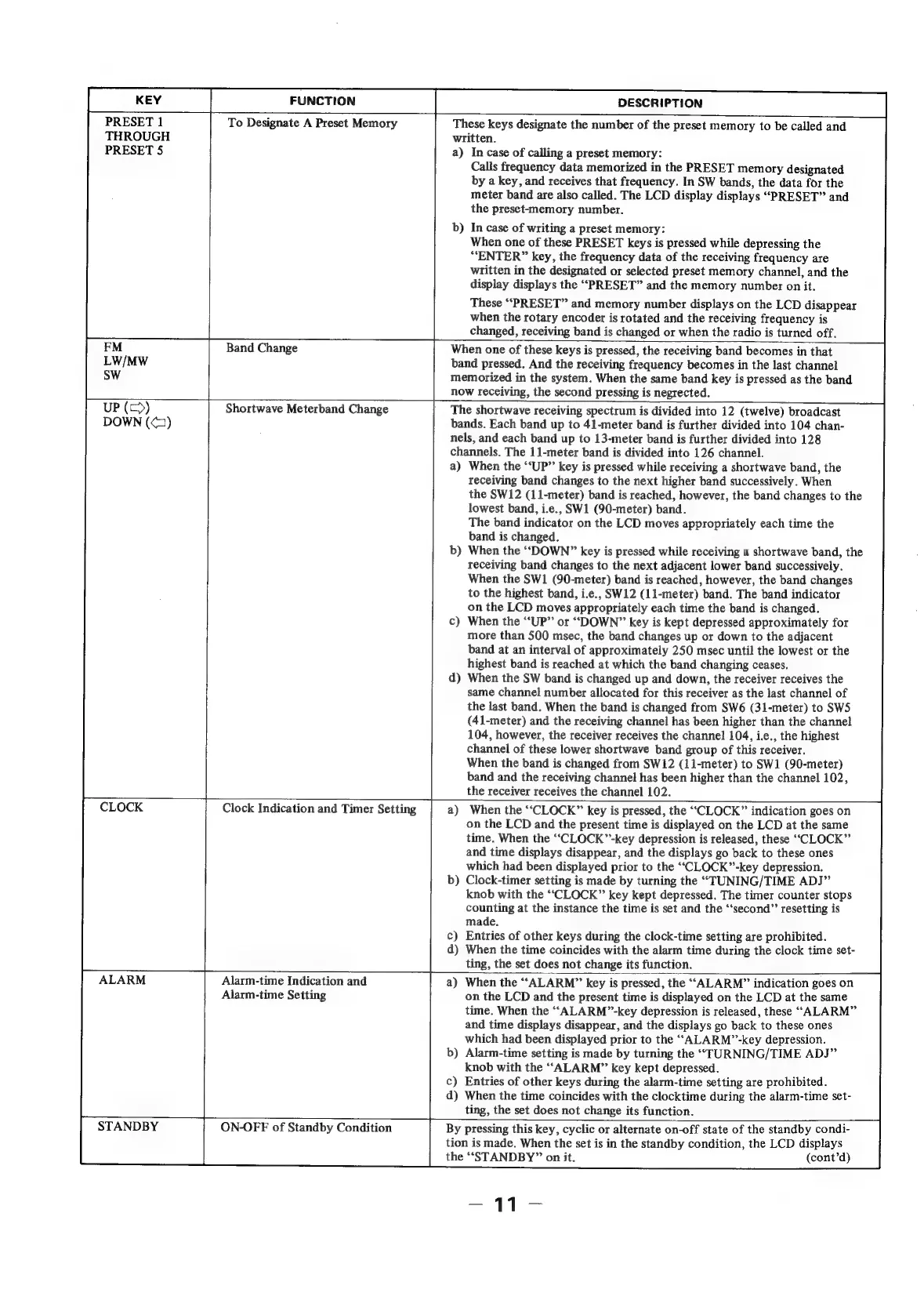
PRESET
1
THROUGH
PRESET
5
FUNCTION
To
Designate
A
Preset
Memory
Band
Change
DESCRIPTION
These
keys
designate
the
number
of
the
preset
memory
to
be
called
and
written.
a)
In
case
of
calling
a
preset
memory:
Calls
frequency
data
memorized
in
the
PRESET
memory
designated
by
a
key,
and
receives
that
frequency.
In
SW
bands,
the
data
for
the
meter
band
are
also
called.
The
LCD
display
displays
“PRESET”
and
the
preset-memory
number.
In
case
of
writing
a
preset
memory:
When
one
of
these
PRESET
keys
is
pressed
while
depressing
the
“ENTER”
key,
the
frequency
data
of
the
receiving
frequency
are
written
in
the
designated
or
selected
preset
memory
channel,
and
the
display
displays
the
“PRESET”
and
the
memory
number
on
it.
These
“PRESET”
and
memory
number
displays
on
the
LCD
disappear
when
the
rotary
encoder
is
rotated
and
the
receiving
frequency
is
changed,
receiving
band
is
changed
or
when
the
radio
is
turned
off.
When
one
of
these
keys
is
pressed,
the
receiving
band
becomes
in
that
band
pressed.
And
the
receiving
frequency
becomes
in
the
last
channel
memorized
in
the
system.
When
the
same
band
key
is
pressed
as
the
band
now
receiving,
the
second
pressing
is
negrected.
Shortwave
Meterband
Change
The
shortwave
receiving
spectrum
is
divided
into
12
(twelve)
broadcast
bands.
Each
band
up
to
41-meter
band
is
further
divided
into
104
chan-
nels,
and
each
band
up
to
13-meter
band
is
further
divided
into
128
channels.
The
11-meter
band
is
divided
into
126
channel.
a)
When
the
‘‘UP”’
key
is
pressed
while
receiving
a
shortwave
band,
the
receiving
band
changes
to
the
next
higher
band
successively.
When
the
SW12
(11-meter)
band
is
reached,
however,
the
band
changes
to
the
lowest
band,
i.e.,
SW1
(90-meter)
band.
The
band
indicator
on
the
LCD
moves
appropriately
each
time
the
band
is
changed.
When
the
“DOWN”
key
is
pressed
while
receiving
a
shortwave
band,
the
receiving
band
changes
to
the
next
adjacent
lower
band
successively.
When
the
SW1
(90-meter)
band
is
reached,
however,
the
band
changes
to
the
highest
band,
i.e.,
SW12
(11-meter)
band.
The
band
indicator
on
the
LCD
moves
appropriately
each
time
the
band
is
changed.
When
the
“UP”
or
“DOWN”
key
is
kept
depressed
approximately
for
more
than
500
msec,
the
band
changes
up
or
down
to
the
adjacent
band
at
an
interval
of
approximately
250
msec
until
the
lowest
or
the
highest
band
is
reached
at
which
the
band
changing
ceases.
When
the
SW
band
is
changed
up
and
down,
the
receiver receives
the
same
channel
number
allocated
for
this
receiver
as
the
last
channel
of
the
last
band.
When
the
band
is
changed
from
SW6
(31-meter)
to
SW5
(41-meter)
and
the
receiving
channel
has
been
higher
than
the
channel
104,
however,
the
receiver
receives
the
channel
104,
i.e.,
the
highest
channel
of
these
lower
shortwave
band
group
of
this
receiver.
When
the
band
is
changed
from
SW12
(11-meter)
to
SW1
(90-meter)
band
and
the
receiving
channel
has
been
higher
than
the
channel
102,
the
receiver
receives
the
channel
102.
Clock
Indication
and
Timer
Setting
When
the
‘“‘CLOCK”
key
is
pressed,
the
“CLOCK”
indication
goes
on
on
the
LCD
and
the
present
time
is
displayed
on
the
LCD
at
the
same
time.
When
the
““CLOCK’’-key
depression
is
released,
these
“CLOCK”
and
time
displays
disappear,
and
the
displays
go
back
to
these
ones
which
had
been
displayed
prior
to
the
““CLOCK”-key
depression.
Clock-timer
setting
is
made
by
turning
the
“TUNING/TIME
ADJ”
knob
with
the
‘‘CLOCK”
key
kept
depressed.
The
timer
counter
stops
counting
at
the
instance
the
time
is
set
and
the
“‘second”’
resetting
is
made.
Entries
of
other
keys
during
the
clock-time
setting
are
prohibited.
When
the
time
coincides
with
the
alarm
time
during
the
clock
time
set-
ting,
the
set
does
not
change
its
function.
Alarm-time
Indication
and
Alarm-time
Setting
When
the
‘“‘ALARM”
key
is
pressed,
the
““ALARM”
indication
goes
on
on
the
LCD
and
the
present
time
is
displayed
on
the
LCD
at
the
same
time.
When
the
““ALARM”-key
depression
is
released,
these
“ALARM”
and
time
displays
disappear,
and
the
displays
go
back
to
these
ones
which
had
been
displayed
prior
to
the
““ALARM”’’-key
depression.
b)
Alarm-time
setting
is
made
by
turning
the
“TURNING/TIME
ADJ”
knob
with
the
“ALARM”
key
kept
depressed.
c)
Entries
of
other
keys
during
the
alarm-time
setting
are
prohibited.
d)
When
the
time
coincides
with
the
clocktime
during
the
alarm-time
set-
ting,
the
set
does
not
change
its
function.
STANDBY
‘|
ON-OFF
of
Standby
Condition
By
pressing
this
key,
cyclic
or
alternate
on-off
state
of
the
standby
condi-
tion
is
made.
When
the
set
is
in
the
standby
condition,
the
LCD
displays
the
“STANDBY”
on
it.
(cont’d)

Related product manuals