EasyManua.ls Logo

Sony ICF-SW22 - Page 2

Sony ICF-SW22
15 pages
Print Icon
To Next Page IconTo Next Page
To Previous Page IconTo Previous Page
Loading...
TABLE
OF
CONTENTS
Section
Title
Page
Specifications
eet
ee
eee
eee
eee
er
ee
eee eee
eee
Cer
eee
eee
rere
cee
rere
reer
ee
rer,
l
1.
GENERAL
Location
of
Controls
eee
errr
reer
ree
ree
eee
err
rrr
rr
eee
eee
eee
ee
eee
ey
?
Installing
the
Batteries
eee
errr
ee
eee
rere
cece
eee
ee
eee
ee
ee
ee
ee
3
Operating
the
Radio
eee
eee
eee
err
ee
ee
eee
ee
eee
eee
eee
ey
3
5
DISASSEMBLY
seriiaacsierieeesis
eee
dees
at
4
3.
ELECTRICAL
ADJUSTMENTS
+
sccseececceeeeceeerereerenees
5
4.
DIAGRAMS
4-]
:
Printed
Wiring
Boards
PETERS
REREER
TEER
ETRE
eRe
CN
7
4-2.
Schematic
Diagram
cede
Ra
VE
SEe
a
CENA
R
OES
ARR
RR
RR
TER
Cad
Ee
ces
9
5B.
EXPLODED
VIEW
sos:ccscccsctscasecdsccccacscsscesecsoavenevece’s
11
6G.
ELECTRICAL
PARTS
LIST
<-::ccescccesceeesseeeveeeeseeenees
12
SECTION
1
GENERAL
This
section
is
extracted
from
instruction
manual.
|
Molter:
1i(e)a
me)
mere)
al
ine)
ty
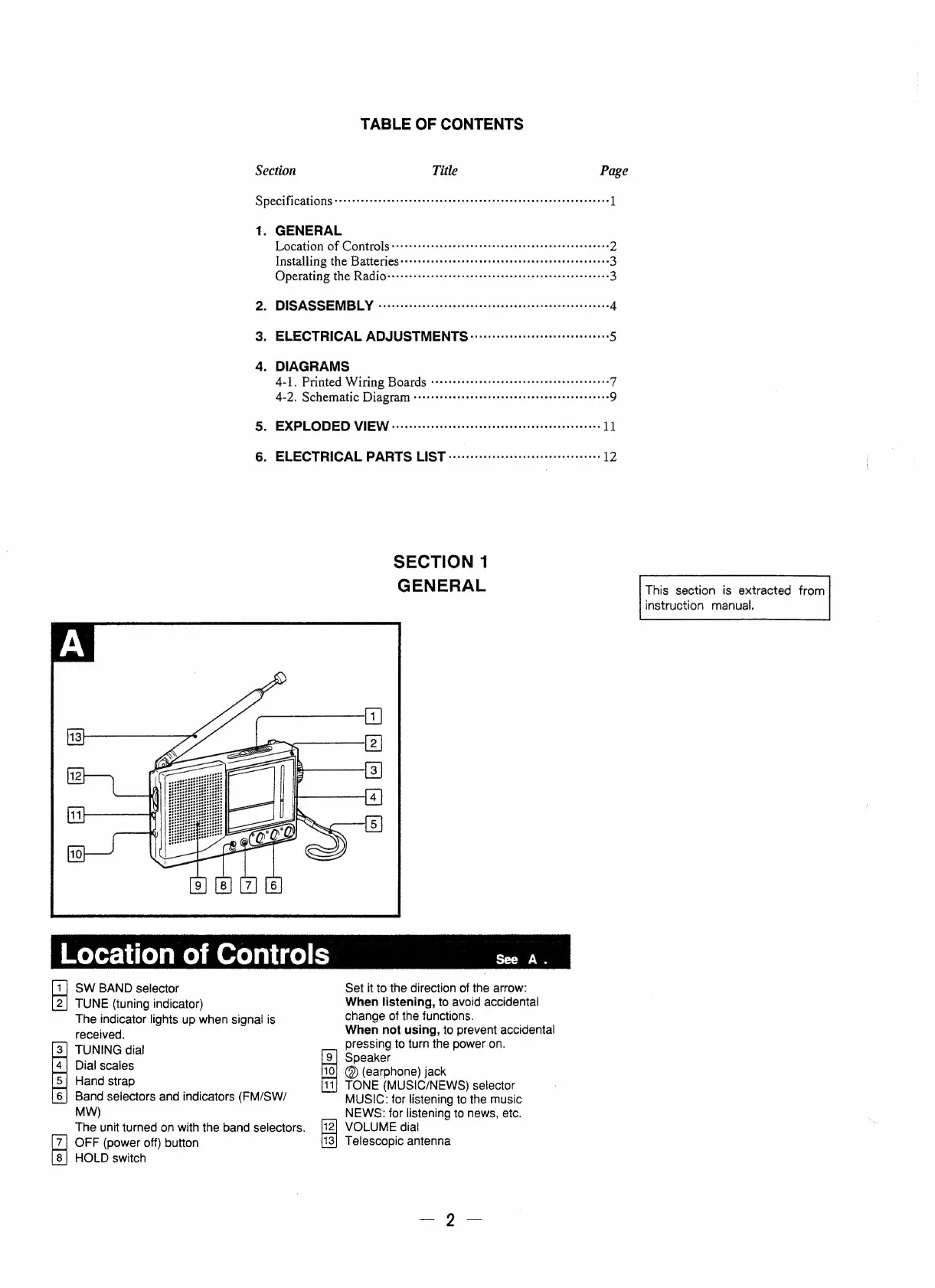
See
A.
SW
BAND
selector
Set
it
to
the
direction
of
the
arrow:
TUNE
(tuning
indicator)
When
listening,
to
avoid
accidental
The
indicator
lights
up
when
signal
is
change
of
the
functions.
received.
When
not
using,
to
prevent
accidental
3
;
pressing
to
turn
the
power
on.
Fa
3)
Boece
@)
(earphone)
jack
Hand
strap
_
TONE
(MUSIC/NEWS)
selector
|6]
Band
selectors
and
indicators
(FM/SW/
MUSIC:
for
listening
to
the
music
MW)
NEWS:
for
listening
to
news,
etc.
The
unit
turned
on
with
the
band
selectors.
VOLUME
dial
alis)
OFF
(power
off)
button
Telescopic
antenna
18}
HOLD
switch

Related product manuals