EasyManua.ls Logo

Sony ICF-SW22 - Page 3

Sony ICF-SW22
15 pages
Print Icon
To Next Page IconTo Next Page
To Previous Page IconTo Previous Page
Loading...
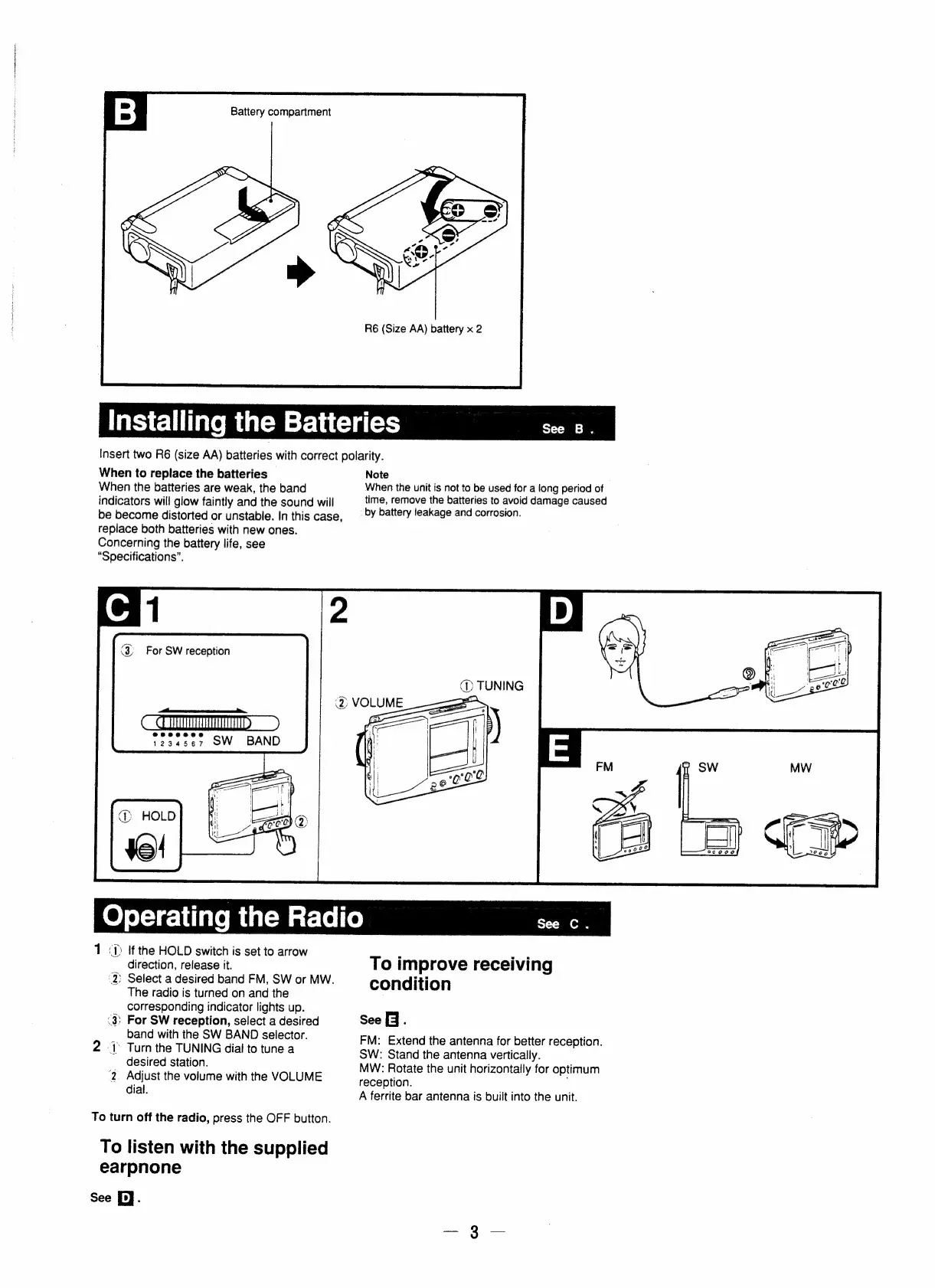
Battery
compartment
R6
(Size
AA)
battery
x
2
Installing
the
Batteries
See
B.
Insert
two
R6
(size
AA)
batteries
with
correct
polarity.
When
to
replace
the
batteries
Note
When
the
batteries
are
weak,
the
band
When
the
unit
is
not
to
be
used
for
a
long
period
of
indicators
will
glow
faintly
and
the
sound
will
time,
remove
the
batteries
to
avoid
damage
caused
be
become
distorted
or
unstable.
In
this
case,
_‘
by
battery
leakage
and
corrosion.
replace
both
batteries
with
new
ones.
Concerning
the
battery
life,
see
“Specifications”.
f
(
For
SW
reception
@
TUNING
ee
1234567
OW
BAND
Operating
the
Radio
See
C
.
1
<D
If
the
HOLD
switch
is
set
to
arrow
;
foe
direction,
release
it.
To
improve
receiving
2)
Select
a
desired
band
FM,
SW
or
MW.
iti
The
radio
is
turned
on
and
the
condition
corresponding
indicator
lights
up.
(3)
For
SW
reception,
select
a
desired
See
9.
band
with
the
SW
BAND
selector.
FM:
Extend
the
antenna
for
better
reception.
2
J)
Turn
the
TUNING
dial
to
tune
a
SW:
Stand
the
antenna
vertically.
:
desired
station.
MW:
Rotate
the
unit
horizontally
for
optimum
2
Adjust
the
volume
with
the
VOLUME
reception
eae
dial.
A
ferrite
bar
antenna
is
built
into
the
unit.
To
turn
off
the
radio,
press
the
OFF
button.
To
listen
with
the
supplied
earpnone
See
[i].

Related product manuals