EasyManua.ls Logo

Sony IFU-WLM2 - User Manual

Sony IFU-WLM2
18 pages
Print Icon
To Next Page IconTo Next Page
Loading...
User's Guide
IFU-WLM2
2-635-317-11 (2)
masterpage:Cover
© 2005 Sony Corporation
2-635-317-11 (2)
IT
JP
FR
DE
ES
IT
CS
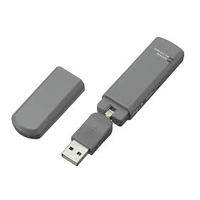
USB Wireless LAN
Module
C:\data\Projector\LanModule\2635317112\2635317112_IFUWLM2\GB00COV.FM
IFU-WLM2
Question and Answer IconNeed help?

Do you have a question about the Sony IFU-WLM2 and is the answer not in the manual?

Summary

Overview

Introduction

Introduces the USB Wireless LAN Module and its manual. Recommends user familiarity with Windows installation.

Main Features of the USB Wireless LAN Module

Lists high-speed connection, standards, interface, encryption, and built-in flash memory.

Part Names and Functions

Installation

Utility Software Installation

Explains how to install the utility software from CD-ROM or flash memory.

Additional Setup Processes

Details specific options prompted during installation for Windows 98SE and Windows Me, including system restart.

Setting Up the Network Connection

Guides users on using the management software to connect to a network.

Setting Up Encryption

Explains how to enable WEP/WPA encryption and create connection profiles.

Removing Your USB Wireless LAN Module

Provides steps for safely removing the USB Wireless LAN Module from the computer.

Using the Utility

Link Status Tab

Shows current wireless connection status, signal strength, and SSID details.

Configure Profile Tab

Lists registered connection profiles and options to add, delete, edit, or activate them.

Site Survey Tab

Provides information on networks in range and options for scanning, connecting, or adding profiles.

Advance Tab

Allows selection of the region for wireless network usage and notes channel availability.

Others

Product Specifications

Details technical specifications like frequency range, modulation, interface, and operating parameters.

Summary

Overview

Introduction

Introduces the USB Wireless LAN Module and its manual. Recommends user familiarity with Windows installation.

Main Features of the USB Wireless LAN Module

Lists high-speed connection, standards, interface, encryption, and built-in flash memory.

Part Names and Functions

Installation

Utility Software Installation

Explains how to install the utility software from CD-ROM or flash memory.

Additional Setup Processes

Details specific options prompted during installation for Windows 98SE and Windows Me, including system restart.

Setting Up the Network Connection

Guides users on using the management software to connect to a network.

Setting Up Encryption

Explains how to enable WEP/WPA encryption and create connection profiles.

Removing Your USB Wireless LAN Module

Provides steps for safely removing the USB Wireless LAN Module from the computer.

Using the Utility

Link Status Tab

Shows current wireless connection status, signal strength, and SSID details.

Configure Profile Tab

Lists registered connection profiles and options to add, delete, edit, or activate them.

Site Survey Tab

Provides information on networks in range and options for scanning, connecting, or adding profiles.

Advance Tab

Allows selection of the region for wireless network usage and notes channel availability.

Others

Product Specifications

Details technical specifications like frequency range, modulation, interface, and operating parameters.

Sony IFU-WLM2 Specifications

General IconGeneral
BrandSony
ModelIFU-WLM2
CategoryControl Unit
LanguageEnglish

Related product manuals