8
KD-60X690E/KD-70X690E(UC2/LA1)/KD-60X695E(AR4/LA8)/KD-60X697E(CO1)/KD-60X6700E/KD-70X6700E(AZ1/ME6/EA4)
SELF DIAGNOSIS FUNCTION
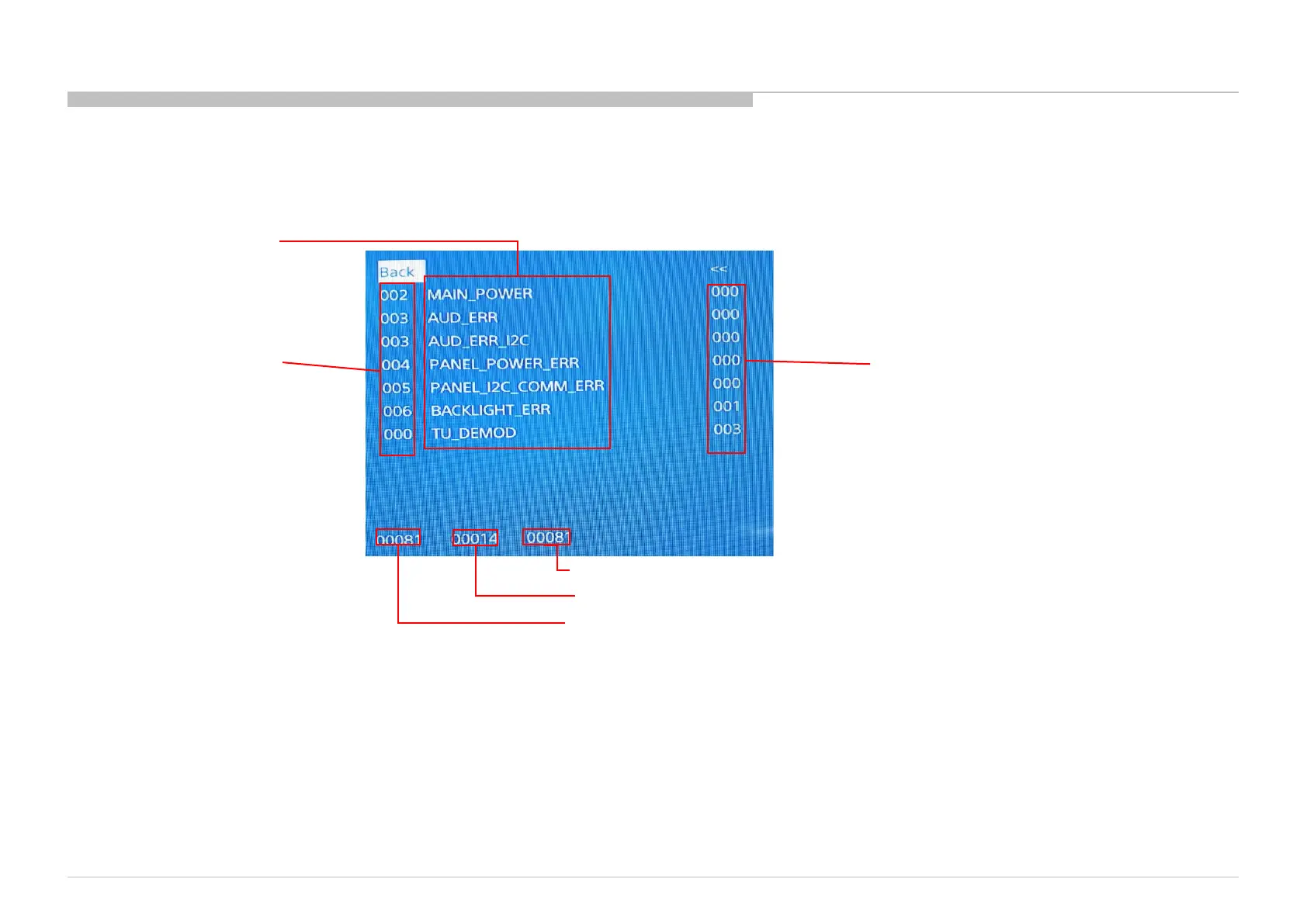
[SELF DIAGNOSTIC SCREEN DISPLAY]
Error count
Item name
STBY LED flash time
Total operation time by hour
Boot count
Panel operation time by hour
Since the diagnostic results displayed on the screen are not automatically cleared, always check the self-diagnostic screen.
After you have completed the repairs, clear the result display to “0”.
Clearing the Self Check Diagnostic List
1. Error history and Error count : Press the Channel 8 => Channel 0 .
2. Panel operation time : Press the Channel 7 => Channel 0 .
Exiting the Self-diagnostic screen
To exit the Self Diagnostic screen, turn off the power to the TV by pressing the POWER button on the remote or the POWER button on the TV.





 To Next Page