Connecting the TV
26
KDF-E42A10/KDF-E50A10
2-597-544-12(1)
D:\WINNT\Profiles\noriko\Desktop\Troy EN2\2597544121\01US04INS.fm
masterpage:3 columns Right
Digital Cable Box or
Digital Satellite
Receiver
Disconnect all power sources before making any connections.
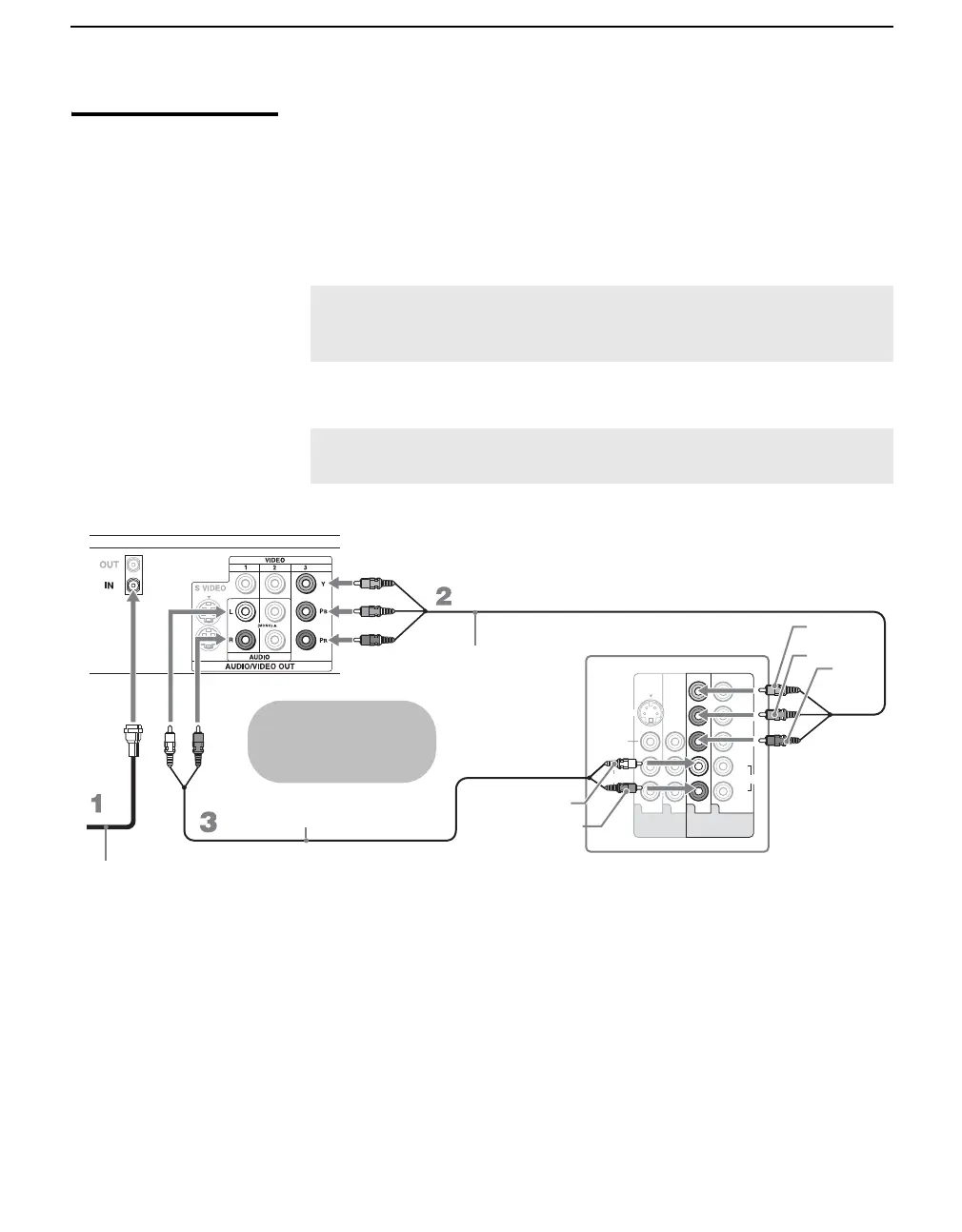
1 Connect the RF coaxial cable from the CATV or satellite dish to the
input of the digital cable box or digital satellite receiver.
2 Use a component video cable to connect the digital cable box or satellite
receiver’s YP
BPR jacks to the TV’s Y PB/CB PR/CR jacks. Use the
HD/DVD IN 4 or 5 input.
3 Use an audio cable to connect the digital cable box or satellite receiver’s
AUDIO OUT jacks to the TV’s AUDIO IN jacks.
✍ Component video (Y PB/CB PR/CR) connection is necessary to view
480p, 720p, and 1080i formats. Note that this TV displays all format
types of picture in a resolution of 1280 dots x 720 lines.
✍ The Y PB/CB PR/CR jacks do not provide audio, so audio cables
must be connected to provide sound.
L
R
(MONO)
AUDIO
VIDEO IN
VIDEO
S VIDEO
134 5
Y
P
B
/C
B
P
R
/C
R
L
R
AUDIO
HD / DVD IN
(1080i/720p/480p/480i)
Rear of TV
Y
P
B/CB
PR/CR
AUDIO-L
AUDIO-R
Audio cable
Component video cable
Digital cable box or satellite receiver
Cables are often
color-coded to connectors.
Connect red to red,
white to white, etc.
RF coaxial cable






 To Next Page