E:\DATA\4297517111\4297517111_KDL32BX310_EN\01US06WEL.fm
masterpage:Right
KDL-32BX310
4-297-517-11(1)
19
Operating the TV
Operating the TV
Using the Remote Control
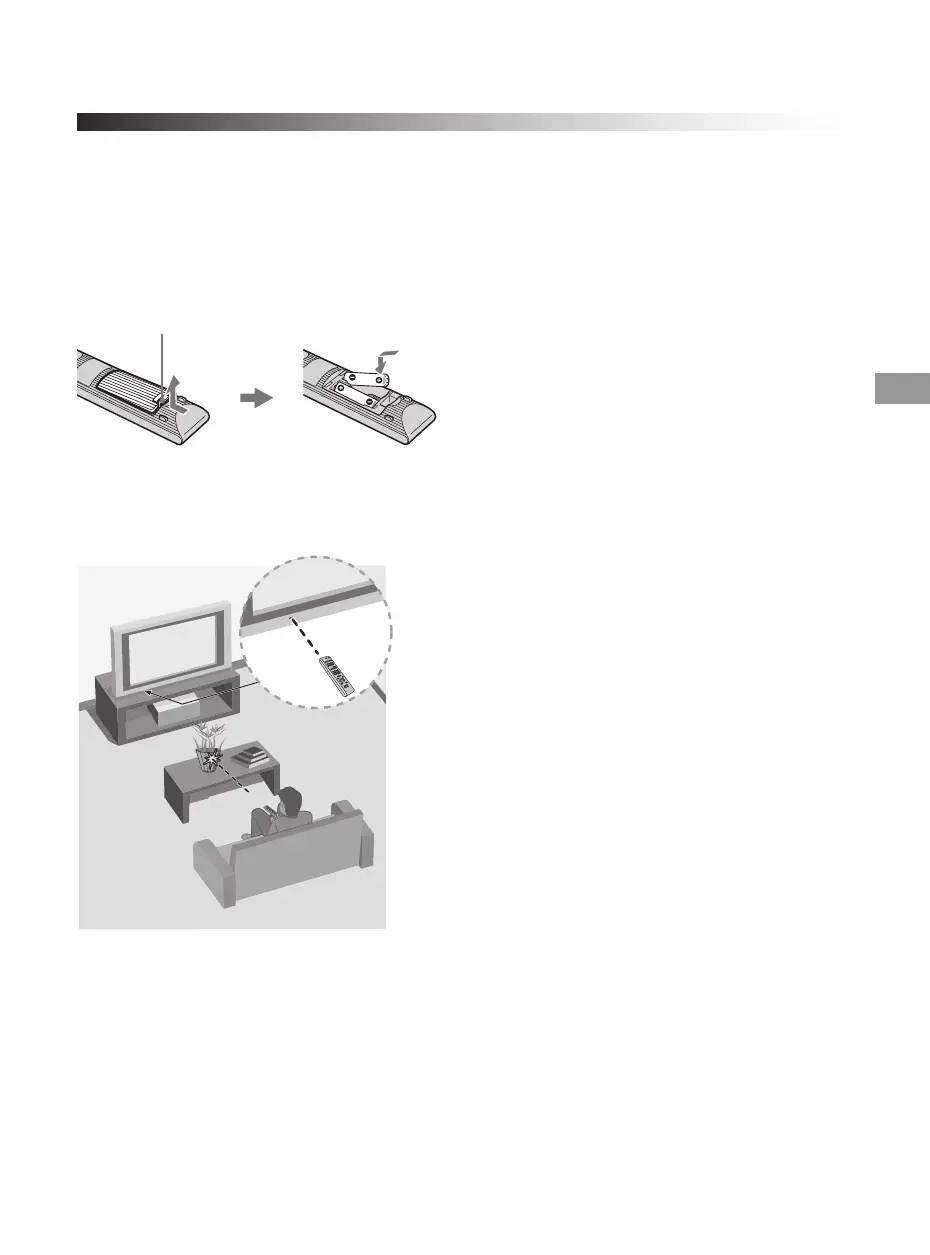
To Insert Batteries into the Remote Control
Insert two size AA batteries (supplied) by matching e and E on the batteries to the diagram
inside the battery compartment of the remote control.
Guidelines to follow
Push to open
• Point your remote control directly at the IR sensor
located on your TV.
• Make sure that no objects are blocking the path
between the remote control and the IR sensor on your
TV.
• Fluorescent lamps can interfere with your remote
control; try turning off the fluorescent lamps.
• If you are having problems with the remote control,
reinsert or replace your batteries and make sure that
they are correctly inserted.
01US0 Cov-UC.book Page 19 Wednesday, July 13, 2011 11:08 AM




 To Next Page