E:\DATA\4297517111\4297517111_KDL32BX310_EN\01US09OTH.fm
masterpage:Left
42
KDL-32BX310
4-297-517-11(1)
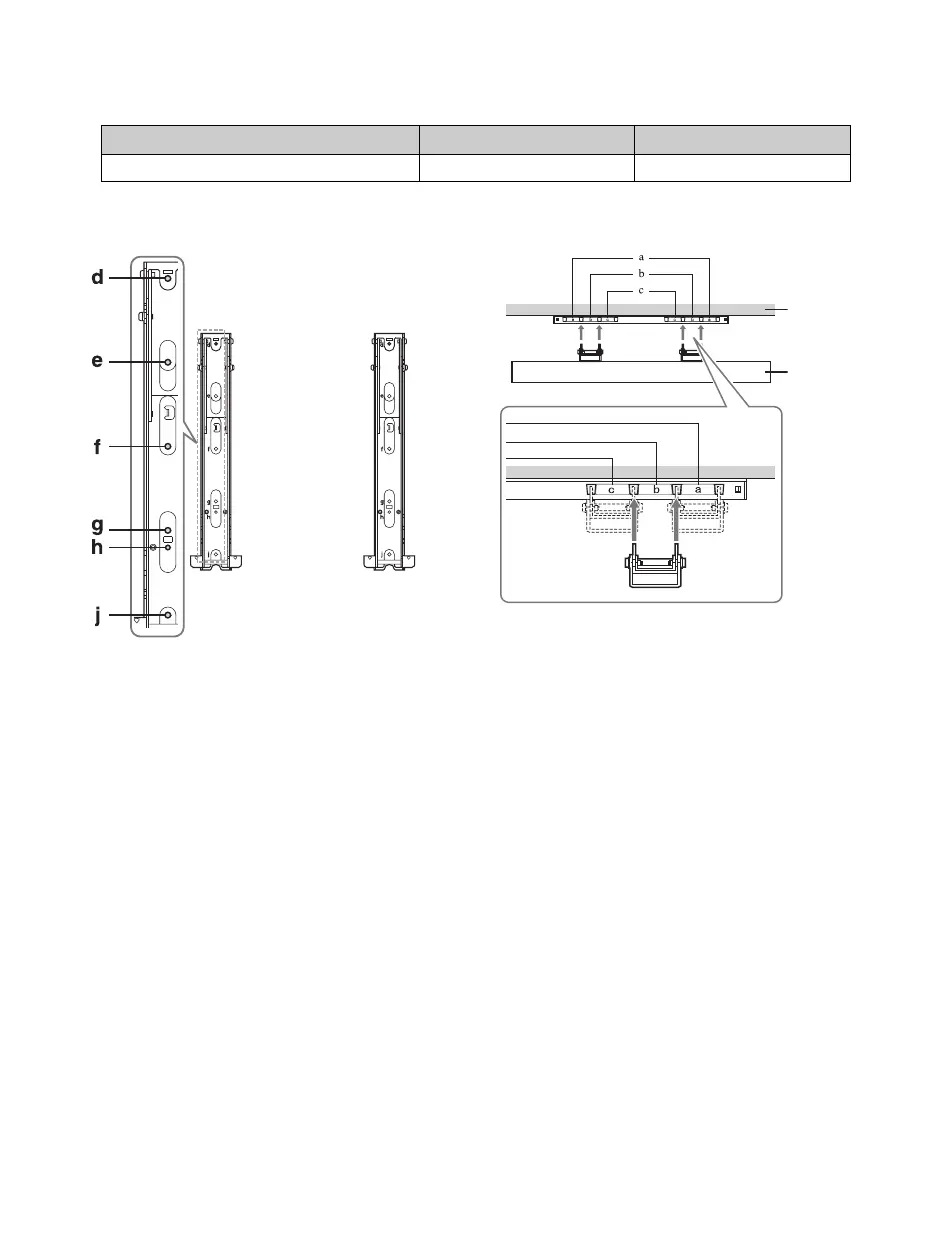
Screw and Hook Locations Diagram/Table
2 Adjust the angle of the Mounting Hook.
Refer to the Instructions for SU-WL500.
Step 5: Installing the TV on the wall
Refer to the Instructions for SU-WL500.
~
• When you put the TV back on the Table-Top Stand, reverse the above steps.
• When moving the TV, do not squeeze the bottom of the front panel too tight.
• Remove the screws or install the Mounting Hook on a stable and level surface.
TV Model Screw location Hook location
KDL-32BX310 d, g c
Screw location
When installing the Mounting Hooks on the TV.
Hook location
When installing the TV onto Base Bracket.
Wall
TV
01US0 Cov-UC.book Page 42 Wednesday, July 13, 2011 11:08 AM




 To Next Page