D:\TV's JOB\SONY TV\SY0413_B1\4411895111_US\US03STU.fm
KDL-HX751/HX750
4-411-895-11(1)
11
Getting Started
To detach the Table-Top Stand from the TV,
remove the screws fixed in step 2.
~
• Do not remove the Table-Top Stand for any
reason other than to install corresponding
accessories on the TV.
• When removing the Table-Top Stand from
the TV, lay the display face down on a stable
work surface that is larger than the TV.
• To prevent damaging the surface of the LCD
display, make sure to place a soft cloth on
the work surface.
• When installing the TV on a wall, remove the
screws from the rear of the TV. Be sure to
store the removed screws in a safe place,
keeping them away from children.
• When attaching the Table-Top Stand again,
be sure to fasten the screws (previously
removed) to the original holes on the rear of
the TV.
2: Adjusting the
viewing angle of
the TV
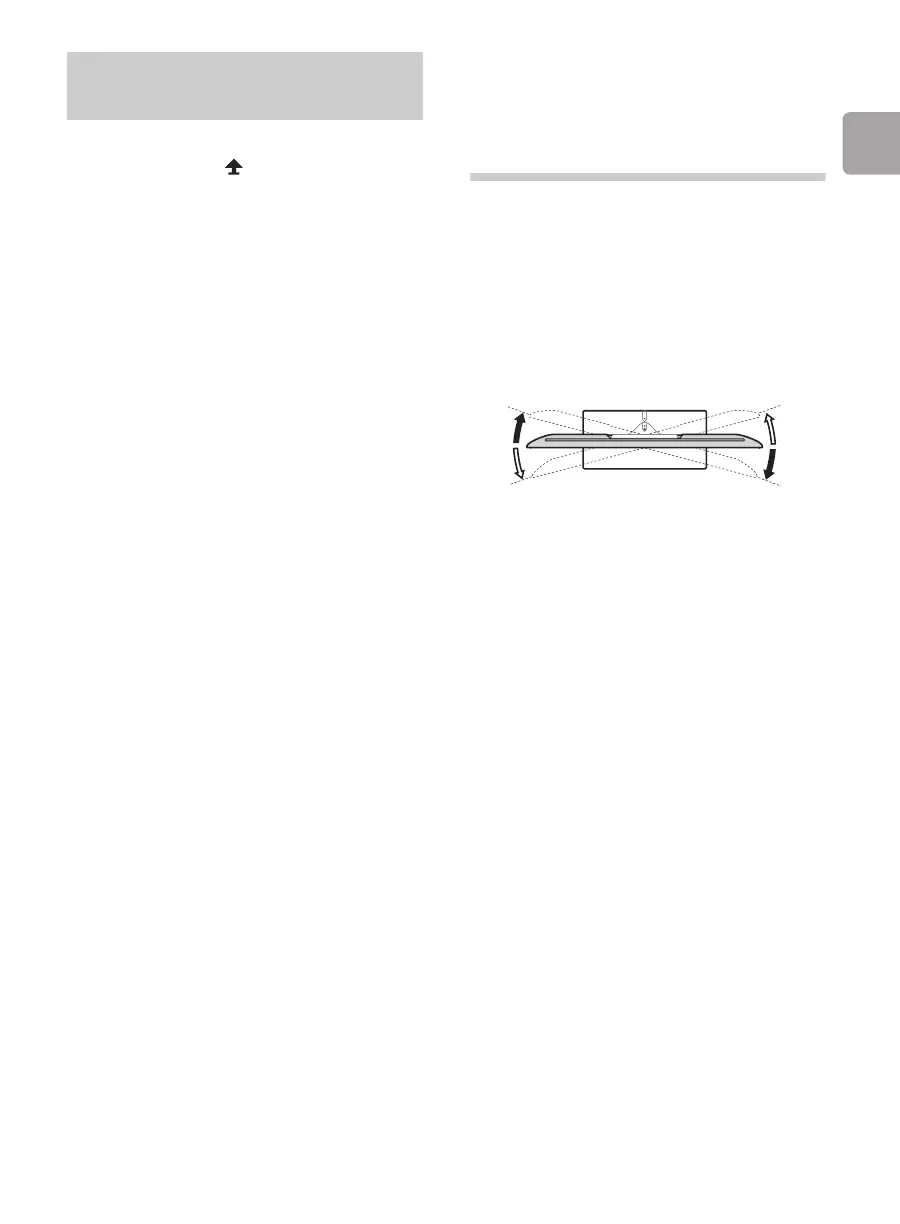
This TV can be adjusted within the angles as
illustrated.
x Angle adjustment (Swivel)
~
• When adjusting the angle, hold the stand
with one hand to avoid having the stand slip
or TV tip over.
Detaching the Table-Top
Stand from the TV
15°
15°
15°
15°


 To Next Page
 Loading...