EasyManua.ls Logo

Sony KP-41PX2 - Overview of Projection TV Buttons

Sony KP-41PX2
148 pages
Print Icon
To Next Page IconTo Next Page
To Previous Page IconTo Previous Page
Loading...
6
Overview
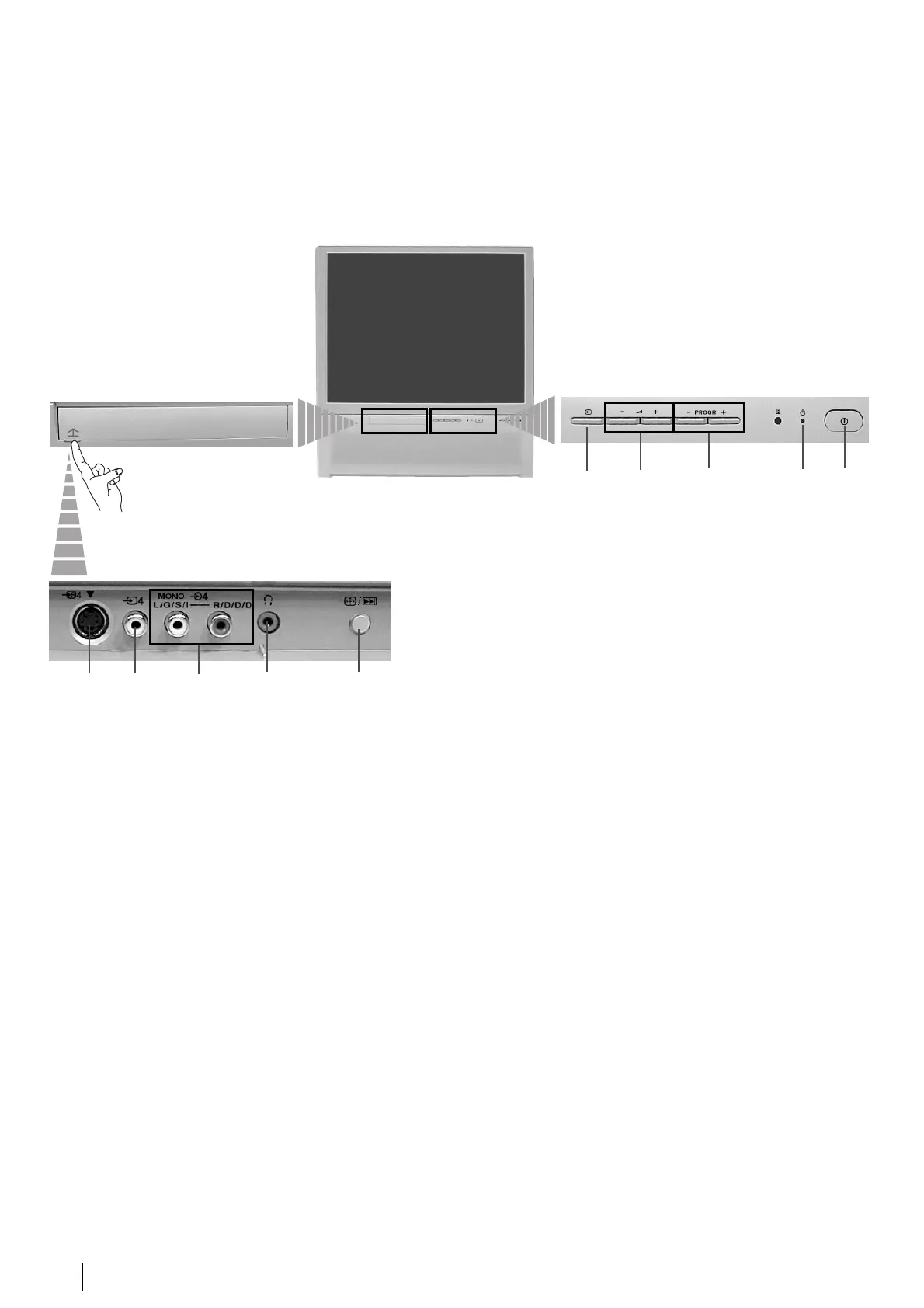
Overview of Projection TV Buttons
On/Off
Switch
Video
Input
jack
S video
Input
jack
Audio
Input
jacks
Headphones
jack
1
Auto Convergence
Button:
Press this button to adjust
the colour registration.
For more details, please
refer to the chapter
“Adjusting Colour
Registration
(Convergence)” on page
10.
or
2
Auto Start Up Button:
Press and hold this
button for approximately
2 seconds to start the auto
start up sequence.
For more details, please
refer to the chapter
“Switching On the
Projection TV and
Automatically Tuning”
on page 8.
Standby
indicator
Programme
Up or Down
Buttons
(Select TV
channels)
Volume
control
buttons
Push up the flap on the front of the TV
to reveal the front control panel.
Selecting
Input
source

Related product manuals