EasyManua.ls Logo

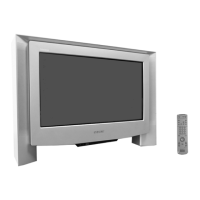
Sony KV-28FX68B - User Manual

Sony KV-28FX68B
32 pages
Print Icon
To Next Page IconTo Next Page
Loading...
FD Trinitron
Colour Television
KV-28FX68B
KV-32FX68B
© 2003 by Sony Corporation
Instruction Manual
GB
4-094-189-61(1)
R
FX68B(03) IRL Cover.fm Page 1 Monday, March 31, 2003 11:08 AM

Questions and Answers

  • D
    Donald PerkinsAug 16, 2025
    How to fix Sony TV remote control that is not working?
    • T
      Todd ReyesAug 16, 2025
      To resolve the issue of a non-functional remote control with your Sony TV: * Ensure the Media Selector is correctly set to the device you're using (TV, VCR, or DVD). * If it still fails to operate your VCR or DVD, configure the appropriate code set, as detailed in the “Remote Control Configuration for VCR/DVD” chapter. * Try replacing the batteries.
  • R
    Richard HorneAug 19, 2025
    What to do if my Sony KV-28FX68B TV has sound but no picture?
    • W
      watkinsjosephAug 19, 2025
      If your Sony TV screen is dark but the sound is fine, reset the picture settings to factory defaults. Access the menu system, find “Picture Adjustment,” and select “Reset.”
  • R
    ryanromeroAug 21, 2025
    How to fix Sony KV-28FX68B TV when there is good picture but no sound?
    • M
      Margaret BeltranAug 22, 2025
      If your Sony TV has a good picture but no sound, try the following: * Press the 2+ button on the remote control. * In the “Detail Set Up” menu, ensure that “TV Speakers” is set to “On”. * Make sure headphones are not plugged in.
  • G
    Grace TorresAug 25, 2025
    What to do if Sony KV-28FX68B does not show picture from Scart connector?
    • N
      nelsonjackieAug 26, 2025
      If your Sony TV shows no picture or menu information from equipment connected to the Scart connector, ensure that the connected equipment is powered on. Then, repeatedly press the t button on the remote until the correct input symbol appears on the screen.
  • M
    mcphersonjosephAug 27, 2025
    Why my Sony TV has no picture and sound?
    • M
      marcusgarzaAug 28, 2025
      To troubleshoot a Sony TV with no picture and no sound: * Check the aerial connection. * Plug the TV in and press the ! button on the front of the TV. * If the standby indicator is on, press the TV I/1 button on the remote.
  • S
    Susan FuentesAug 31, 2025
    Why is my Sony KV-28FX68B not showing colour?
    • M
      michelle04Aug 31, 2025
      If your Sony TV shows no color on color programs, reset the picture settings to factory defaults. Go to the menu system, select “Picture Adjustment,” and then select “Reset.”
  • E
    Eric GrossSep 3, 2025
    What to do if Sony TV picture is distorted when changing programs?
    • E
      Edgar ThompsonSep 3, 2025
      If you see a distorted picture on your Sony TV when changing programs or selecting teletext, turn off any equipment connected to the Scart connector on the rear of the TV.
  • J
    Jason StewartSep 6, 2025
    How to fix a noisy picture on Sony TV?
    • S
      Stephanie FisherSep 6, 2025
      If you are viewing a TV channel on your Sony TV and the picture is noisy, try these steps: * In the menu, go to “Manual Programme Preset” and adjust Fine Tuning (AFT) to improve picture reception. * In the “Detail Set Up” menu, select “Noise Reduction” and set it to “Auto” to reduce picture noise.
  • A
    anthonysinghSep 9, 2025
    How to correct a slanted picture on Sony TV?
    • M
      Marissa ManningSep 9, 2025
      If your Sony TV picture is slanted, use the menu system to select the “Picture Rotation” option in the “Detail Set Up” menu to correct the slant.
  • A
    Ashlee TorresSep 12, 2025
    Why is my Sony TV picture unstable when viewing a scrambled channel?
    • J
      James BrownSep 12, 2025
      To resolve the issue of no unscrambling or an unstable picture on your Sony TV while viewing a scrambled channel with a decoder connected through the Scart connector i3/r3: * Go to the “Set Up” menu, then enter “Detail Set Up” and set “AV3 Output” to “TV”. * Ensure the decoder is not connected to the scart socket i2/ 2.

Summary

NOTICE

How to replace the Fuse

IMPORTANT Safety and Wiring Instructions

General Warnings

Safety Information

Remote Control Overview

Overview of Remote Control Buttons

Detailed description of each button and its function on the Sony remote control for TV operations.

TV Controls and Connections

Overview of TV Buttons

Identifies and explains the functions of buttons located on the TV set itself.

Inserting Remote Control Batteries

Instructions for correctly inserting batteries into the remote control unit.

Connecting Aerial and VCR

Guide on how to connect the TV to an aerial and a VCR using provided or optional cables.

First Time Operation

Switching On and Automatic Tuning

Step-by-step guide for initial TV setup, including language, country, and automatic channel search.

Menu System Guide

Introducing and Using the Menu System

Explanation of how to navigate and operate the TV's on-screen menu system.

Picture Adjustment Settings

Details on adjusting picture settings like contrast, brightness, colour, and sharpness.

Sound Adjustment Settings

Guide to adjusting sound settings, including effect, treble, bass, balance, and volume.

Sleep Timer Function

How to set the sleep timer to automatically switch the TV to standby mode.

Language Selection

Instructions for selecting the display language for the TV menus.

Auto Channel Tuning

Procedure for automatically searching and storing available TV broadcast channels.

Programme Sorting and Labelling

How to reorder TV channels and assign custom labels to them.

AV Input Presets

Guide to naming external equipment connected to the TV's input sockets.

Manual Programme Preset

Instructions for manually tuning and storing individual TV channels or VCR channels.

Auto Format Screen Adjustment

How to automatically adjust the screen aspect ratio for different broadcast signals.

Noise Reduction Feature

Instructions for using the noise reduction feature to improve picture quality.

AV3 Output Configuration

Setting the AV3 output for aerial, VCR, or monitor audio/video signals.

TV Speaker Control

How to mute TV speakers to use external audio equipment.

RGB Centring Adjustment

Adjusting the horizontal position of the picture when using an RGB source.

Picture Rotation Correction

Correcting picture slant caused by Earth's magnetism using the Picture Rotation menu.

Teletext Services

Teletext Operation

Guide to accessing and navigating teletext pages, freezing, and revealing information.

Fastext Functionality

How to use the one-button push Fastext feature to access teletext pages.

External Equipment Connection

Connecting Optional Equipment

Instructions for connecting various optional devices like camcorders, VCRs, and DVD players.

Using Connected Optional Equipment

How to select and view input signals from connected external devices.

Connecting a VCR

Detailed steps for connecting a VCR, including Smartlink compatibility.

Connecting External Audio Equipment

Guide to connecting Hi-Fi systems for amplified TV audio output.

Dolby Virtual Sound Setup

Instructions for setting up the Dolby Virtual sound effect with Hi-Fi equipment.

Mono Audio Connection

Steps for connecting mono audio equipment and configuring sound settings.

Remote Control Configuration

VCR;DVD Remote Control Setup

Procedure to configure the TV remote to control VCRs and DVDs from various manufacturers.

Specifications

Troubleshooting Guide

Sony KV-28FX68B Specifications

General IconGeneral
BrandSony
ModelKV-28FX68B
CategoryTV
LanguageEnglish

Related product manuals