7
Step 2: Setting the
time
You must set the time before using the timer
functions.
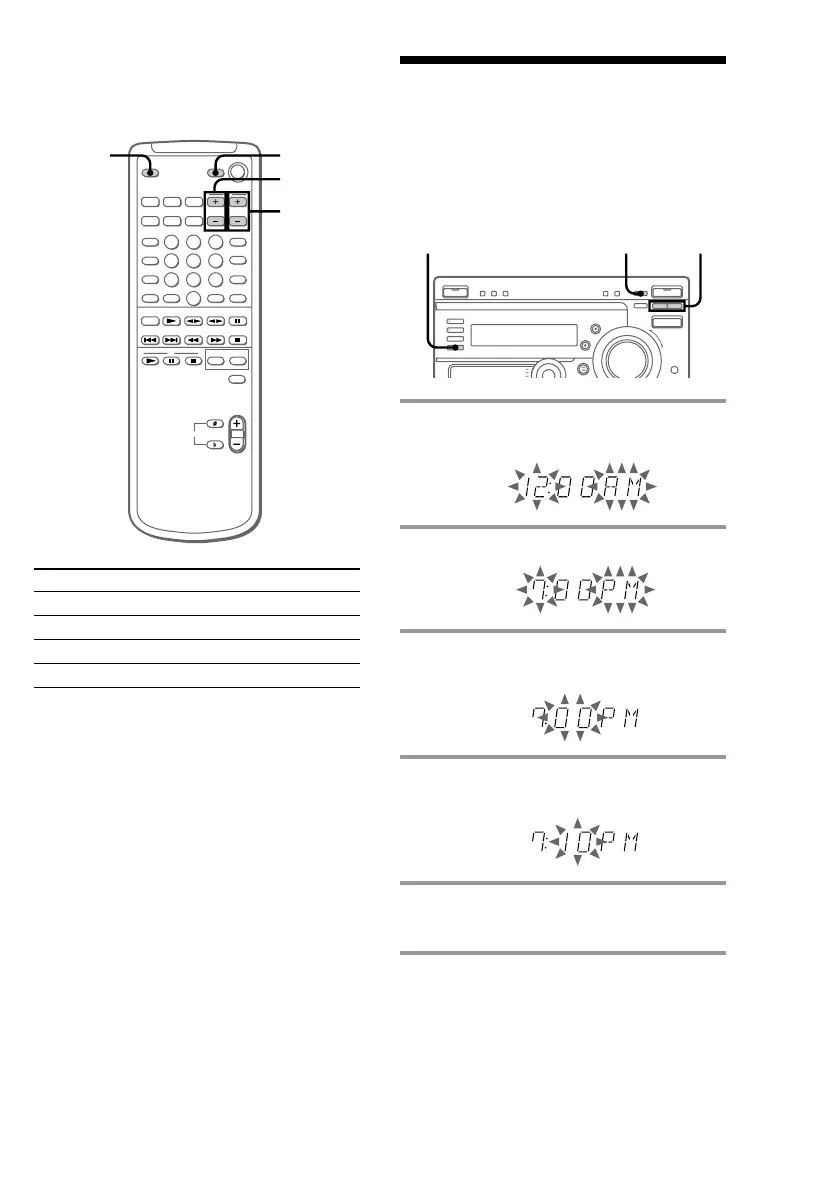
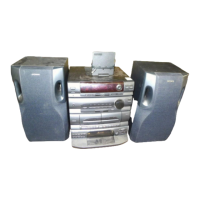
3,51 2,4
1 Press t/CLOCK SET.
The hour indication flashes.
2 Press TUNING +/– to set the hour.
3 Press ENTER/NEXT.
The minutes indication flashes.
4 Press TUNING +/– to set the
minutes.
5 Press ENTER/NEXT.
The clock starts.
Tip
If you make a mistake, start over from step 1.
Note
The clock setting is canceled when you disconnect
the power cord or if a power failure occurs.
By pressing
TV 1/u
TV/VIDEO
TV VOL
TV CH
Note
Depending on the TV, you may not be able to
control your TV or to use some buttons above.
When carrying this system
Do the following to protect the CD
mechanism.
Make sure that all CDs are removed from the
unit.
1 Press FUNCTION repeatedly until “CD”
appears in the display.
2 Hold down CD LOOP and press 1/u.
3 Disconnect the power cord.
You can
Turn on or off the TV
Select the input source for the TV
Adjust the volume of the TV
Change the channel of the TV
TV 1/u
TV CH
TV VOL
TV/
VIDEO
Using the remote
You can control Sony TVs using the buttons
below.


 To Next Page