4-20 (E)
MAV-555
A/D Reference Video Level Setting
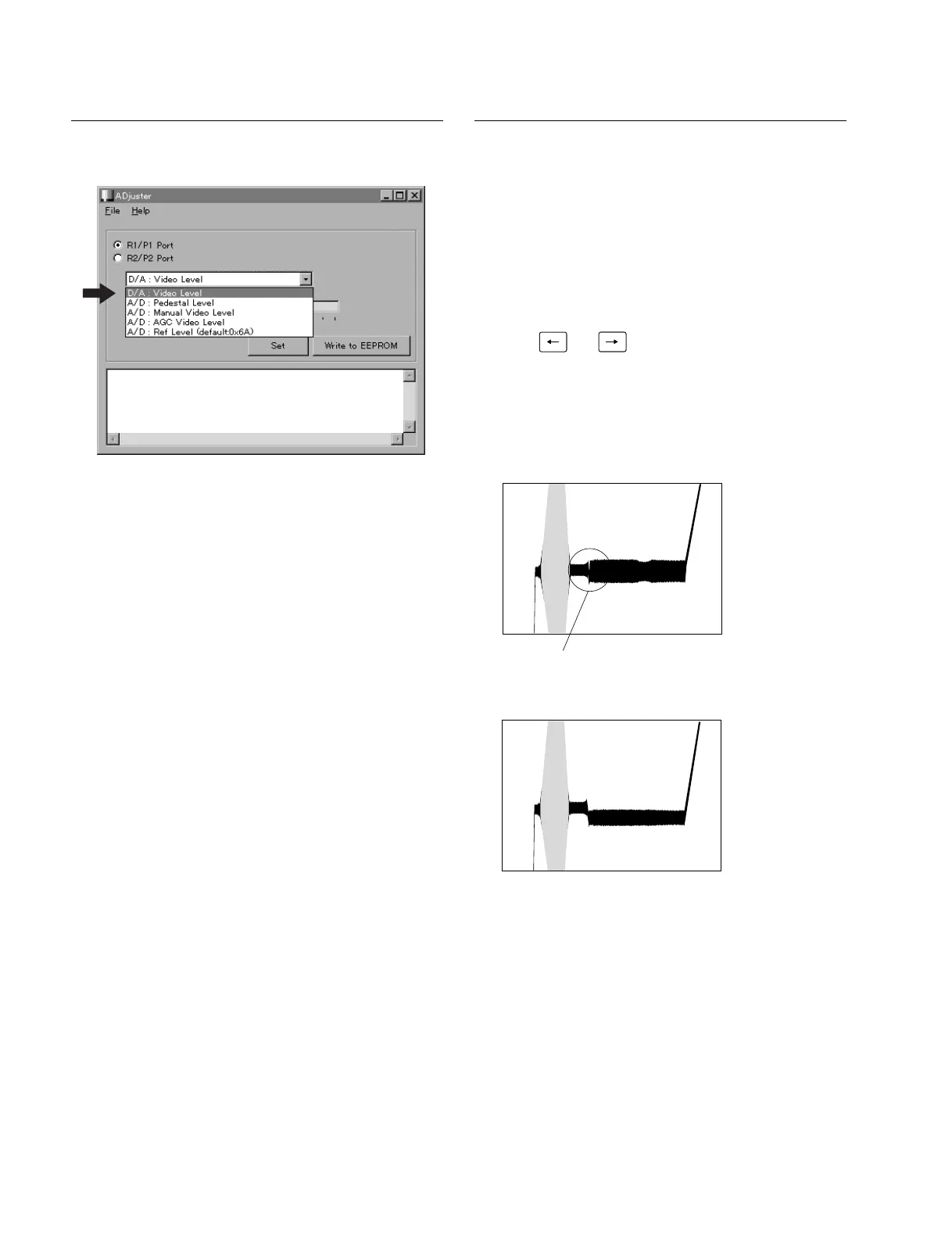
1. Select “A/D Ref Level” of the ADjuster.
2. Press “Set” of the ADjuster. (Default value is set.)
3. Click “Write to EEPROM” of the ADjuster.
A/D Pedestal Video Level Adjustment
n
Turn on the main power of the MAV-555 and measuring
equipment. Wait for at least 30 minutes before starting any
adjustments.
1. Select “A/D Pedestal Level” of the ADjuster.
2. Input the ramp signal from signal generator.
3. Change the set value of the level bar of the ADjuster
using and key of a personal computer or
with a mouse. Click “Set” and confirm the pedestal
level.
4. Repeat step 3 until the specifications are satisfied.
Specifications : As specified by the waveform shown
below.
5. Click “Write to EEPROM” of the Adjuster and save
the set value.
4-6. AD-160 Board Adjustment
Specifications : The pedestal level must not
have any flight of stairs.
OK
NG


 To Next Page