15
EN
Monitoring
Monitoring Preparations
This unit enables you to monitor the following 4 types
of signals as necessary.
1 Group 1, 2 : Select to monitor mixer group bus 1 and
2. The sound from group bus 1 is localized in the L
(left) channel and the sound from group bus 2 is
localized in the R (right) channel. When recording,
select to monitor the sound being recorded.
2 Group 3, 4 : Select to monitor mixer group bus 3 and
4. The sound from group bus 3 is localized in the L
(left) channel and the sound from group bus 4 is
localized in the R (right) channel. When recording,
select to monitor the sound being recorded.
3 CUE : Select to listen to all the sound recorded on
the disc. You can adjust the volume level of the
individual tracks using the TRACK 1~4 knobs
located above the MONITOR keys. (All tracks are
heard in mono.) When recording, the track being
recorded is muted.
4 STEREO : Select to listen to the sound of the mixer’s
stereo bus. For use during mixdown (etc.).
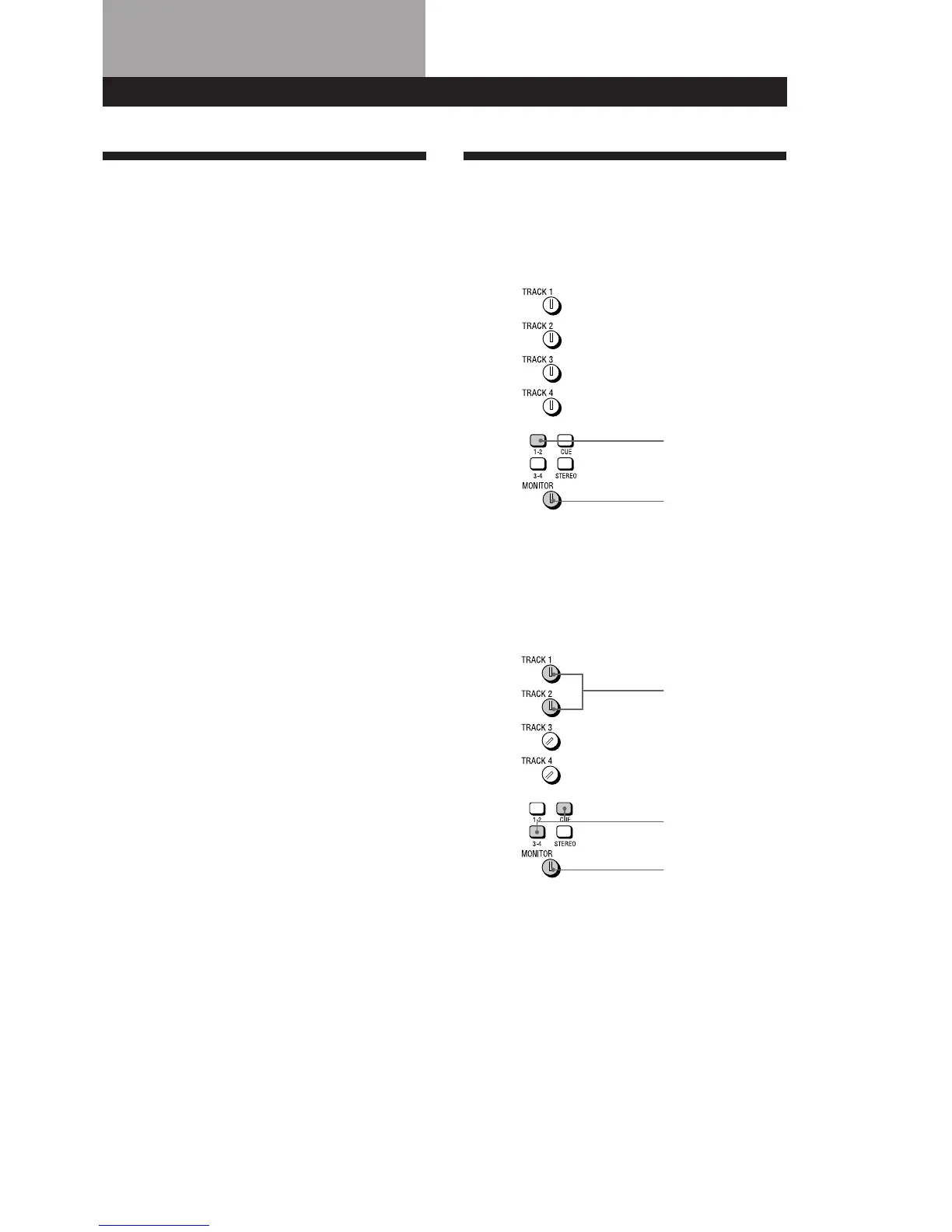
Monitoring Example
EXAMPLE 1: Monitoring the sound from
group bus 1 and 2 (during recording, etc.)
EXAMPLE 2: Monitoring the sound being
recorded to tracks 3 and 4 while
monitoring the sound of tracks 1 and 2
(during overdubbing, etc.)
Press down
Turn to adjust level
Turn to adjust level
Press down
Turn to adjust level
(continued)


 To Next Page