EasyManua.ls Logo

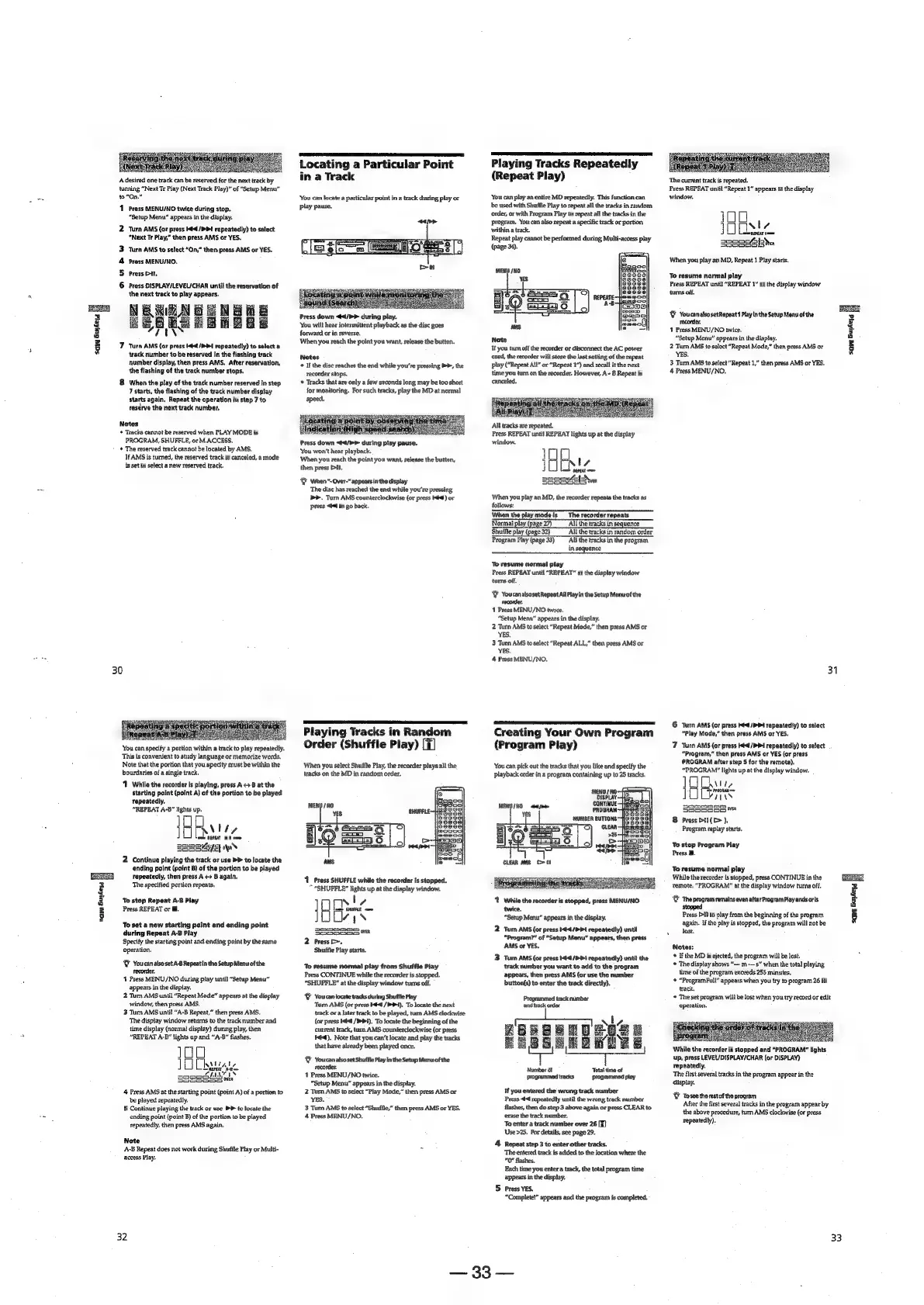
Sony MDS-E12 - Locating the Stored Track to Start Play Instantaneously (Multi-access Play); Locating a Particular Point in a Track; Playing Tracks in Random Order (Shuffle Play); Playing Tracks Repeatedly (Repeat Play)

Sony MDS-E12
120 pages
Print Icon
To Next Page IconTo Next Page
To Previous Page IconTo Previous Page
Loading...
Saw
Gujketd
i
2
2
%
3
e
E4
3
8
A
desired
one
track
can
be
reserved
for
the
next
track
by
turning
“Next
Tr
Play
(Next
Track
Play)”
of
“Setup
Menu”
to”“On.”
11
Press
MENU/NO
twice
during
stop.
“Setup
Menu”
appears
in
the
display.
2
Turn
AMS
(ar
press
Kd
/P
>
repeatedly)
to
select
“Next
Tr
Play,”
then
press
AMS
or
YES.
‘Turn
AMS
to
select
“On,”
then
press
AMS
or
YES.
Press
MENU/NO,
Press
Dt,
Press
DISPLAY/LEVEL/CHAR
until
the
reservation
of
the
next
track
to
play
appears.
NERONG
ENE
HB
BOOLCLELEL
ia
771
7
Turn
AMS
(or
press
tat
/PP4
repeatedly)
to
select
a
track
number
to
be
reserved
in
the
flashing
track
number
display,
then
press
AMS.
After
reservation,
the
flashing
of
the
track
number
stops.
&
When
the
play
of
the
track
number
reserved
in
step
7
starts,
the
flashing
of
the
track
number
display
starts
again,
Repeat
the
operation
in
step
7
to
ceserve
the
next
track
number,
oud
w
Notes
+
Tracks
cannot
be
reserved
when PLAY
MODE
is
PROGRAM,
SHUFELE,
or
M.ACCESS,
*
The
reserved
track
cannot
be
located
by
AMS,
If
AMS
is
turned,
the
reserved
track
is
canceled,
a
mode
is
set
to
select
a
new
reserved
track.
30
‘You
can
specify
a
portion
within
a
track
to
play
repeatedly.
This
is
convenient
to
study
language
or
memorize
words.
Note
that
the
portion
that
you
specity
must
be
within
the
bourdaries
of
a
single
track.
‘1
While
the
recordar
is
playing,
press
A
4
B
at
the
starting
point
(point
A)
of
the
portion
to
be
played
tepeatedly,
“REPEAT
A-B’”
lights
up.
HNN
fe
ame
REPEAT
A-3
oom
BEBSAE
oN
2
Continue
playing
the
track
or
use
PP
to
locate
the
ending
polnt
(point
B)
of
the
portion
to
be
played
repeatedly,
then
press
A
<>
B
again.
The
specified
portion
repeats,
To
stop
Repeat
A-B
Play
Press
REPEAT
or
@.
To
set
a
new
starting
point
and
ending
point
during
Repeat
A-B
Play
Specify
the
starting
point
and
ending
point
by
the
same
operation.
®
YoucanalsosetA-8
Repeatin
the
Setup
Menuofthe
recorder.
4
Press
MENU/NO
during
play
until
“Setup
Menu”
appears
in
the
display.
2
Turn
AMS
until
“Repeat
Mode”
appears
at
the
display
window,
then
press
AMS.
3
Turn
AMS
until
“A-B
Repeat,”
then
press
AMS.
‘The
display
window
returns
to
the
track
number
and
time
display
(normal
display)
during
play,
then
“REPEAT
A-B"
lights
up
and
“A-B”
flashes.
Leven’
ve
10
alate
vis
mere
LNT
SSe8e53
NALiyty,
4
Press
AMS
at
the
starting
point
(point
A)
of
a
portion
to
be
played
repeatedly.
5
Continue
playing
the
track
or
use
PP
to
locate
the
ending
point
(point
B)
of
the
portion
to
be
played
repeatedly,
then
press
AMS
again.
Note
A-B
Repeat
does
not
work
during
Shuffle
Play
or
Multi-
access
Play.
32
Locating
a
Particular
Point
in
a
Track
‘You
can
locate
a
particular
point
in
a
track
during
play
or
play
pause.
:
Press
down
</P>
during
play.
‘You
will
hear
intermittent
playback
as
the
disc
goes
forward
or
in
reverse.
When
you
reach
the
point
you
want,
release
the
button.
Notes
If
the
disc
reaches
the
end
while
you're
pressing
>>,
the
recorder
stops.
‘*
Tracks
that
are
only
a
few
seconds
long
may
be
too
short
for
monitoring.
For
such
tracks,
play
the
MD
at
normal
speed,
gating.
34
ithe
clade
shan
<Hi
Bashan
tate
Press
down
<¢4/h>
during
play
pause.
‘You
won't
hear
playback.
When
you
reach
the
point
you
want,
release
the
button,
then
press
Dt.
When
*-Over-“appearsinthedisplay
The
disc
has
reached
the
end
while
you're
pressing
>.
Turn
AMS
counterclockwise
(or
press
KK)
or
press
tal
to
go
back.
Playing
Tracks
in
Random
Order
(Shuffle
Play)
[7]
‘When
you
select
Shuffle
Play,
the
recorder
plays
all
the
Iracks
on
the
MD
in
random
order.
1
Press
SHUFFLE
while
the
recorder
Is
stopped.
*
“SHUFFLE”
lights
up
at
the
display
window.
joe
JUUe
ys
ey
Saaaos3
2
Press
>.
Shuffle
Play
starts.
To
resume
normal
play
from
Shuffle
Play
Press
CONTINUE
while
the
recorder
is
stopped.
“SHUFFLE”
at
the
display
window
turns
off.
Y
Youcan
locate
tracks during
Shuffle
Play
Turn
AMS
(or
press
it
/>4).
To
locate
the
next
track
or
a
later
track
to
be
played,
turn
AMS
clockwise
(or
press
Hed
/Pi),
To
locate
the
beginning
of
the
current
track,
turn
AMS
counterclockwise
(or
press
eed.
Note
that
you
can’t
locate
and
play
the
tracks
that
have
already
been
played
once.
W
Youcanalsoset
Shuffie
Play
in
the
Setup
Menuofthe
recorder.
1
Press
MENU/NO
twice.
“Setup
Menu”
appears
in
the
display.
2
Tum
AMS
to
select
“Play
Mode,”
then
press
AMS
or
YES.
3
Tum
AMS
to
select
“Shuffle,”
then
press
AMS
or
YES.
4
Press
MENU/NO.
Playing
Tracks
Repeatedly
(Repeat
Play)
You
can
play
an
entire
MD
repeatedly.
This
function
can
be
used
with
Shuffle
Play
to
repeat
all
the
tracks
in
random
order,
or
with
Program
Play
to
repeat
all
the
tracks
in
the
Program,
You
can
also
repeat
a
specific
track
or
portion
within
a
track.
Repeat
play
cannot
be
performed
during
Multi-access
play
(page
34).
If
you
turn
off
the
recorder
or
disconnect
the
AC
power
cord,
the
recorder
will
store
the
last
setting
of
the
repeat
play
(“Repeat
Al”
or
“Repeat
2”)
and
recall
it
the
next
time
you
tum
on
the
recorder,
However,
A-
B
Repeat
is
canceled.
Press
REPEAT
until
REPEAT
lights
up
at
the
display
IER
ey
AEN
sesetel
When
you
play
an
MD,
the
recorder
repeats
the
tracks
as.
follows:
‘When
the
playmodeis
The
recorder
repeats
Normal
play
(page
27)
All the
tracks
in
sequence
‘Shuffle
play
(page
32)
All
the
tracks
in
random
order
Program
Play
(page
33)
All the
tracks
in
the
program
in
sequence
To
resume
normal
play
Press
REPEAT
until
“REPEAT”
at
the
display
window
turns
off.
Y
YoucanalsosetRepeat
All
Ptay
in
the
Setup
Menuofthe
recorder,
1
Press
MENU/NO
twice.
“Setup
Menu”
appears
in
the
display.
2
Turn
AMS
to
select
“Repeat
Mode,”
then
press
AMS
or
‘YES.
3
Turn
AMS
to
select
“Repeat
ALL,”
then
press
AMS
or
YES.
4
Press
MENU/NO,
Creating
Your
Own
Program
(Program
Play)
You
can
pick
out
the
tracks
that
you
like
and
specify
the
playback
order
in
a
program
containing
up
to
25
tracks,
‘1
While
the
recorder
is
stopped,
press
MENU/NO
twice.
“Setup
Menu”
appears
in
the
display.
2
Turn
AMS
(or
press
K44/P>41
repeatedly)
until
“Program?”
of
“Setup
Menu”
appears,
then
press
AMS
or
YES.
3
Turn
AMS
(or
press
4</PPi
repeatedly)
until
the
track
number
you
want
to
add
to
the
program
appears,
then
press
AMS
(or
use
the
number
‘button(s)
to
enter
the
track
directly).
Programmed
track
raimber
sand
track
order
Number
of
programmed
tracks
Total
time
of
programmed
play
If
you
entered
the
wrong
track
number
Press
444
repeatedly
until
the
wrong
track
number
flashes,
then
do
step
3
above
again
or
press
CLEAR
to
erase
the
track
number.
To
enter
a
track
number
over
26
[¥}
‘Use
>25.
For
details,
see
page
29.
4
Repeat
step
3
to
enter
other
tracks.
‘The
entered
track
is
added
to
the
location
where
the
0"
flashes.
Each
time
you
enter
a
track,
the
total
program
time
appears
in
the
display,
S
Press
YES.
“Complete!”
appears
and
the
program
is
completed.
ee,
eee
The
current
track
is
repeated.
Press
REPEAT
until
“Repeat
1”
appears
at
the
display
window.
100
JOOS
sonnel,
seRseeh>
When
you
play
an
MD,
Repeat
1
Play
starts.
Te
resume
normal
play
Press
REPEAT
until
“REPEAT
1”
at
the
display
window
turns
off.
WY
Youcanalso
setRepeat
1
Playin
the
Setup
Menu
ofthe
recorder.
4
Press
MENU/NO
twice.
“Setup
Menu”
appears
in
the
display.
2
Turn
AMS
to
select
“Repeat
Mode,”
then
press
AMS
or
YES.
3
Tum
AMS
to
select
“Repeat
1,”
then
press
AMS
or
YES.
4
Press
MENU/NO.
31
6
Turn
AMS
(or
press
Hed
/PD4
repeatedly)
to
select
“Play
Mode,”
then
press
AMS
or
YES.
7
Turn
AMS
(or
press
ltd
/P
Pd
repeatedly)
to
satect
“Program,”
then
press
AMS
or
YES
(or
press
PROGRAM
after
step
5
for
the
remota).
“PROGRAM
lights
up
at
the
display
window.
]
Avi,
|
proline
PERDIeII
oye,
Sascsss
8
Pross
Dal
(c>
),
Program
replay
starts.
‘To
stop
Program
Play
Press
@.
To
rasume
normal
play
While
the
recorder
is
stopped,
press
CONTINUE
in
the
remote,
"PROGRAM"
at
the
display
window
turns
off.
&
The
program remains
even
after
Proyram
Play
endsoris
stopped
Press
Pt)
to
play
from
the
beginning
of
the
program
again.
If
the
play
is
stopped,
the
program
will
not
be
Jost.
Notes:
©
If
the
MD
is
ejected,
the
program
will
be
lost.
*
The
display
shows
“—
m
s”
when
the
total
playing
time
of
the
program
exceeds
255
minutes.
©
“ProgramFull”
appears
when
you
try
to
program
26
th
track,
«
The
set
program
will
be
lost
when
you
try
record
or
edit
operation.
While
the
recorder
is
stopped
and
“PROGRAM*”
tights
up,
press
LEVEL/DISPLAY/CHAR
(or
DISPLAY)
repeatediy,
The
first
several
tracks
in
the
program
appear
in
the
dispiay.
WY
Tosee
therest
of
the
program
After
the
first
several
tracks
in
the
program
appear
by
the
above
procedure,
tarn
AMS
clockwise
(or
press
repeatedly).
33
e
Ss.
Ey
a
=
i]
g
GEES
save
Buikejd

Other manuals for Sony MDS-E12

Related product manuals