EasyManua.ls Logo

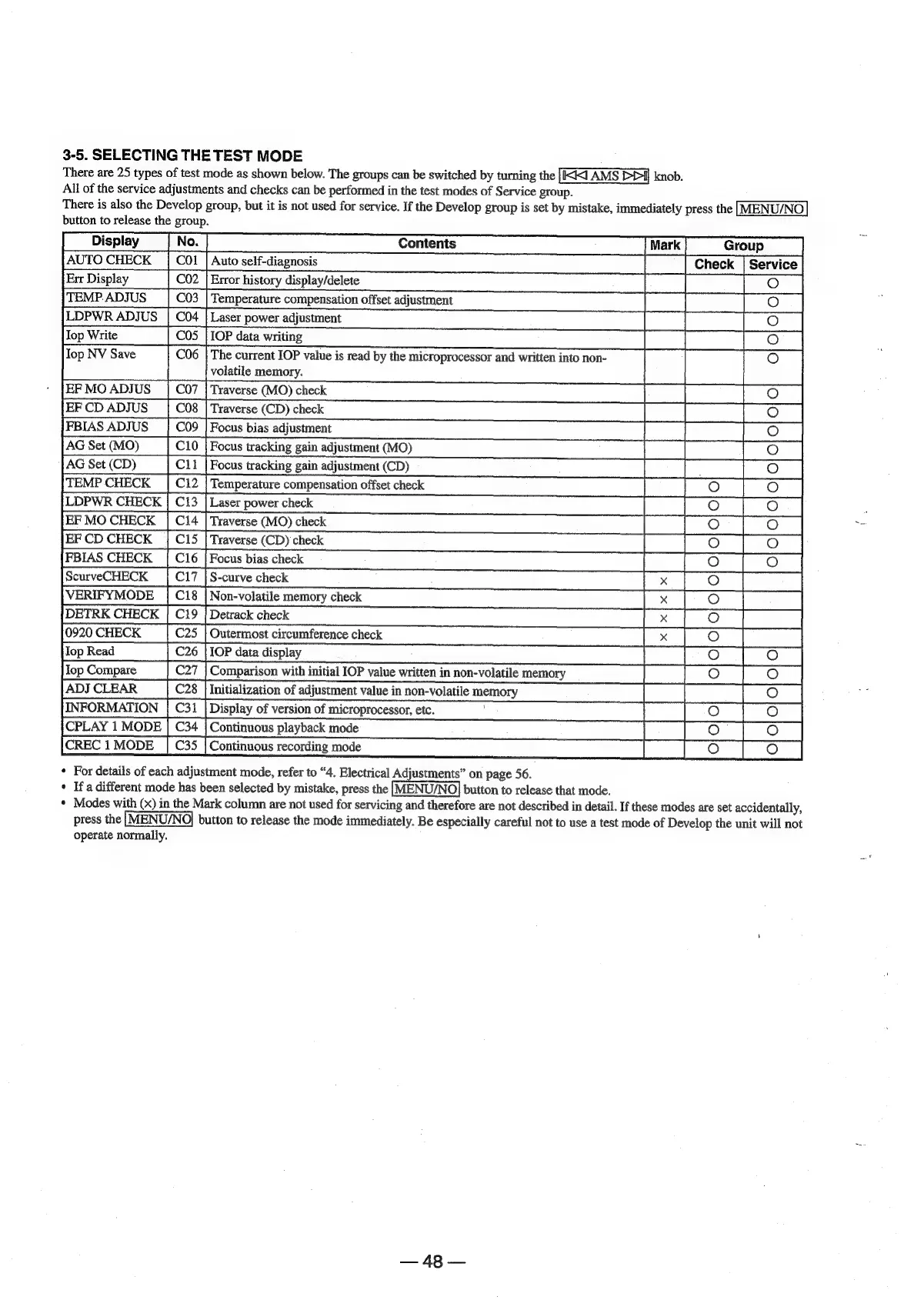
Sony MDS-E12 - 3-5. Selecting the Test Mode; For details of each adjustment mode, refer to 4. Electrical Adjustments on page 56.; Modes with (x) in the Mark column are not used for servicing and therefore are not described in detail.

Sony MDS-E12
120 pages
Print Icon
To Next Page IconTo Next Page
To Previous Page IconTo Previous Page
Loading...
3-5.
SELECTING
THE
TEST
MODE
There
are
25
types
of
test
mode
as
shown
below.
The
groups
can
be
switched
by
turning
the
[KIKI
AMS
PPI]
knob.
All
of
the
service
adjustments
and
checks
can
be
performed
in
the
test
modes
of
Service
group.
There
is
also
the
Develop
group,
but
it
is
not
used
for
service.
If
the
Develop
group
is
set
by
mistake,
immediately
press
the
|MENU/NO
button
to
release
the
group.
Display
[No
—~SSC—w
mts
SSS
AUTO
CHECK
Err
Display
Error
history
display/delete
TEMP.
ADJUS
Temperature
compensation
offset
adjustment
LDPWR
ADJUS
|
C04
|
Laser
power
adjustment
op
Write
0S
|
IOP
data
writing
lop
NV
Save
C06
|
The
current
IOP
value
is
read
by
the
microprocessor
and
written
into
non-
volatile
memory.
EF
MO
ADJUS
C07
|
Traverse
(MO)
check
EF
CD
ADJUS
C08
|
Traverse
(CD)
check
FBIAS
ADJUS
C09
|
Focus
bias
adjustment
AG
Set
(MO)
Focus
tracking
gain
adjustment
(MO)
AG
Set
(CD)
C11
|
Focus
tracking
gain
adjustment
(CD)
TEMP
CHECK
|
C12
|
Temperature
compensation
offset
check
LDPWR
CHECK
|
C13
|
Laser
power
check
EF
MO
CHECK
Traverse
(MO)
check
EF
CD
CHECK
|
C15
|
Traverse
(CD)
check
FBIAS
CHECK
Focus
bias
check
curveCHECK
17
VERIFYMODE
|
Ci8
|
Non-volatile
memory
check
DETRK
CHECK
Detrack
check
920
CHECK
C25
|
Outermost
circumference
check
Q
a
w
2)
op
Read
IOP
data
display
op
Compare
C27
|
Comparison
with
initial
IOP
value
written
in
non-volatile
memory
ADJ
CLEAR
Initialization
of
adjustment
value
in
non-volatile
memory
INFORMATIO
Display
of
version
of
microprocessor,
etc.
CPLAY
1
MOD
Continuous
playback
mode
CREC
1
MODE
Continuous
recording
mode
*
For
details
of
each
adjustment
mode,
refer
to
“4.
Electrical
Adjustments”
on
page
56.
+
Ifa
different
mode
has
been
selected
by
mistake,
press
the
[MENU/NO]
button
to
release
that
mode.
*
Modes
with
(x)
in
the
Mark
column
are
not
used
for
servicing
and
therefore
are
not
described
in
detail.
If
these
modes
are
set
accidentally,
press
the
|MENU/NO|
button
to
release
the
mode
immediately.
Be
especially
careful
not
to
use
a
test
mode
of
Develop
the
unit
will
not
operate
normally.
m|
4
AR

Other manuals for Sony MDS-E12

Related product manuals