— 4 —
SECTION 1
SERVICING NOTE
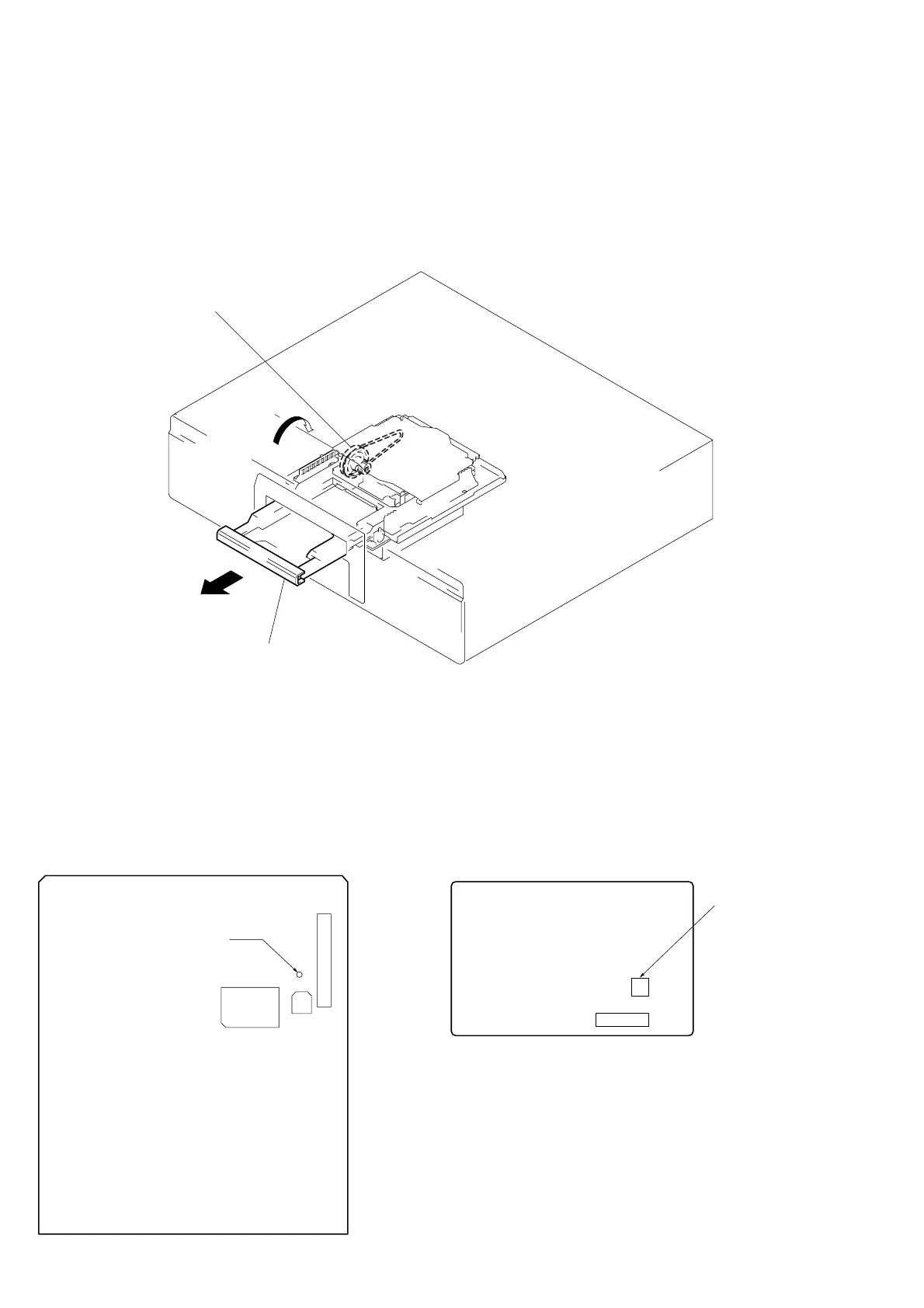
HOW TO OPEN THE DISC TRAY WHEN POWER SWITCH TURNS OFF
1 Remove the fourteen screws (BVTT 3x8) from the bottom plate.
2 Remove the bottom plate.
3 Rotate the pulley gear in the arrow direction A, and open the tray assembly in the arrow direction B.
Pully gear
A
B
Tray assembly
FORCED RESET
The system microprocessor can be reset in the following way.
Use these methods when the unit cannot be operated normally due to the overrunning of the microprocessor, etc.
Method 2:
Disconnect the power plug, and short-circuit CN905 of the PW board
with a pair of tweezers, etc.
[PW board] (Component Side)
CN905
(RESET)
CN901
Method 1:
Set TP (S.RST) of the DIG board to ground momentarily.
[DIG board] (Side A)
TP
(S.RST)
CN203
C206
IC202


 To Next Page