6GB
F:\0918\4548379111\4548379111MEXN5100BTUC\01GB-MEXN5100BTUC\040CD.fm masterpage: Left
MEX-N5100BT/MEX-N4100BT
4-548-379-11(1)
Press to thumbs up, or to thumbs down in
Pandora® (page 14).
(repeat)
(shuffle)
MIC (page 16)
PAUSE
MEGA BASS
Press to turn on/off the MEGA BASS function.
PTY (program type)
Select PTY in RDS.
CAT (category) (MEX-N5100BT only)
Select radio channels in SiriusXM.
AUX input jack
DSPL (display)
Press to change display items.
SCRL (scroll)
Press and hold to scroll a display item.
USB port
RESET (inner panel) (page 7)
Microphone (inner panel) (MEX-N4100BT only)
In order for the handsfree function to work
properly, do not cover the microphone with
tape, etc.
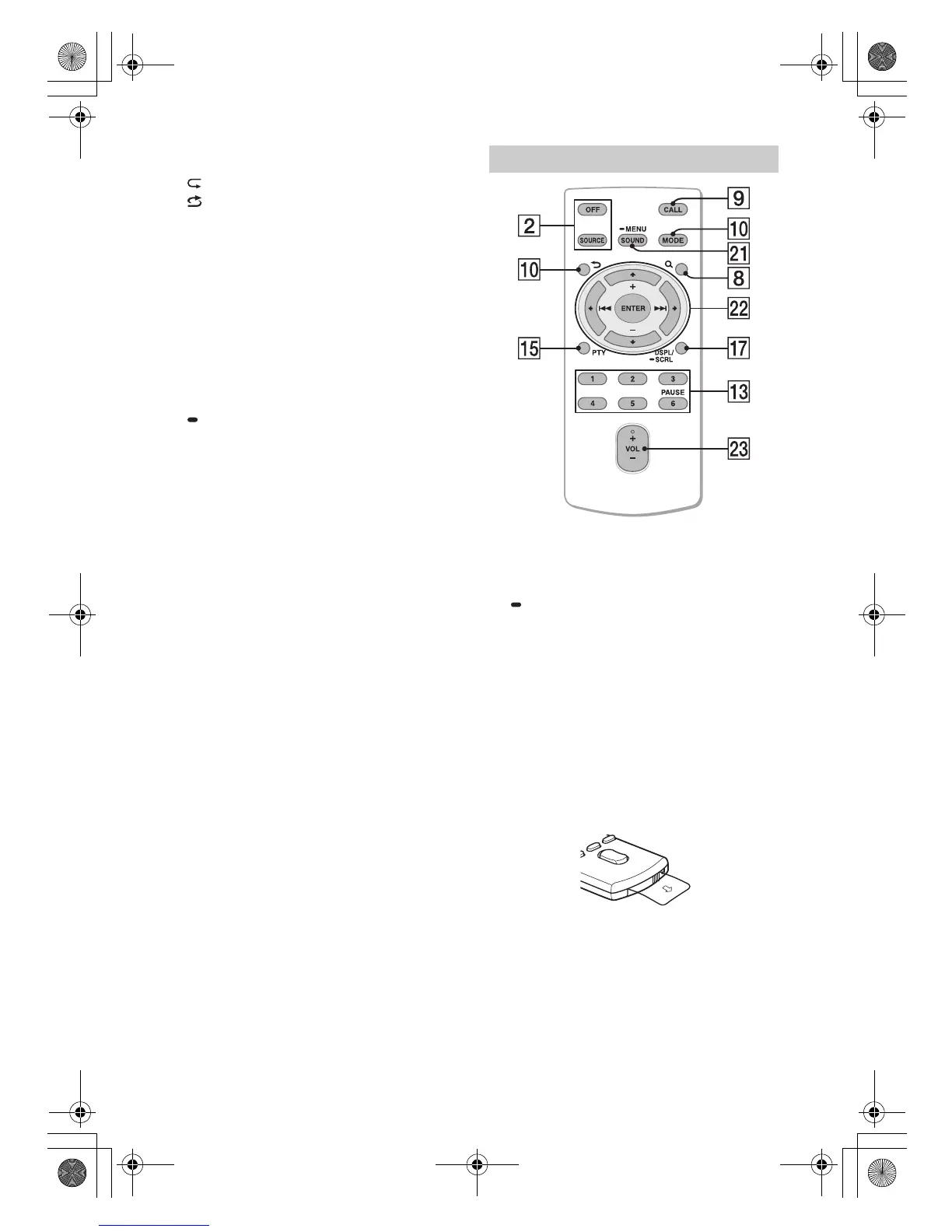
The VOL (volume) + button has a tactile dot.
SOUND*
Open the SOUND menu directly.
MENU*
Press and hold to open the setup menu.
* Not available when the BT phone is selected.
///
Select a setup item, etc.
ENTER
Enter the selected item.
/ (prev/next)
+/– (album +/–)
VOL (Volume) +/–
Remove the insulation film before use.
RM-X231 Remote commander
010COV.book Page 6 Thursday, September 18, 2014 10:49 AM



 To Next Page