DVD/VIDEO CD/CD/MP3
17
GB
To insert additional discs, press DISC
SKIP/EX-CHANGE to rotate the disc tray.
3 Press Z OPEN/CLOSE to close the disc
tray.
Playing discs
Loading a disc
You can also load and play discs with MP3
audio tracks. See “Playing a disc with MP3
audio tracks” on page 25 for MP3.
1 Press Z OPEN/CLOSE.
The disc tray opens.
2 Place a disc with the label side up on
the disc tray.
DVD/VIDEO CD/CD/MP3
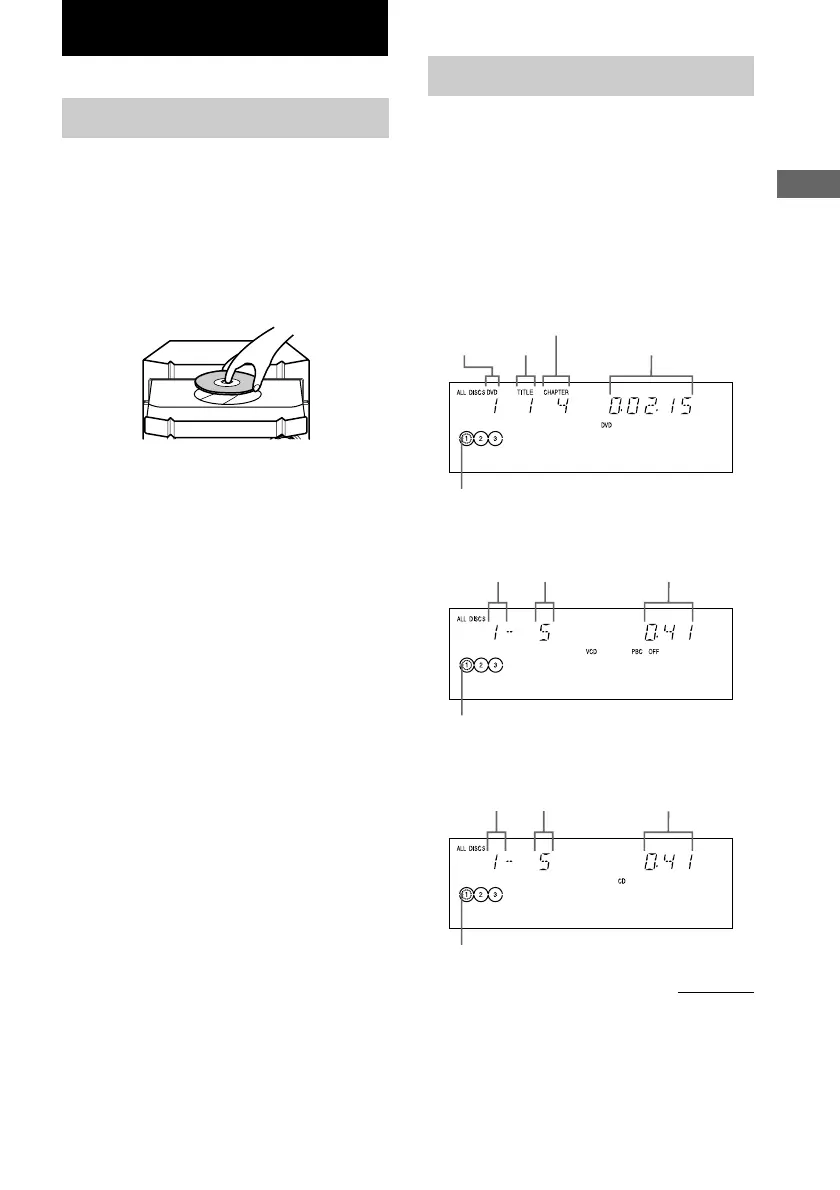
When playing a VIDEO CD:
Disc tray
number
Title
number
Chapter number
Playing time
Disc presence indicator
Disc tray
number
Track number
Playing time
Disc presence indicator
Playing a disc
— Normal Play/Shuffle Play/Slow-
motion Play
You can play up to three discs (DVD, VIDEO
CD, CD or MP3) in a row. Depending on the
DVD or VIDEO CD, some operations may be
different or restricted. Refer to the operating
instructions supplied with the disc.
When playing a DVD:
When playing a CD:
Disc tray
number
Track number Playing time
Disc presence indicator
continued



 To Next Page
 Loading...