13
MHC-VX777/VX555/VX555J 4-232-651-12 (1)
VIDEO CD/CD
To
Switch to CD
function from
another source
Play repeatedly
(Repeat Play)
Cancel Repeat
play
Exchange other
CDs while playing
Remove the CD
*1
All the tracks repeated up to five times.
You cannot use this function during SHUFFLE
ALL DISCS.
*2
To repeat the current track you are playing.
Tip
Pressing the CD while the power is off automatically
turns the power on and CD is selected as a function.
When the system is in the power saving mode, this
function does not work.
Programming the VIDEO
CD/CD tracks
–– Program Play
You can make a program of up to 25 tracks
from all the VIDEO CD/CDs in the order you
want them to be played.
1 Load a VIDEO CD/CD.
2 Press PLAY MODE repeatedly until
“PROGRAM” appears in the display.
3 Press one of the DISC 1~3 buttons to
select a VIDEO CD/CD.
To program all the tracks on a CD at once,
proceed to step 5 while “AL” appears on the
display.
Do this
Press CD or DISC 1~3
(Automatic Source Selection).
Press REPEAT repeatedly to
select “REPEAT”*
1
or
“REPEAT 1”*
2
.
Press REPEAT until “REPEAT”
or “REPEAT 1” disappears from
the display.
Press DISC SKIP
EX-CHANGE.
Press Z OPEN/CLOSE.
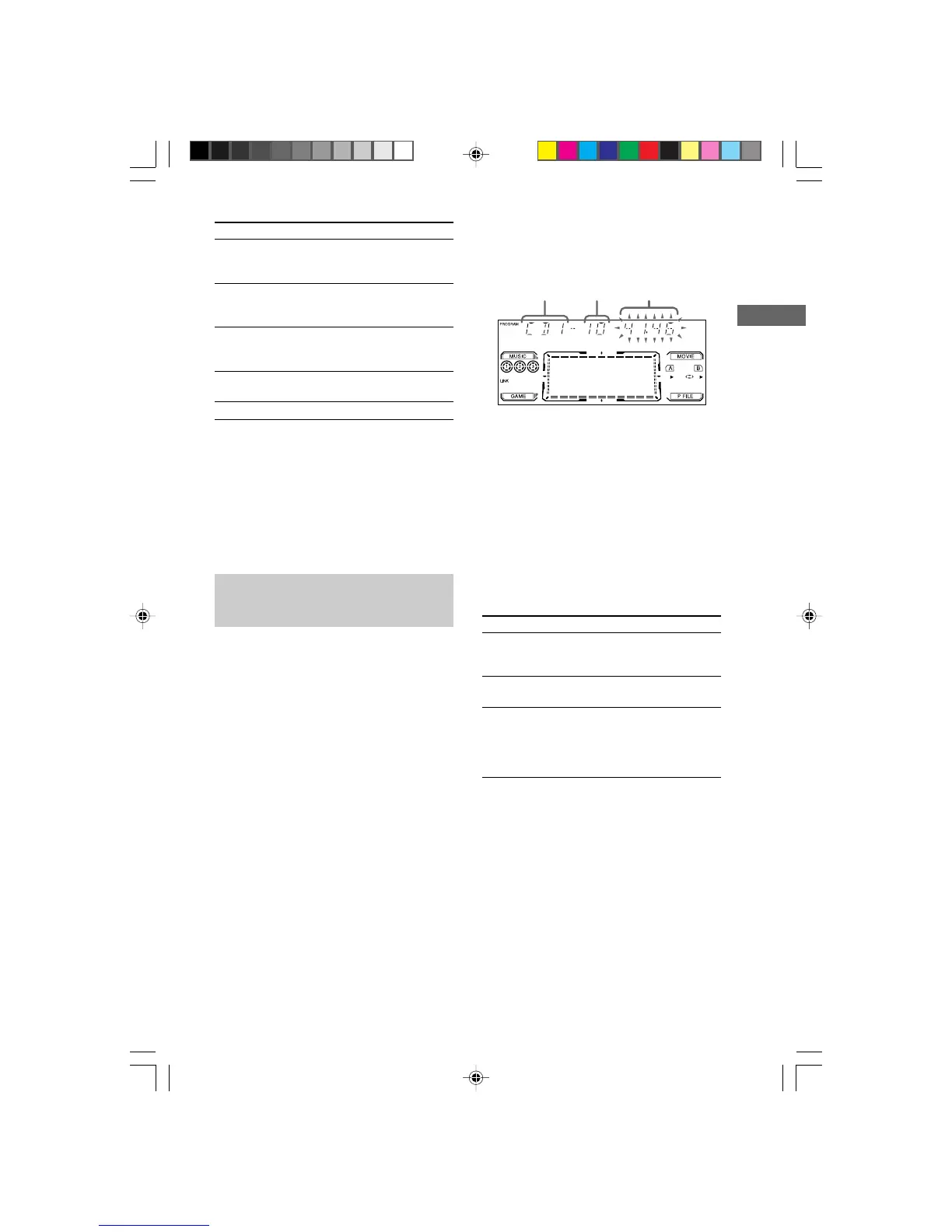
Track
number
Total playing time
(including selected
track)
Disc tray
number
4 Press . or > repeatedly until the
track you want appears in the display.
5 Press ENTER.
The track(s) is (are) programmed. The
program step number appears, followed by
the total playing time.
6 To program additional tracks, repeat
steps 3 to 5.
Skip step 3 to select tracks from the same
disc.
7 Press nN.
To
Cancel Program
Play
Clear a track from
the end
Add a track to
the program in
stop mode
Tips
• The program you made remains in the CD player
even after it has been played back. Press nN to
play the same program again.
• If “--.--” appears instead of the total playing time
during programming, this means:
– you have programmed a track number
which exceeds 20.
– the total playing time has exceeded 100 minutes.
Press
PLAY MODE repeatedly until
“PROGRAM” or “SHUFFLE”
disappears from the display.
CLEAR on the remote in stop
mode.
1 Select the disc tray with
DISC 1~3 button.
2 Select the track by pressing
. or >.
3 Press ENTER.
04CDP_MHC-VX777/VX555.p65 GB 13/03/2001, 4:58 PM13



 To Next Page