24
MHC-VX777/VX555/VX555J 4-232-651-12 (1)
Adjusting the graphic
equalizer
You can adjust the sound by raising or
lowering the levels of specific frequency
ranges.
Before operation, first select the audio
emphasis you want for your basic sound.
1 Press one of the cursor b/B/v/V.
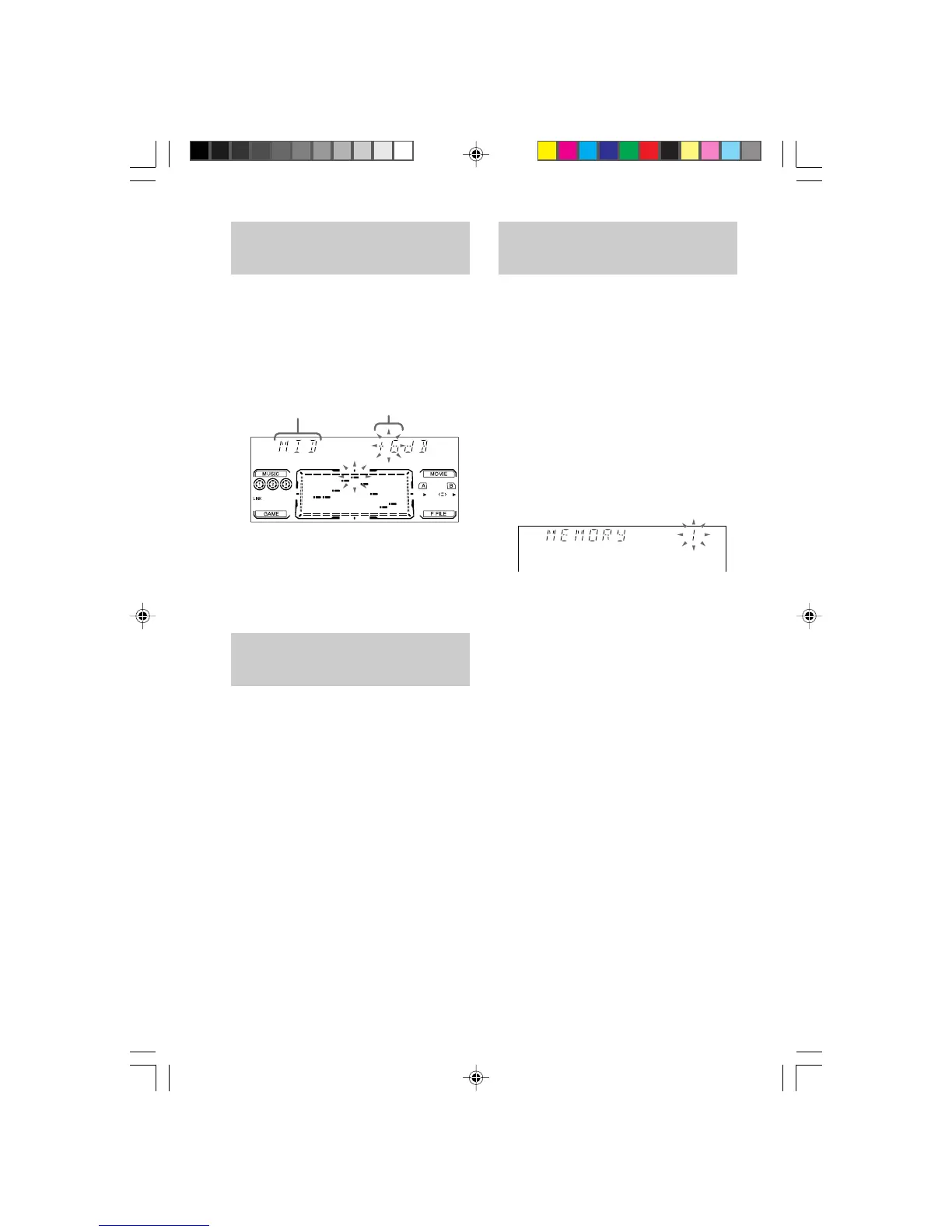
2 Press cursor b/B to select the
frequencies or surround, then press
cursor v/V to adjust the frequencies
level or to select the surround effect.
3 Press ENTER to exit.
Selecting the surround
effect
You can enjoy this system's surround effect.
Press CINEMA SPACE repeatedly to
select the surround effect you want.
Each time you press the button, the display
changes cyclically as follows:
SURR OFF t C. SPACE LOW t
C. SPACE MID t C. SPACE HIGH t
SURR ON
Note
When you choose other sound effects, the surround
effect will be canceled.
Frequency band
Frequency level
Making a personal audio
emphasis file
— Personal file
You can create a personal file of sound effect
settings (surround effect and graphic equalizer)
and store them in the memory of the unit. You
can create up to three personal files.
Before operation, first select the audio
emphasis you want for your basic sound.
1 Obtain the sound effect you want by
changing the graphics equalizer and
surround effect.
2 Press and hold down P File.
The personal file number appears in the
display.
3 Use cursor b/B/v/V to select the
personal file number (P FILE) which
you want to store the sound effect
settings.
4 Press ENTER.
The adjusted sound effect are stored under
the selected personal file. The settings
previously stored at this memory location
are erased and replaced by a new settings.
To call up the personal file
Press P FILE repeatedly until the personal file
number you want appears in the display.
07SOU_MHC-VX777/VX555.p65 GB 13/03/2001, 4:59 PM24



 To Next Page