6-GB
Preparations (continued)
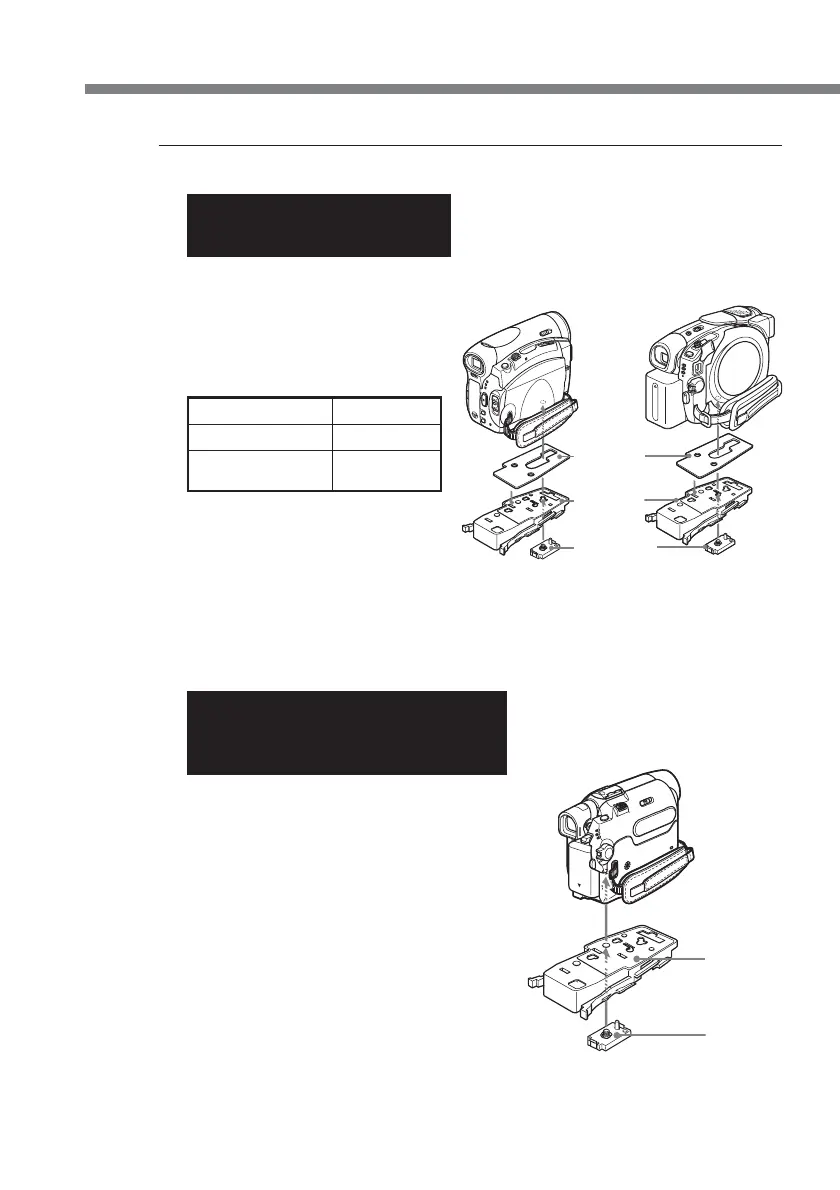
5 Attach the camera mounting shoe.
For DCR-HC90/HC90E/
DVD803/DVD803E/DVD403/
DVD403E
Use the mounting shoe H, spacer, and
the screw plate.
The camcorder of the illustration may
differ from the camcorder you use.
Refer to the following table to confirm
the position for attaching the screw
plate, according to your camcorder.
DCR- Shoe H
HC90/HC90E 1
DVD803/DVD803E 2
DVD403/DVD403E
1 Attach the spacer to shoe H.
2 Attach the screw plate to shoe H so
that the catch on the reverse side of
the shoe clicks into place.
3 Fasten the screw of the screw plate to
the tripod screw hole of the
camcorder and tighten firmly.
For DCR-HC43/HC43E/HC42/
HC42E/HC39E/HC33/HC33E/HC32/
HC32E/HC22E/HC21/HC21E/HC19E/
HC17E
Use the mounting shoe H and the screw plate.
The position for attaching the screw plate to shoe
H, is 3.
1 Attach the screw plate to shoe H so that
the catch on the reverse side of the shoe
clicks into place.
2 Fasten the screw of the screw plate to the
tripod screw hole of the camcorder and
tighten firmly.
Camera
mounting
shoe H
Screw plate
Camera
mounting
shoe H
Screw plate
Spacer


 To Next Page