11-GB
GB
Installing the camcorder to the marine pack
You can also install camcorder models different from the one shown in the illustration.
For DCR-HC90/HC90E/HC43/HC43E/HC42/HC42E/HC40/HC40E/HC39E/
HC33/HC33E/HC32/HC32E/HC30/HC30E/HC22E/HC21/HC21E/HC20/HC20E/
HC19E/HC18E/HC17E/HC16E/DVD803/DVD803E/DVD703/DVD703E/
DVD653/DVD653E/DVD602/DVD602E/DVD403/DVD403E/DVD203/
DVD203E/DVD202E/DVD103/DVD103E/DVD92/DVD92E
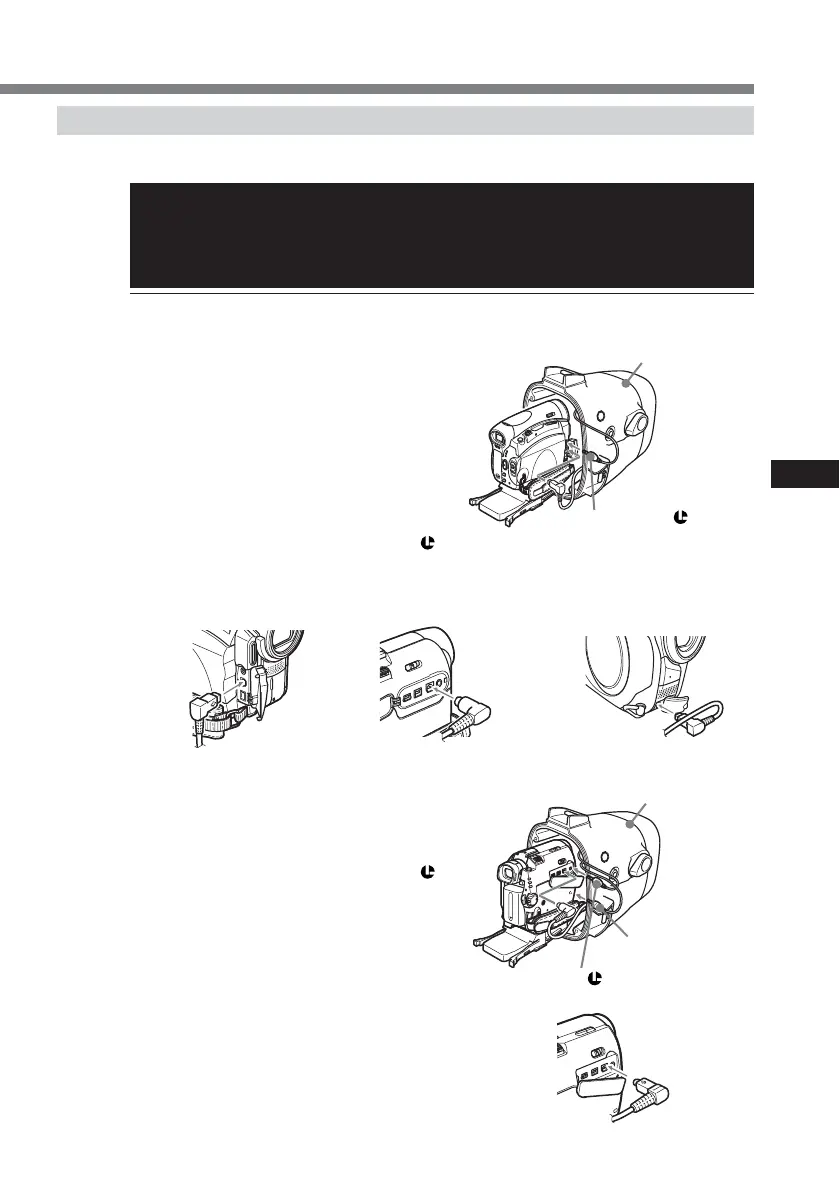
1 Connect the remote cord and the microphone
cord to the camcorder.
For DCR-HC90/HC90E/HC43/HC43E/HC42/
HC42E/HC39E/HC33/HC33E/HC32/HC32E/
HC22E/HC21/HC21E/HC19E/HC17E/DVD803/
DVD803E/DVD703/DVD703E/DVD653/
DVD653E/DVD602/DVD602E/DVD403/
DVD403E/DVD203/DVD203E/DVD202E/
DVD103/DVD103E/DVD92/DVD92E
* The microphone cord is not necessary.
1 Connect the remote cord to the LANC
jack.
2 Connect the A/V multi-cord of the
marine pack to the camcorder’s A/V jack.
For DCR-HC40/HC40E/HC30/HC30E/HC20/
HC20E/HC18E/HC16E
1 Connect the microphone cord to the MIC
jack (plug in power).
2 Connect the remote cord to the LANC
jack.
3 Connect the A/V multi-cord of the
marine pack to the camcorder’s A/V jack.
front shell
1 to the MIC jack
(plug in power)
2 to the LANC
jack
continued
front shell
1 to the LANC
jack


 To Next Page