12-GB
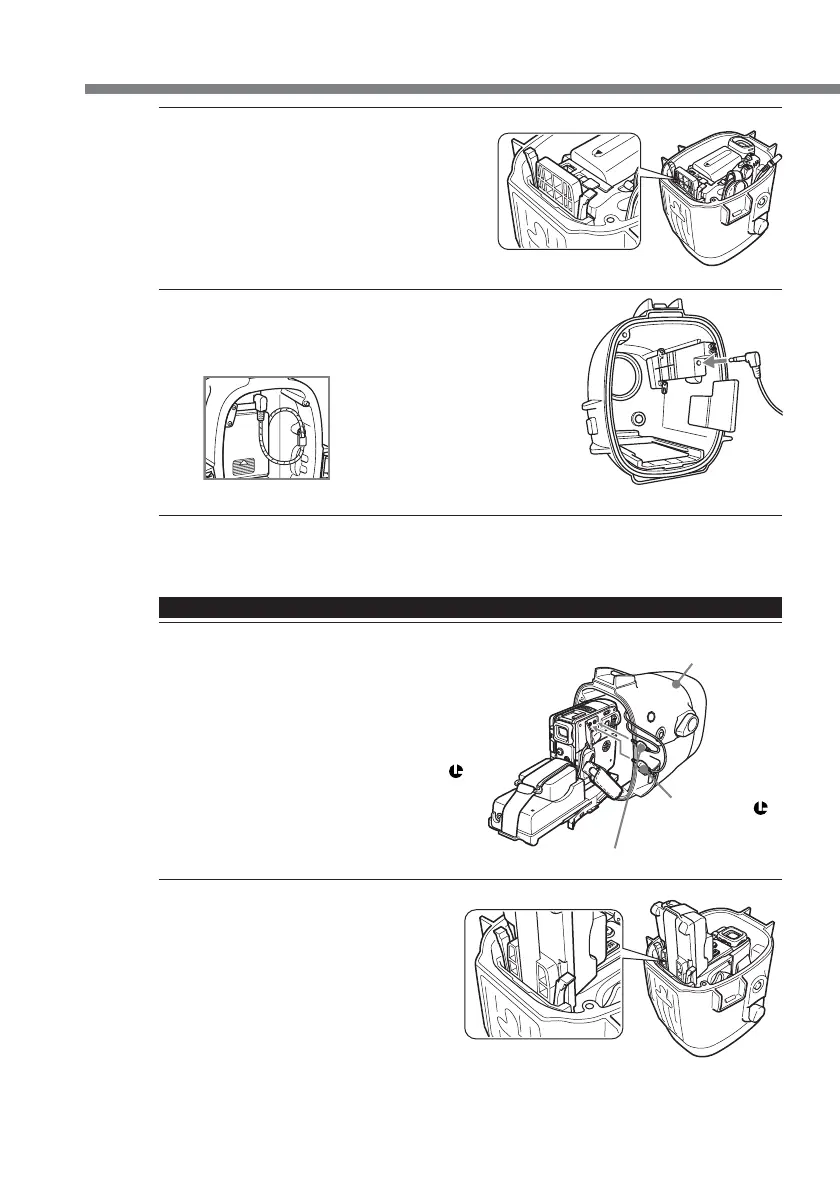
2 Insert the camcorder, sliding the
mounting shoe along the guide rail of
the marine pack until the mounting
shoe clicks into place.
3 Connect the monitor cord to part A
(see illustration) of the marine pack.
Then, fasten the latches securely, and attach the grip.
For details, see page 13.
For DCR-PC109/PC109E/PC108/PC108E/PC107/PC107E/PC106E
1 Connect the remote cord and microphone cord
to the camcorder.
* The A/V multi-cord is not necessary.
1 Connect the microphone cord to the MIC
jack (plug in power).
2 Connect the remote cord to the LANC
jack.
2 Insert the camcorder, sliding the
mounting shoe along the guide rail of
the marine pack until the mounting
shoe clicks into place.
front shell
1 to the MIC jack (plug in power)
2 to the LANC
jack
Preparations (continued)
The cords are placed in the
plug holders of the marine pack
at the factory. Pull the plugs
out of the holders when in use.
A


 To Next Page