19-GB
GB
Removing the camcorder
continued
Before opening the marine pack, rinse it with fresh water and dry with a soft cloth.
When you open the marine pack, make sure you are dry. And take care that no water drips from
your wet suit.
For DCR-HC90/HC90E/DVD803/DVD803E/DVD703/DVD703E/DVD653/
DVD653E/DVD602/DVD602E/DVD403/DVD403E/DVD203/DVD203E/
DVD202E/DVD103/DVD103E/DVD92/DVD92E
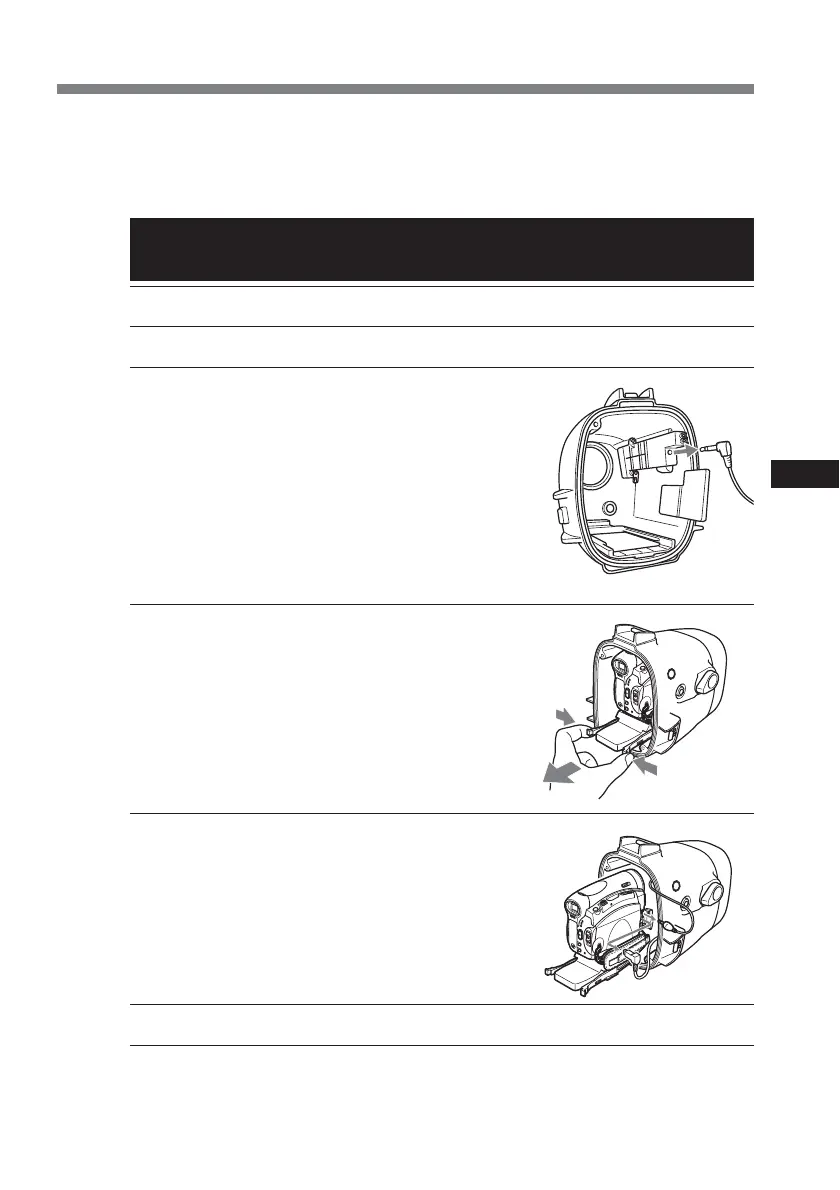
1 Remove the grip.
2 Unfasten 3 latches and open the marine pack.
3 Disconnect the monitor cord.
4 Take the camcorder out of the front shell.
Hold the camera mounting shoe by the knobs and extract
the camcorder.
When you open the marine pack, do not pull the cords by
force.
5 Disconnect the remote cord, the microphone
cord and the A/V multi-cord.
6 Remove the mounting shoe from the camcorder.
7 Remove the batteries from the LCD monitor battery compartment and the battery case of
the grip.


 To Next Page