23-GB
GB
Handling the O-ring
Set the O-ring in place
Avoid setting the O-ring in dusty or sandy locations.
1 Remove the O-ring.
Do not use pointed or metal objects to remove the O-ring. These objects might scratch or
damage the marine pack groove or O-ring.
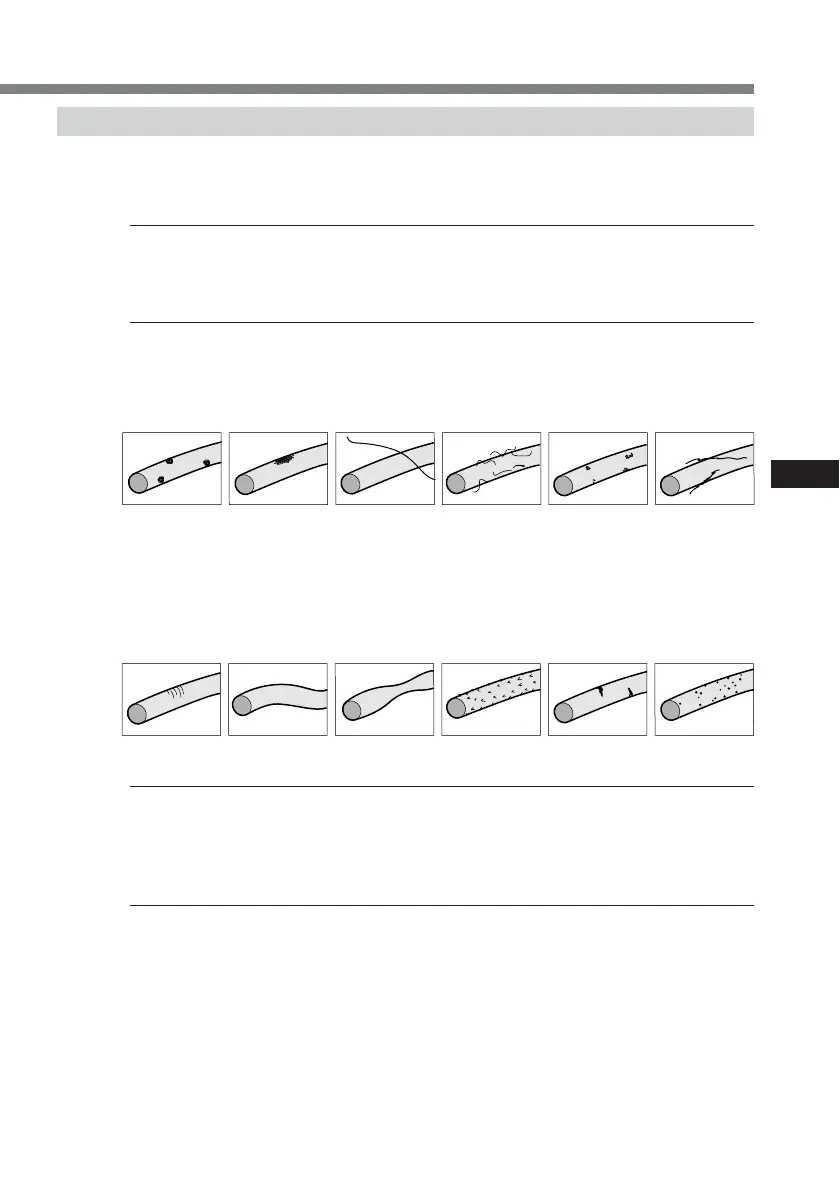
2 Inspect the O-ring.
•Fully check the following, and wipe off with a soft cloth or tissue paper.
– Check for any dirt, grains of sand, hair, dust, salt, thread scraps, etc.
– Check for any old grease.
• Lightly run your fingertip around the O-ring to check for any unapparent dirt.
• After wiping the O-ring, take care to prevent any cloth or tissue paper fibres from
remaining on the O-ring.
• Check the O-ring for cracking, skew, distortion, fine splitting, scratches,
sand-biting, etc. Replace cracked or scratched O-rings.
3 Inspect the O-ring groove.
Grains of sand or hardened salt sometimes get into the groove. Carefully remove them by
blowing with an air spray or by wiping them with a cotton wool bud. Prevent fibre scraps from
the cotton wool bud from entering inside.
4 Also, inspect the contacting surface on the other side of the O-ring in the same way.
v Dirt v Sand v Hair v Dust v Salt v
Thread scraps
v Cracking v Skew v Distortion v Fine Splitting v Scratches v Sand-biting
continued



 To Next Page