masterpage:Left
filename[D:\WORKS\CD\3067952121\3067952121DirectCDUC\02GB-
DirectCDUC\03pre.fm]
12
model name1[MVC-CD200/CD300]
[3-067-952-12(1)]
Removing the disc
Note
When you write new data onto the disc, before removing
the disc from the camera, be sure to follow the procedure
below. If you remove the disc or disconnect the USB cable,
without following the procedure, data on the disc may be
broken.
When you open the file in the disc with your application
software, quit it before starting the procedure below.
When using a CD-R
1
Right-click th
e DirectCD icon on the taskbar and select [Eject]
from the drop-down list box.
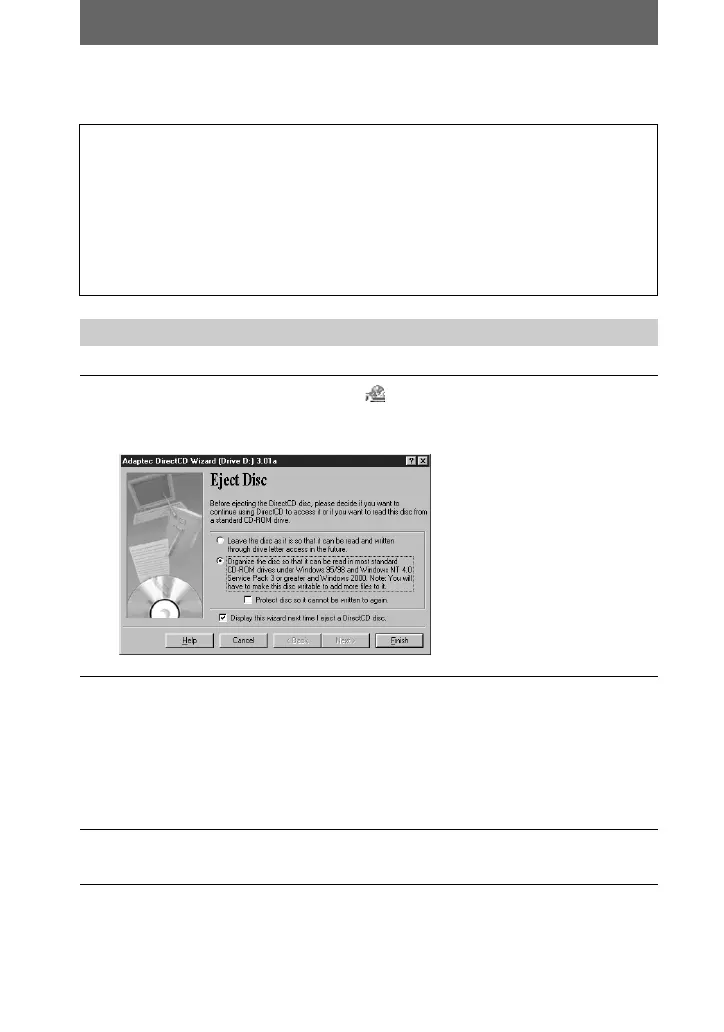
The “Eject Disc” window appears.
2
Check the appropriate option.
• If you do not execute the finalization, click the upper option on the
window.
• If you execute the finalization to view images on a CD-ROM drive,
click the lower option on the window. When you will not add or modify data
on the disc any more, also, check the “Protect disc so it cannot be written to
again” option.
3
Check that the ACCESS lamp is not lit, then open the disc cover
and remove the disc.
01cov.book Page 12 Monday, July 23, 2001 2:09 PM










 To Next Page