masterpage:Right
filename[D:\WORKS\CD\3067952121\3067952121DirectCDUC\02GB-
DirectCDUC\03pre.fm]
9
model name1[MVC-CD200/CD300]
[3-067-952-12(1)]
DirectCD will be available after you restart your computer. Check the option [Yes ...,]
then click [Finish].
Note on Easy CD Creator
You cannot use Easy CD Creator with the camera connected to your computer with the USB
cable.
3
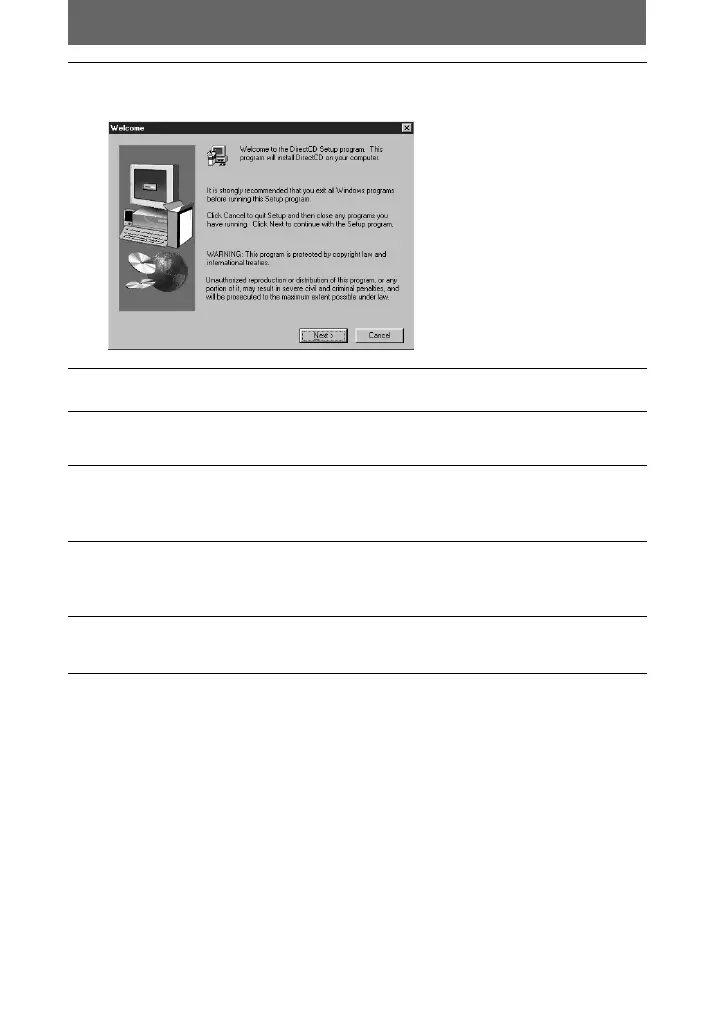
Click [DirectCD].
The “Welcome” window appears on the screen.
4
Click [Next].
5
Read the text on the window carefully, and if you accept it, click
[Yes].
6
Check the folder in which DirectCD will be installed.
When you install DirectCD into another folder other than the default one, click
[Browse...], and select the folder.
7
Click [Next].
The setup of the program starts. When the installation is complete, the screen
returns to the window displayed in step
1
.
8
Click [Exit].
The “Setup Complete” window appears on the screen.
01cov.book Page 9 Monday, July 23, 2001 2:09 PM










 To Next Page