EasyManua.ls Logo

Sony MXP-290 - Page 52

Sony MXP-290
Print Icon
To Next Page IconTo Next Page
To Previous Page IconTo Previous Page
Loading...
@
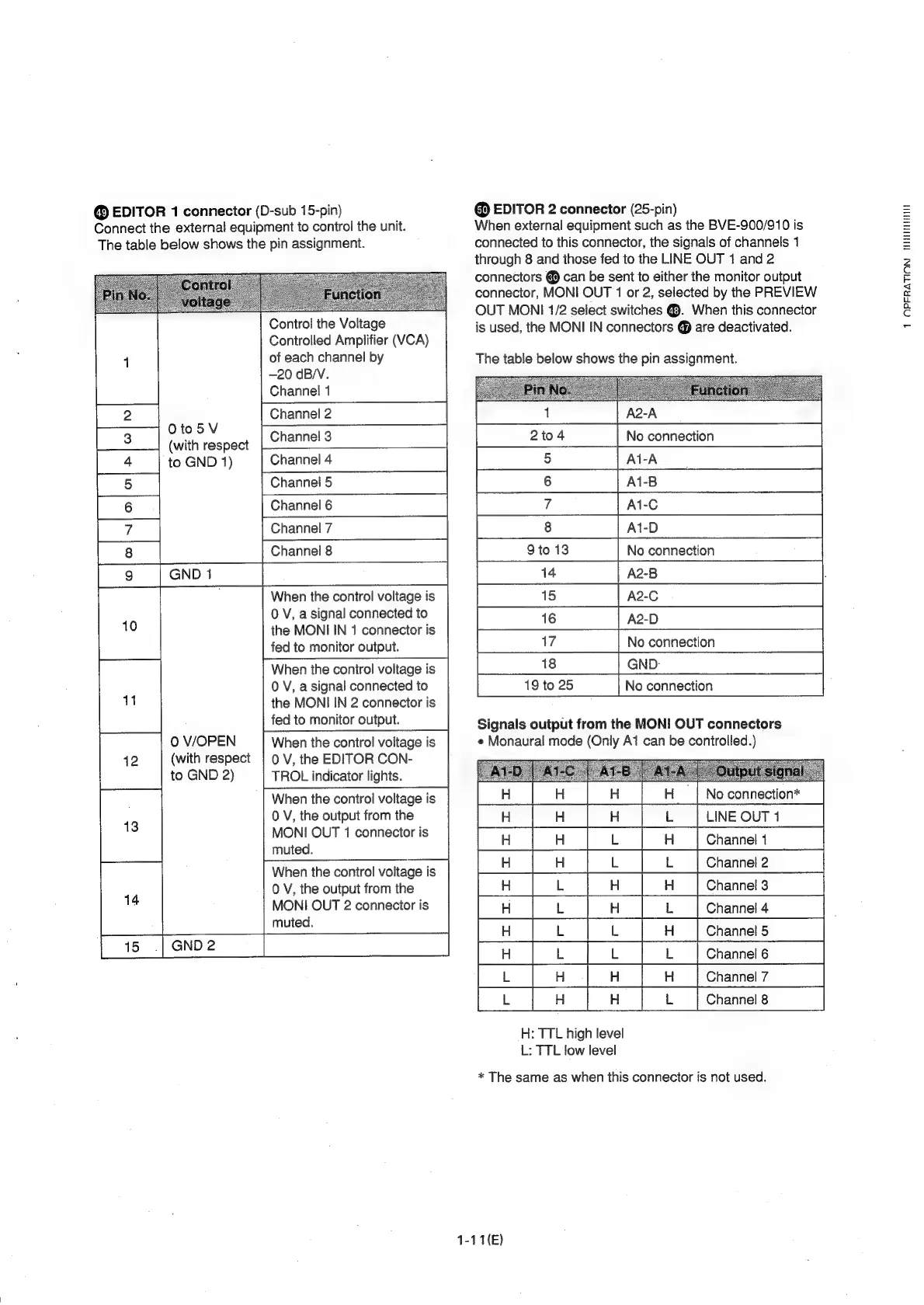
EDITOR
1
connector
(D-sub
15-pin)
Connect
the
external
equipment
to
control
the
unit.
The
table
below
shows
the
pin
assignment.
Oto5V
(with
respect
to
GND
1)
0
V/OPEN
(with
respect
to
GND
2)
Control
the
Voltage
Controlled
Amplifier
(VCA)
of
each
channel
by
—20
dB/V.
Channel
1
Channel
2
Channel
3
Channel
4
Channel
5
Channel
6
Channel
7
Channel
8
When
the
control
voltage
is
0
V,
a
signal
connected
to
the
MONI
IN
1
connector
is
fed
to
monitor
output.
When
the
control
voltage
is
0
V,
a
signal
connected
to
the
MONI
IN
2
connector
is
fed
to
monitor
output.
When
the
control
voitage
is
0
V,
the
EDITOR
CON-
TROL
indicator
lights.
When
the
control
voltage
is
0
V,
the
output
from
the
MONI
OUT
1
connector
is
muted.
When
the
control
voltage
is
0
V,
the
output
from
the
MONI
OUT
2
connector
is
muted.
@
EDITOR
2
connector
(25-pin)
When
external
equipment
such
as
the
BVE-900/910
is
connected
to
this
connector,
the
signals
of
channels
1
through
8
and
those
fed
to
the
LINE
OUT
1
and
2
connectors
@
can
be
sent
to
either
the
monitor
output
connector,
MONI
OUT
1
or
2,
selected
by
the
PREVIEW
OUT
MONI
1/2
select
switches
@.
When
this
connector
is
used,
the
MONI
IN
connectors
@
are
deactivated.
The
table
below
shows
the
pin
assignment.
A2-A
No
connection
A1-A
Ai-B
A1-C
Ai-D
9to
13
No
connection
14
A2-B
15
A2-C
ie)
ss
()
a
|
16
A2-D
18
GND-
19
to
25
No
connection
Signals
output
from
the
MONI
OUT
connectors
e
Monaural
mode
(Only
A1
can
be
controlled.)
a
a
a
re
a
re
:
=<
=x
rc
|
B
=
=
oe
=
.
|e
Ea
Be
H:
TTL
high
level
L:
TTL
low
level
*
The
same
as
when
this
connector
is
not
used.
1-11(E)
1
OPFRATION
TWHEITHHIH

Related product manuals