EasyManua.ls Logo

Sony PCM-800 - Dubbing Audio and Time Code between PCM-800 S

Sony PCM-800
135 pages
Print Icon
To Next Page IconTo Next Page
To Previous Page IconTo Previous Page
Loading...
Dubbing
Audio
and
Time
Code
between
PCM-800s
at
One
Time
_-
Pre-operating
procedure
Master
Slave
PCM-800/DABK-801
—~
7
CODE
Termination
jy
plug
The
original
relationships
between
the
audio,
ABS
times
and
time
code
numbers
can
be
copied
without
any
alterations
whatever.
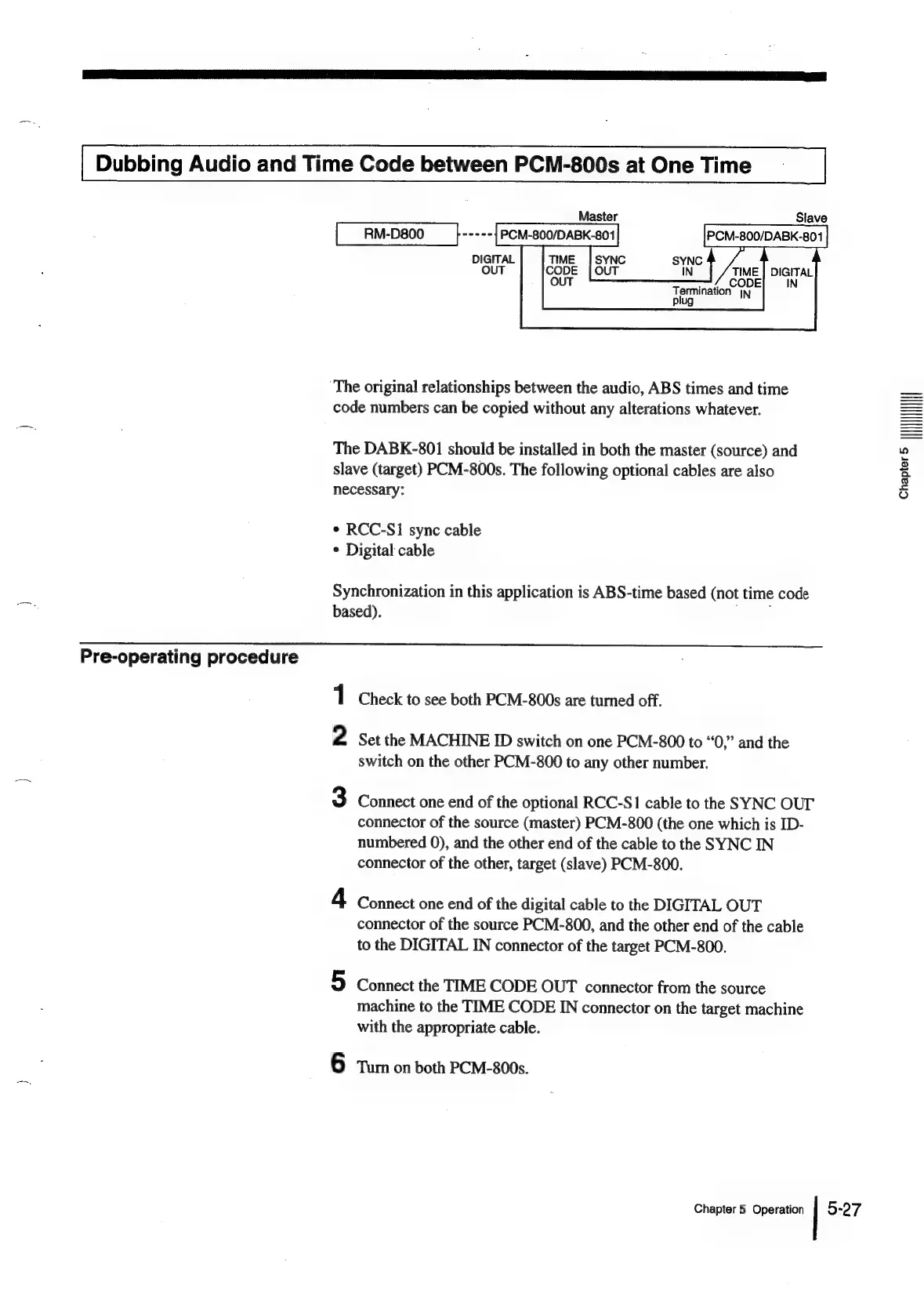
The
DABK-801
should
be
installed
in
both
the
master
(source)
and
slave
(target)
PCM-800s.
The
following
optional
cables
are
also
necessary:
*
RCC-S1
sync
cable
*
Digital
cable
Synchronization
in
this
application
is
ABS-time
based
(not
time
code
based).
oo
1
Check
to
see
both
PCM-800s
are
turned
off.
2
Set
the
MACHINE
ID
switch
on
one
PCM-800
to
“0,”
and
the
switch
on
the
other
PCM-800
to
any
other
number.
3
Connect
one
end
of
the
optional
RCC-S1
cable
to
the
SYNC
OUT
connector
of
the
source
(master)
PCM-800
(the
one
which
is
ID-
numbered
0),
and
the
other
end
of
the
cable
to
the
SYNC
IN
connector
of
the
other,
target
(slave)
PCM-800.
4
Connect
one
end
of
the
digital
cable
to
the
DIGITAL
OUT
connector
of
the
source
PCM-800,
and
the
other
end
of
the
cable
to
the
DIGITAL
IN
connector
of
the
target
PCM-800.
5
Connect
the
TIME
CODE
OUT
connector
from
the
source
machine
to
the
TIME
CODE
IN
connector
on
the
target
machine
with
the
appropriate
cable.
6
Tum
on
both
PCM-800s,
Chapter
5
Operation
5-27
Chapter>
IHHIII

Table of Contents