11
Turn o the controller
Press the (PS) button on the controller to display the control centre
of your PS5 console. When you select Accessories
> PS VR2 Sense
Controller (L) or PS VR2 Sense Controller (R) > Turn O, the controller
and its status indicator turns o.
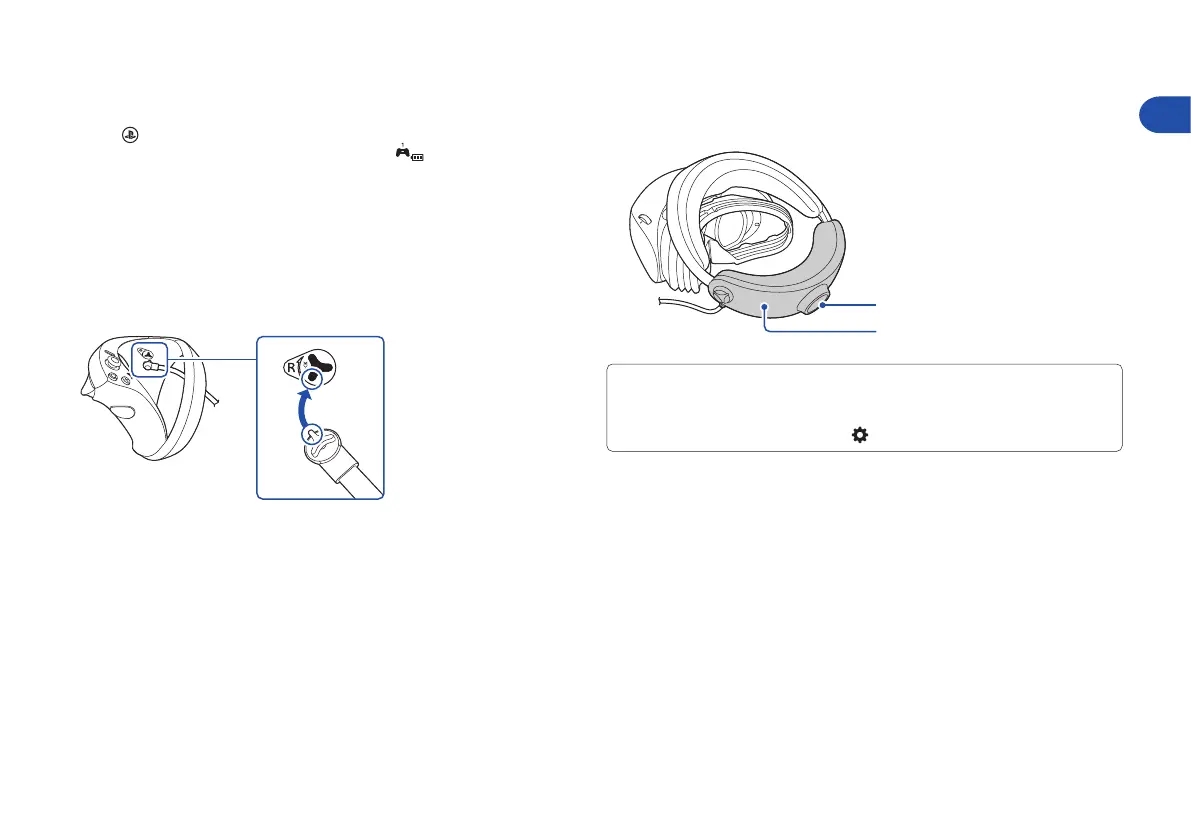
Attach the straps
If a strap detaches from either of the controllers, use the following method
to reattach it.
Align the raised part of the hook with the strap holder. Then, rotate the strap
hook in the direction of the arrow until the strap locks into place.
Remove your VR headset
Hold down the headband release button and pull back the headband to
remove the VR headset.
• When the VR headset is removed, the headset screen will turn o
automatically.
• You can check how to wear the VR headset properly from your PS5 console’s
home screen by selecting Settings
> Accessories > PlayStation VR2.
Headband release button
Headband
EN


 To Next Page