The Timer20
GB
Setting the clock
“0:00” indication appears in the display
until you set the clock.
As long as the clock goes, “:” flashes.
The Timer
Tip
The time display
system:
24-hour system
Before you begin, hook up the systems (see page 26).
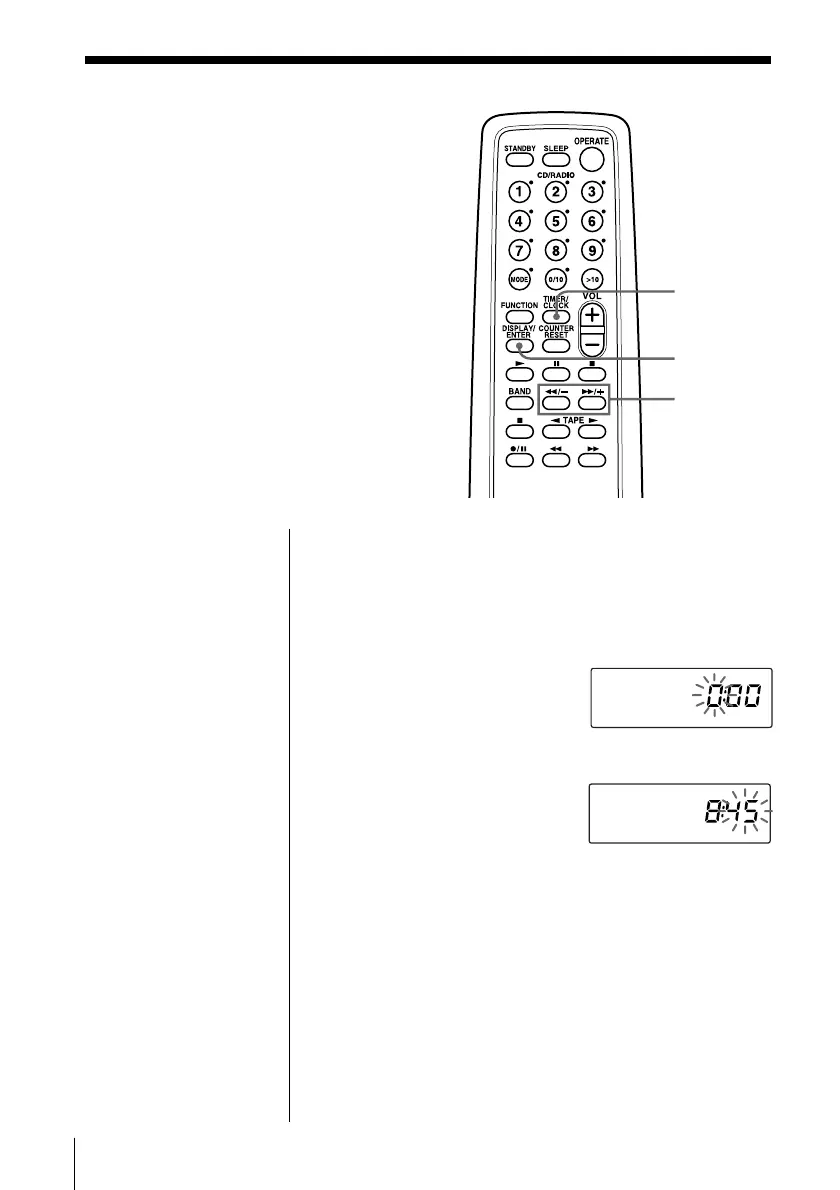
1 Press and hold TIMER/CLOCK for about 2
seconds until the hour digit flash.
2 Set the clock.
1 Press 0/– or )/+
to set the hour and
press DISPLAY/
ENTER.
2 Press 0/– or )/+
to set the minutes.
3 Press DISPLAY/ENTER.
“:” flashes and the clock starts from 00 seconds.
0/–,
)/+
DISPLAY/
ENTER
TIMER/
CLOCK
.


 To Next Page