Displaying the Markers and Zebra Patterns
44
Recording
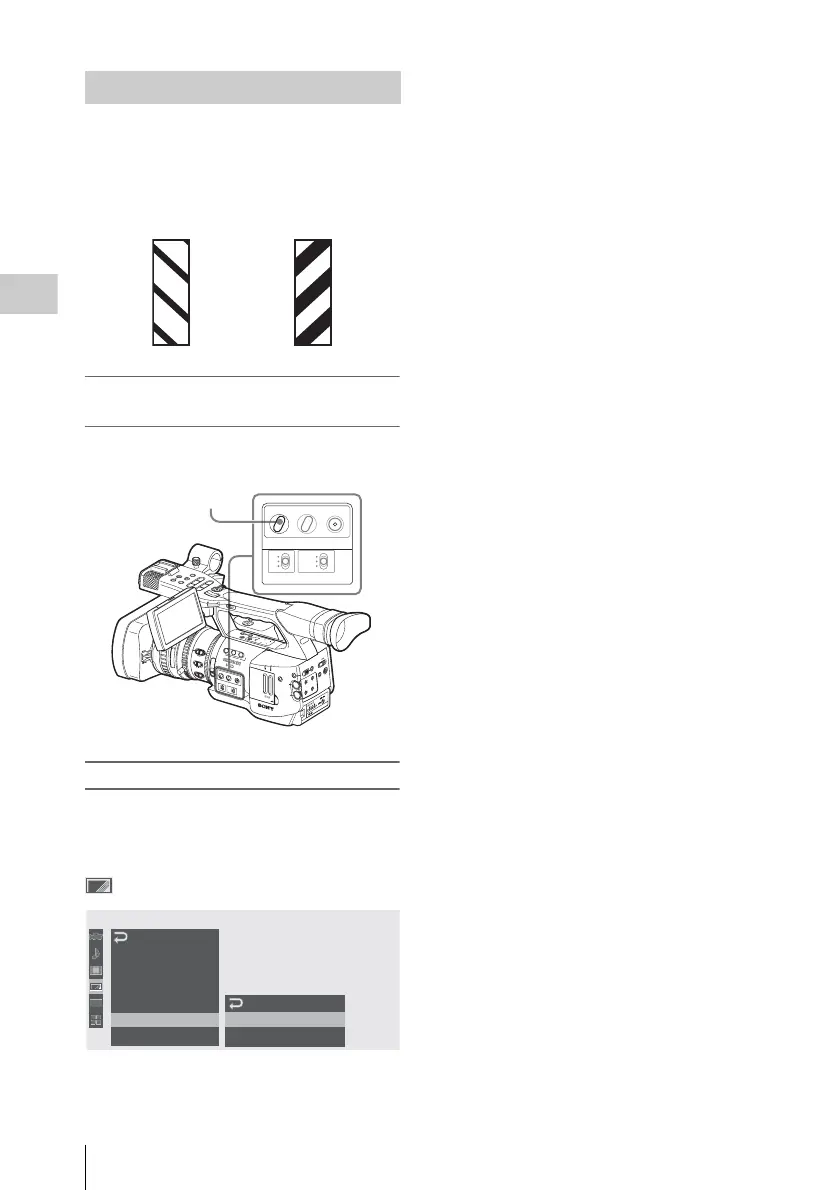
A zebra pattern(s) can be inserted to the picture
on LCD monitor/EVF screen to check the
appropriate luminance level.
Turning the zebra-pattern indication on/
off
Pressing the ZEBRA button turns the zebra
pattern-indication on/off.
Changing the zebra pattern
Using “Zebra” of the LCD/VF SET menu, you
can change the zebra pattern to be displayed.
Press the MENU button to set the camcorder to
Menu mode, display the LCD/VF SET menu with
, and select “Zebra” from the menu.
Zebra Select
Select the zebra pattern(s) to be displayed.
1 (Zebra1): To display a zebra pattern in the area
of ±10% centering the video level set with
“Zebra1 Level.”
2 (Zebra2): To display a zebra pattern for the
video level over 100%.
Both: To display both Zebra1 and Zebra2
Zebra1 Level
Set the center level of Zebra1 in the range of 50 to
107%. The default setting is 70%.
Displaying the Zebra Patterns
Factory-set zebras
1 (70%) 2 (100%)
O
F
F
2
1
N
D
F
I
L
T
E
R
Z
E
B
R
A
P
E
A
K
I
N
G
G
A
I
N
B
A
PRST
L
M
H
W
H
I
T
E
B
A
L
F
U
L
L
A
U
T
O
S
L
O
T
S
E
L
E
C
T
O
P
E
N
A
C
C
E
S
S
A
B
1
2
3
A
S
S
I
G
N
L
E
N
S
I
N
F
O
B
R
T
D
I
S
P
H
I
S
T
O
G
R
A
M
M
E
N
U
C
H
-
1
A
U
D
I
O
L
E
V
E
L
C
H
-
2
A
U
T
O
M
A
N
U
A
L
I
N
T
E
X
T
P
IC
T
U
R
E
P
R
O
F
IL
E
P
M
W
-
E
X
1
D
C
IN
C
H
-2
A
U
T
O
M
A
N
U
A
L
I
N
T
E
X
T
C
H
-1
A
U
DIO
S
E
L
E
C
T
A
U
DIO
IN
O
F
F
C
A
M
E
R
A
C
A
N
C
E
L
S
E
L/S
E
T
M
E
D
IA
1
5
2
5
40
81.2
10
3
1
0
5
1
0
3
0
1
5
5
.
8
M
A
N
U
A
U
T
O
MANU
AU
TO
FOCUS
I
R
I
S
M
A
C
R
O
O
F
F
O
N
T
H
U
M
B
N
A
I
L
F
R
E
V
P
R
E
V
S
E
L
/
S
E
T
P
L
A
Y
/
P
A
U
S
E
S
T
O
P
C
A
N
C
E
L
F
F
W
D
N
E
X
T
R
E
C
S
T
A
R
T
/
S
T
O
P
H
O
L
D
R
E
C
R
E
V
I
E
W
l
s
L
j
G
/S
J
M
O
N
I
T
O
R
V
O
L
H
L
O
F
F
A
S
H
O
T
T
R
A
N
S
I
T
I
O
N
B
L
C
D
B
.
L
I
G
H
T
T
C
/
U
-
B
I
T
/
D
U
R
A
T
I
O
N
S
T
A
T
U
S
B
A
R
S
/
C
A
M
D
I
S
P
L
A
Y
B
A
T
T
I
N
F
O
O
N
O
F
F
ZEBRA PEAKING
GAIN
B
A
PRST
L
M
H
WHITE BAL
FULL AUTO
ZEBRA button
00:00
LCD
EVF
Peaking
M
arker
Zebra
Display
O
n/
O
ff
LCD/VF
SET
Zebra
Select
Zebra1
Level
:
1
:
70
B
B
B
B
B
B



 To Next Page