Recording Audio Signals
58
Recording
Set the AUDIO IN switches, both CH-1 and
CH-2, to INT.
1 Set the AUDIO IN switches CH-1 and
CH-2 to EXT.
2 Connect external audio sources to the
AUDIO IN connectors CH-1 and CH-2.
3 Set the LINE/MIC/+48V switches CH-1
and CH-2 to LINE (line level: +4 dBu).
You can use an external microphone for
recording, such as the ECM-673 Electret
Condenser Microphone.
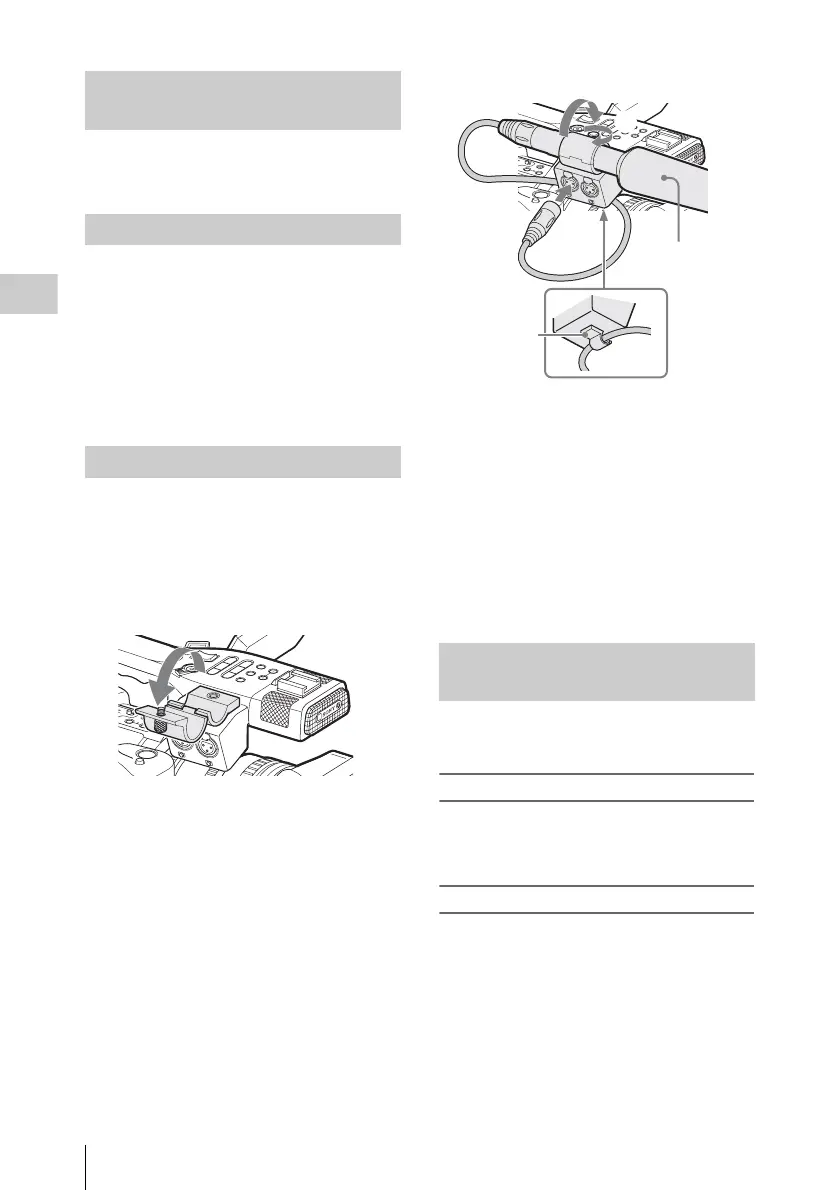
1 Loosen the screw of the microphone
holder and open the cover.
2 Attach a microphone, close the
microphone holder cover for the
original condition to secure, then
connect the microphone cable to either
of the AUDIO IN connectors (CH-1 or
CH-2).
3 Set the corresponding AUDIO IN
switch (CH-1 or CH-2) to EXT.
4 Set the corresponding LINE/MIC/+48V
switch (CH-1 or CH-2) according to the
connected microphone.
MIC: For a microphone that requires no
power supply
+48V: For a microphone that requires +48V
power supply (such as the ECM-673)
You can select automatic or manual adjustment
mode independently for each channel.
To adjust the levels automatically (AGC)
When the AUDIO SELECT switches CH-1 and
CH-2 are set to AUTO, the audio recording levels
are automatically adjusted.
To adjust the levels manually
Set the AUDIO SELECT switches CH-1 and CH-
2 to MANUAL, and adjust the audio recording
levels by turning the AUDIO LEVEL controls.
The value is set to 0 dB when the control is set to
5. Setting to 10 maximizes the level (+12 dB) and
setting to 0 minimizes it (–
∞).
The input levels are displayed on the screen when
you press the DISPLAY/BATT INFO button.
Using the Built-in Stereo
Microphones
Using External Inputs
Using an External Microphone
E
X
P
A
F
O
C
U
R
E
C
R
E
V
IE
W
R
E
L
E
A
S
E
S
T
A
R
T
/
S
T
O
P
A
SHOT
TRANSITION
B
L
C
D
B
.
L
I
G
H
T
O
N
O
F
F
P
R
E
V
PLA
Y
/P
AU
S
E
S
T
O
P
C
A
N
C
E
L
F
F
W
D
N
E
X
T
R
E
C
S
T
A
R
T
/
S
T
O
P
H
O
L
D
l
s
L
j
G
/S
J
H
L
O
F
F
T
H
U
M
B
N
A
I
L
F
R
E
V
S
E
L
/
S
E
T
M
O
N
I
T
O
R
V
O
L
AUDI O IN
C
H
-
1
M
I
C
L
I
N
E
M
I
C
+
4
8
V
M
I
C
L
I
N
E
M
I
C
+
4
8
V
C
H
-
2
Adjusting the Audio Recording
Levels
E
XP
AN
FOCUS
REC
R
EVIE
W
R
ELEA
SE
S
TAR
T/
ST
OP
A
S
H
O
T
T
R
A
N
S
IT
IO
N
B
L
C
D
B
.
L
IG
H
T
O
N
O
F
F
P
R
E
V
P
L
A
Y
/P
A
U
S
E
S
T
O
P
C
A
N
C
E
L
F
F
W
D
N
E
X
T
R
E
C
S
T
A
R
T
/
S
T
O
P
H
O
L
D
ls
L
j
G
/S
J
H
L
O
F
F
T
H
U
M
B
N
A
I
L
F
R
E
V
S
E
L
/
S
E
T
M
O
N
I
T
O
R
V
O
L
A
U
D
I
O
I
N
C
H
-1
M
IC
LIN
E
M
IC
+4
8
V
M
IC
L
IN
E
M
IC
+4
8
V
C
H
-2
A
U
D
I
O
I
N
C
H
-1
M
IC
L
IN
E
M
IC
+
4
8V
M
IC
L
IN
E
M
IC
+
4
8
V
C
H
-2
1
2
4
3
External
microphone
to AUDIO IN
Cable clamp



 To Next Page