Showing the Status Screens
93
Status Displays
This camcorder provides status screens of five
kinds in Camera mode and four kinds in Media
mode, permitting you to check the various
settings and statuses of this unit.
The status screens can also be displayed on an
external monitor.
For connections of an external monitor,see
“Connecting External Monitors” on page 114.
Available status screens
• CAMERA status screen (displayed only in
Camera mode) (page 94)
• AUDIO status screen (page 95)
• VIDEO status screen (page 96)
• BUTTON/REMOTE status screen (page 96)
• BATTERY/MEDIA status screen (page 97)
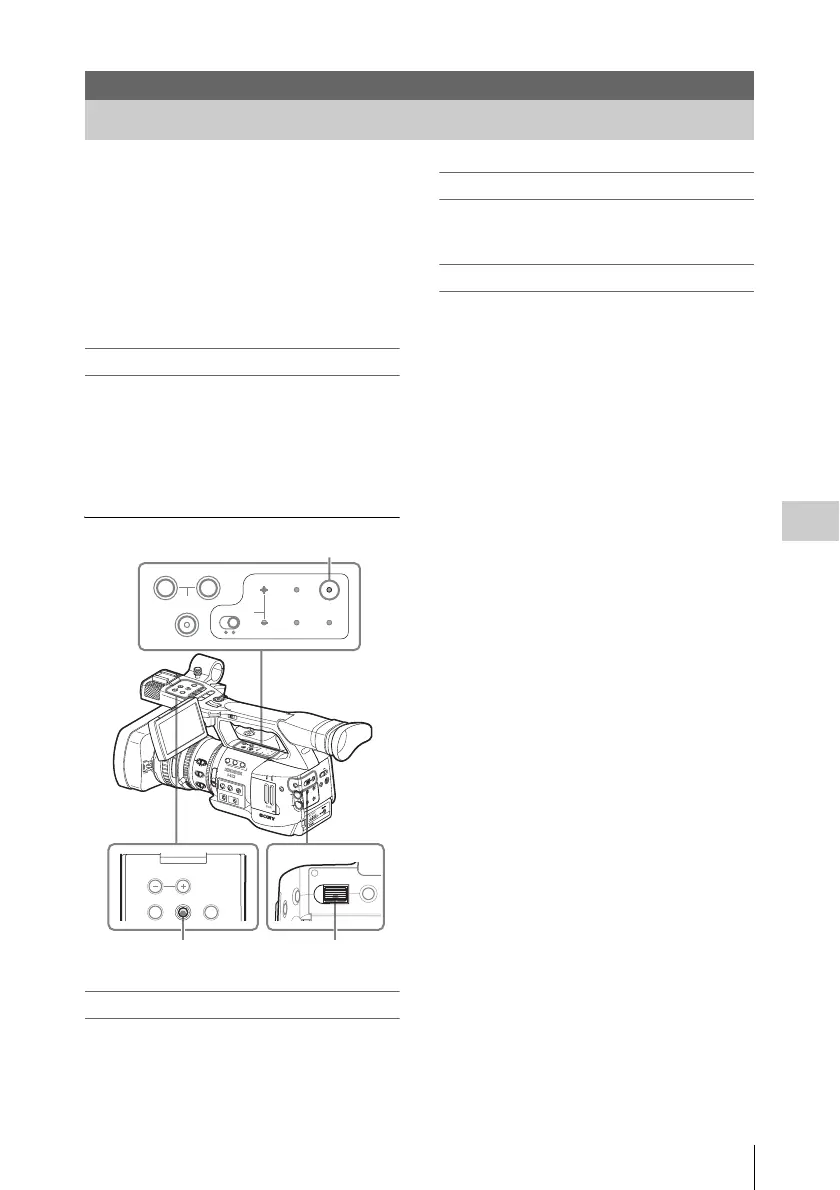
Activating the status screen display
Press the STATUS button.
Switching the status screens
Operating the joystick or the jog dial switches the
screens in sequence.
Canceling the status screen display
Press the STATUS button again. The status
screen display is canceled.
Status Displays
Showing the Status Screens
O
F
F
2
1
N
D
F
I
L
T
E
R
Z
E
B
R
A
P
E
A
K
I
N
G
G
A
I
N
B
A
PRST
L
M
H
W
H
I
T
E
B
A
L
F
U
L
L
A
U
T
O
S
L
O
T
S
E
L
E
C
T
O
P
E
N
A
C
C
E
S
S
A
B
1
2
3
A
S
S
I
G
N
L
E
N
S
I
N
F
O
B
R
T
D
I
S
P
H
I
S
T
O
G
R
A
M
M
E
N
U
C
H
-
1
A
U
D
I
O
L
E
V
E
L
C
H
-
2
A
U
T
O
M
A
N
U
A
L
I
N
T
E
X
T
P
IC
T
U
R
E
P
R
O
F
ILE
P
M
W
-E
X
1
D
C
I
N
C
H
-2
A
U
T
O
M
A
N
U
A
L
I
N
T
E
X
T
C
H
-1
A
U
D
IO
S
E
L
E
C
T
A
U
D
IO
IN
O
FF
C
A
M
E
R
A
C
A
N
C
E
L
S
E
L
/S
E
T
M
E
D
IA
1
5
2
5
40
81.2
10
3
1
0
5
1
0
3
0
1
5
5
.
8
M
A
N
U
A
U
T
O
MANU
AU
T
O
FOCUS
I
R
I
S
M
A
C
R
O
O
F
F
O
N
T
H
U
M
B
N
A
I
L
F
R
E
V
P
R
E
V
S
E
L
/
S
E
T
P
L
A
Y
/
P
A
U
S
E
S
T
O
P
C
A
N
C
E
L
F
F
W
D
N
E
X
T
R
E
C
S
T
A
R
T
/
S
T
O
P
R
E
C
R
E
V
I
E
W
l
s
L
j
G
/S
J
M
O
N
I
T
O
R
V
O
L
H
L
O
F
F
A
S
H
O
T
T
R
A
N
S
I
T
I
O
N
B
L
C
D
B
.
L
I
G
H
T
T
C
/
U
-
B
I
T
/
D
U
R
A
T
I
O
N
S
T
A
T
U
S
B
A
R
S
/
C
A
M
D
I
S
P
L
A
Y
B
A
T
T
I
N
F
O
O
N
O
F
F
THUMNAIL SEL/SET CANCEL
MONITOR VOL
CANCELSEL/SET
MENU
A
SHOT
TRANSITION
B
LCD B.LIGHT
TC/U-BIT/
DURATION
STATUS
BARS/CAM
DISPLAY
BATT INFO
ON OFF
STATUS button
Jog dialJoystick



 To Next Page