PRS-350
7
SECTION 3
TEST MODE
HOW TO ENTER THE TEST MODE
1. Connect the set to PC by the USB cable.
2. The fi le for the test mode is copied under the “READER”
drive.
Note: Confi rm the method of obtaining the fi le for test mode to each ser-
vice headquarters.
3. Remove the set from PC. Then, the power supply automati-
cally becomes on.
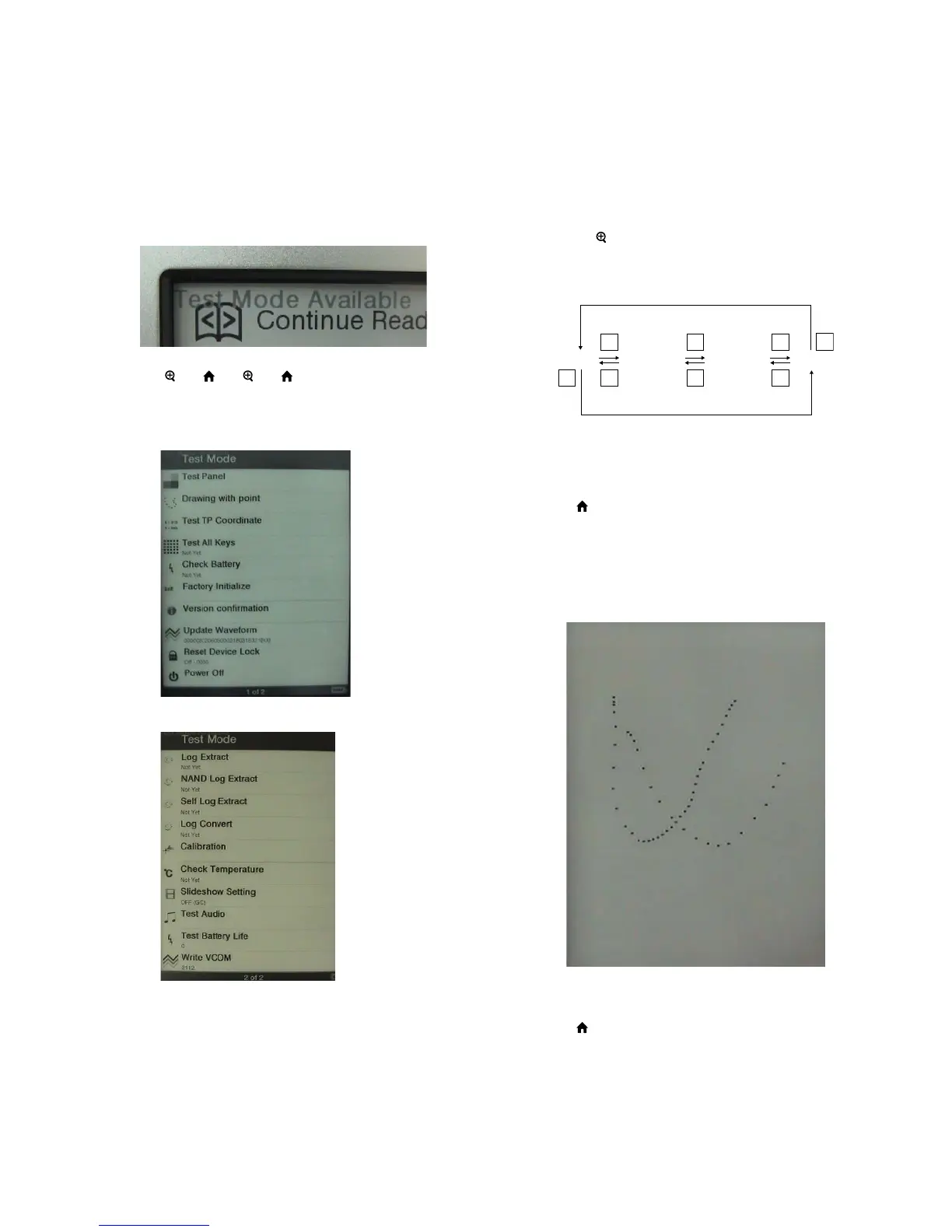
4. Confi rm “Test Mode Avaliable” is displayed on the screen.
5. Press the key as following order.
[
] → [ ] → [ ] → [ ]
6. After a while, indicate the test mode menu, enter the test mode.
7. Press the [<]/[>] keys, change the test mode menu page 1/page
2.
(Test mode menu page 1)
(Test mode menu page 2)
RELEASING THE TEST MODE
Slide the [POWER] key for 5 seconds or more to turn the power
off. Then, delete the fi le copied in “HOW TO ENTER THE TEST
MODE” from the “READER” drive.
OPERATION OF THE TEST MODE
1. Test Panel
Procedure:
1. Touch the “Test Panel” in the test mode menu page 1.
The screen is changed into the image fi les. (all image fi les of in
the directly as “/Sony Reader/software/images”)
2. Press the [<]/[>] keys, change the image fi les.
3. Press the [
] key, image fi le display size change to 600×800 or
500×700.
4. If there are no image fi les, screen is fi lled with grayscale color.
Press the [<]/[>] keys, change the grayscale color.
WHITE LIGHT GRAY
DARK GRAY BLACK
>
<
>
>
<
>
<
<
When the setting of “17. Slideshow Setting” is turning on, the
image fi les (or grayscale color) are changes by the automatic
operation.
Releasing method:
Press the [ ] key, return to the test mode menu 1.
2. Drawing with point
Procedure:
1. Touch the “Drawing with point” in the test mode menu page 1.
The screen is changed into the drawing check.
2. The scanned coordinate is displayed while dragging.
(Screen display)
Releasing method:
Press the [ ] key, return to the test mode menu 1.














 To Next Page