PRS-350
9
8. Update Waveform
In this mode, it is possible to confi rm the variation of LUT and
rewrite.
As for INK INDICATOR 5inch ELEMENT, the parameter that re-
writes the screen of each lot number is different. This parameter is
called LUT (Look Up Table).
When replacing the complete MAIN board or CHASSIS ASSY
(including INK INDICATOR 5inch ELEMENT) you need to re-
write the LUT.
However, rewriting is not required if the lot number is the same.
Note: LUT is written in IC2003 on the MAIN board.
Procedure:
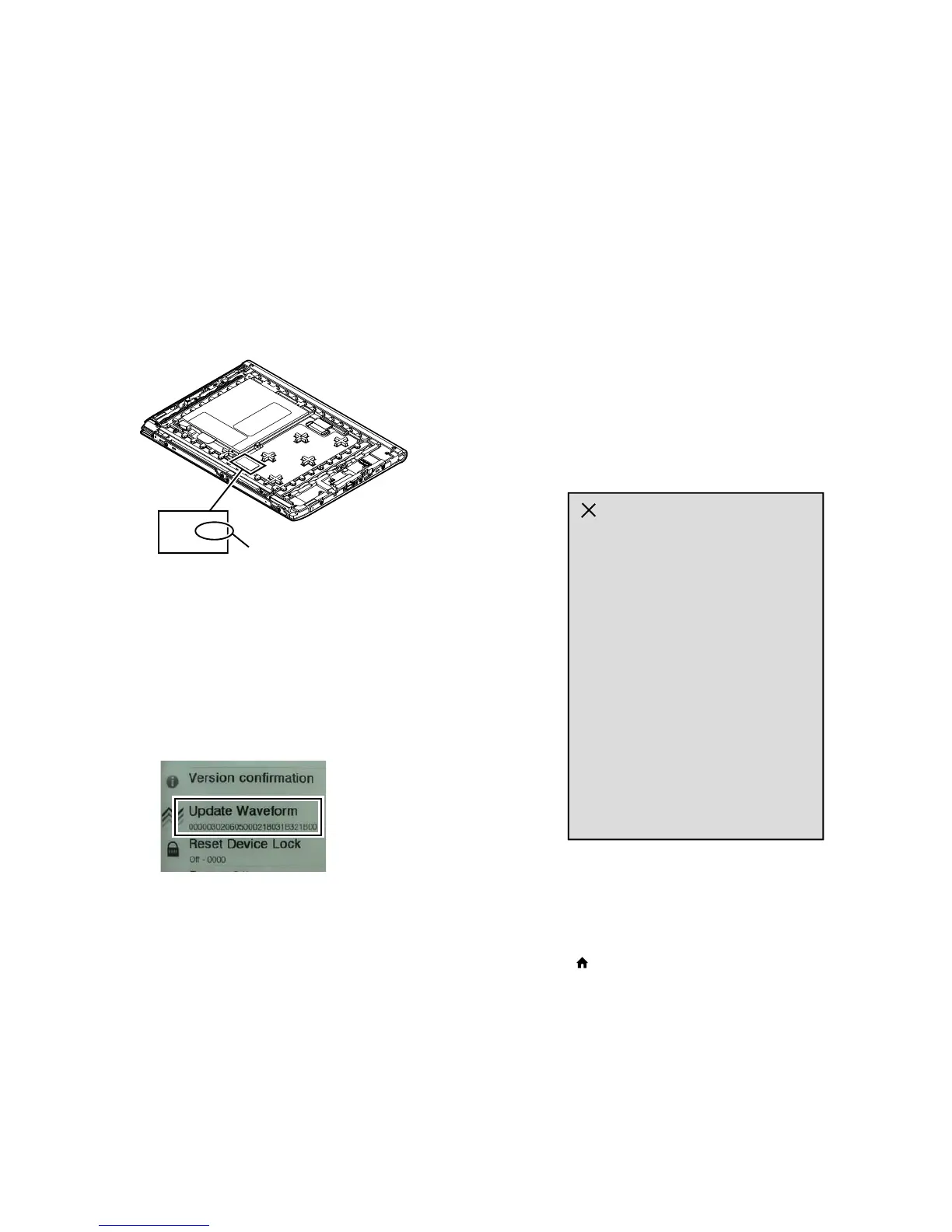
1. Confi rm the lot number of INK INDICATOR 5inch ELE-
MENT referring to the fi gure below.
Note: Remove the MAIN board to confi rm the lot number.
L -1.58 E505
lot number
2. Confi rm the version and the LUT fi le of LUT corresponding to
the lot number to each service headquarters.
3. Make the following folder under the “READER” drive.
/Sony Reader/software/data/
4. Copy the LUT fi le updated under the folder made in step 3, and
change the fi le name to “lut.bin”.
5. The current LUT version displayed at the lower side of “Up-
date Waveform” on test mode menu 1
(Example: “000003020605000218031B321B00” in the fi gure
below).
(Example of displaying current LUT version)
6. Touch the “Update Waveform” in the test mode menu page 1,
it starts rewriting LUT version.
7. After about 10 seconds, screen changes into all white.
8. Press [RESET] key and reboot the set.
9. Enter the test mode again, and confi rm LUT version has been
updated.
9. Reset Device Lock
The current state of device lock and the password are displayed on
the right side of “Reset Device Lock” of test mode menu page 1.
Touch the “Reset Device Lock” to reset the device lock.
10. Power Off
Touch the “Power Off” in the test mode menu page 1.
After a while, the screen display is changed white, so power is
turned off.
11. Log Extract
Touch the “Log Extract” in the test mode menu page 2.
The device saves the log fi les of using right now.
12. NAND Log Extract
Touch the “NAND Log Extract” in the test mode menu page 2.
The device saves the log fi les of using last time before rebooted
or shutdown.
13. Self Log Extract
It is the tool for the developer.
This mode is not used in servicing.
14. Log Convert
It is the tool for the developer.
This mode is not used in servicing.
15. Calibration
Note: When CHASSIS ASSY (LG) is exchanged, it is necessary to ex-
ecute this mode.
Procedure:
1. Touch the “Calibration” in the test mode menu page 2.
The screen is changed into the touch panel calibration.
(Screen display)
2. Touch the top left point and the bottom right point to calibra-
tion. Then, touch the right upper, left bottom, and center point
to confi rm the result of calibration. It return to the test mode
menu 2 when the calibration ends.
Releasing method:
Press the [ ] key, return to the test mode menu 2.
16. Check Temperature
Touch the “Check Temperature” in the test mode menu page 2.
Display of the right side of “Check Temperature” on test mode
menu changes into the display of the temperature.
17. Slideshow Setting
Touch the “Slideshow Setting” in the test mode menu page 2, slide-
show on/off changes whenever it touch the “Slideshow Setting”.
The setting is on, next image is shown every 3 seconds.














 To Next Page