EasyManua.ls Logo

Sony PS-Q3A - Page 8

Sony PS-Q3A
19 pages
Print Icon
To Next Page IconTo Next Page
To Previous Page IconTo Previous Page
Loading...
|
PS-Q3
PS-Q3
|
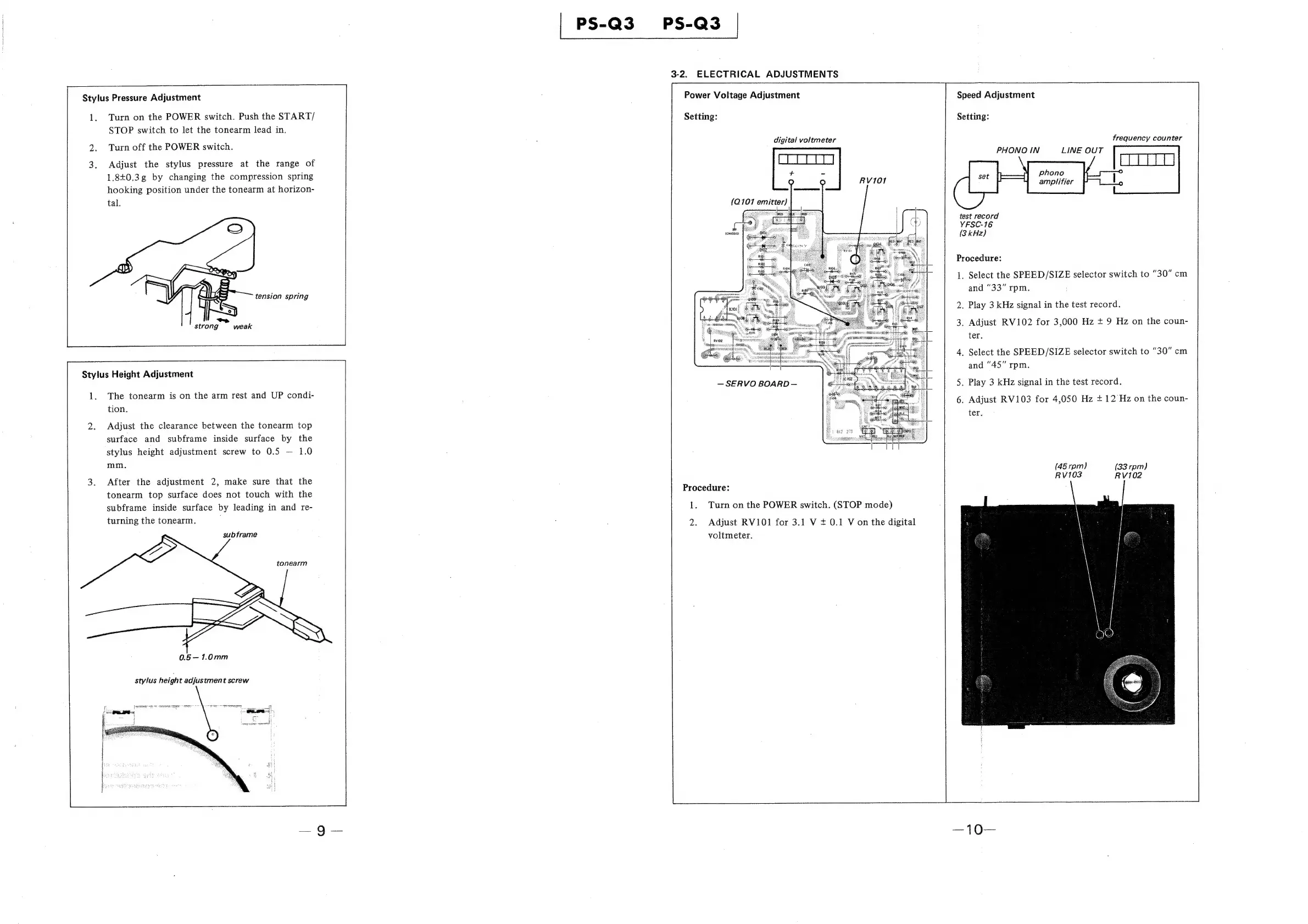
3-2.
ELECTRICAL
ADJUSTMENTS
Stylus
Pressure
Adjustment
Power
Voltage
Adjustment
Speed
Adjustment
1.
Turn
on
the
POWER
switch.
Push
the
START/
Setting:
Setting:
STOP
switch
to
let
the
tonearm
lead
in.
digital
voltmeter
frequency
counter
2.
Turn
off
the
POWER
switch.
PHONO
IN
LINE
OUT
3.
Adjust
the
stylus
pressure
at
the
range
of
1.840.3g
by
changing
the
compression
spring
hooking
position
under
the
tonearm
at
horizon-
tal.
Phono
amplifier
RV101
(Q101
emitter)
‘TREO
test
record
YFSC-16
(3
kHz)
©
(chassis)
Procedure:
1.
Select
the
SPEED/SIZE
selector
switch
to
"30"
cm
and
"33"
rpm.
tension
spring
2.
Play
3
kHz
signal
in
the
test
record.
3.
Adjust
RV102
for
3,000
Hz
+
9
Hz
on
the
coun-
ter.
4,
Select
the
SPEED/SIZE
selector
switch
to
“30"
cm
and
"45"
rpm.
9
-
strong
weak
Stylus
Height
Adjustment
5.
Play
3
kHz
signal
in
the
test
record.
6.
Adjust
RV103
for
4,050
Hz
+
12/Hz
on
the
coun-
ter.
1.
The
tonearm
is
on
the
arm
rest
and
UP
condi-
tion.
2.
Adjust
the
clearance
between
the
tonearm
top
surface
and
subframe
inside
surface
by
the
stylus
height
adjustment
screw
to
0.5
1.0
mm.
(45
rpm)
(33
rpm)
RV103
RV102
3.
After
the
adjustment
2,
make
sure
that
the
tonearm
top
surface
does
not
touch
with
the
subframe
inside
surface
by
leading
in
and
re-
turning
the
tonearm.
Procedure:
1.
Turn
on
the
POWER
switch.
(STOP
mode)
2.
Adjust
RV101
for
3.1
V
+
0.1
V
on
the
digital
voltmeter.
subframe
tonearm

Related product manuals