12
Example: If the parental control level of the system is set to [7],
content with a level from [1] to [7] can be played on the system.
Refer to http://www.ps-playsafeonline.com for further details.
Other security settings
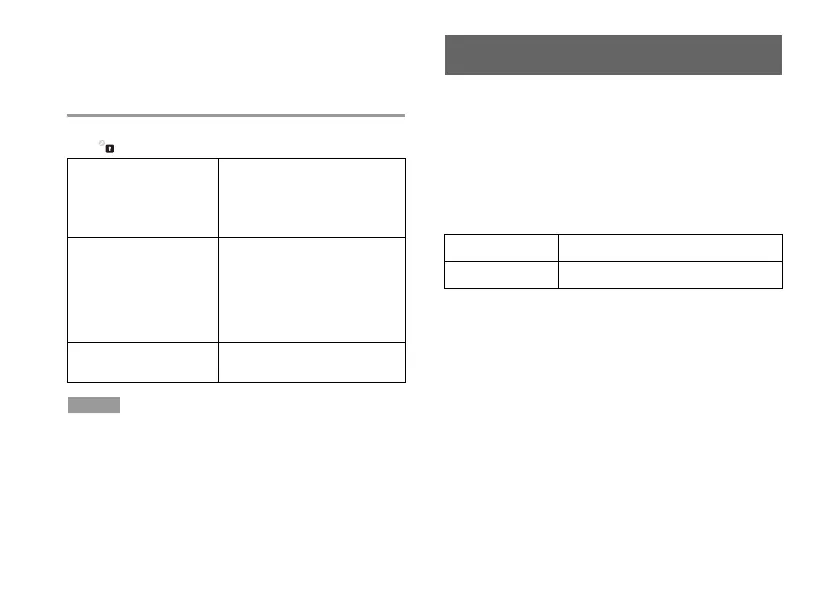
You can set parental control limitations on content other than games
under (Security Settings), as described below.
BD - Parental Control
When playing a BD with parental
control settings, restrict playback
based on the age you have set. The
lower the setting, the tighter the
restriction.
DVD - Parental control
When playing a DVD with parental
control settings, restrict playback
based on the level you have set.
Select from [Off] or one of eight
levels.
The lower the number, the tighter
the restriction.
Internet Browser Start
Control
Restrict the ability to start the
Internet Browser with a password.
Hint
Security settings menu options may vary depending on the version of
the system software in use. For the latest information, refer to the
online user's guide (access from :
eu.playstation.com/ps3/support/manuals/).
Installing a hard disk drive
To install an internal hard disk drive in the PS3™ system - you
will need a compatible hard disk drive and the mounting bracket
(CECH-ZCD1) (both products sold separately). For more
details, please refer to the instruction manuals supplied with
each product.
An official hard disk drive (with mounting bracket) (CECH -
ZHD1) is available to purchase separately.
The following type of hard disk drive may be installed:
Size 2.5 inch / 63.5 mm (internal type)
*1
Interface format Serial ATA
*2
*1 Proper operation is not guaranteed for all models.
*2 Parallel ATA is not supported.



 To Next Page