Initial setup
1 Charge the headset by connecting it to a USB port via USB cable.
The headset may need up to 3 hours to charge fully.
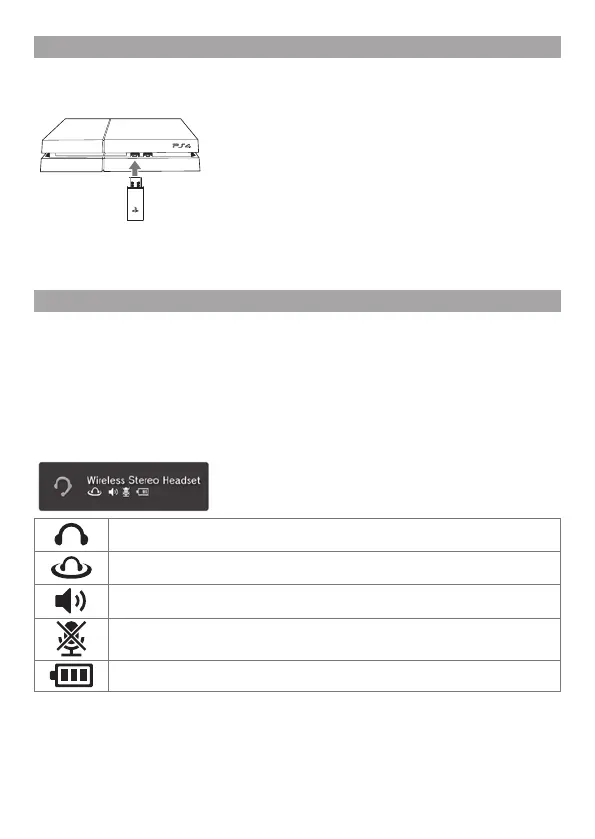
2 Insert the wireless adaptor in the USB port.
3 Slide the POWER switch to position “1” or “2”.
Using the headset with the applicable PlayStation
®
systems
Compatible with the PS4™ and PS3™ system software version 1.60 / 4.20 or later.
Only one headset at a time can be used with the PS3™ system. More than one
headset can be used with the PS4™ system.
Status display
When first connecting to an applicable PlayStation
®
system or when changing the
settings, the following status information is displayed in the upper right corner of
thescreen:
Displayed when [Stereo Headset Audio Extension] is set to [On] *
Displayed when Virtual Surround Sound is enabled
Displays volume level
Displayed when the microphone is turned off
Displays battery charge level
*
Stereo Headset Audio Extension is a system setting that controls the type of audio output to
the wireless stereo headset. It is available only when the wireless adaptor is inserted.



 To Next Page