7
EN
Remove and attach covers
Remove the covers when performing maintenance on your console, or when installing
an M�2 SSD or disc drive�
Safety warnings
Before removing or attaching the covers, please read the following safety precautions�
Caution
• Keep out of reach of young children� Young children may swallow small parts which
may inflict injury�
• After you have turned o your PS5 console and unplugged the AC power cord
and cables, wait for your console to cool down before removing and attaching
the covers� The main unit of your PS5 console may still be hot immediately after
use, and continued handling of your console may cause burns�
• Be careful not to pinch your fingers in the gaps between parts, and not to hurt
your hands and fingers on the corner of parts�
• When turning on your console, make sure the covers are installed correctly�
If the covers are not installed correctly, it may cause the main unit to overheat�
Remove and attach covers
Place your console on a soft cloth spread over a flat surface before removing
or attaching the covers�
Illustrations show the console with disc drive installed�
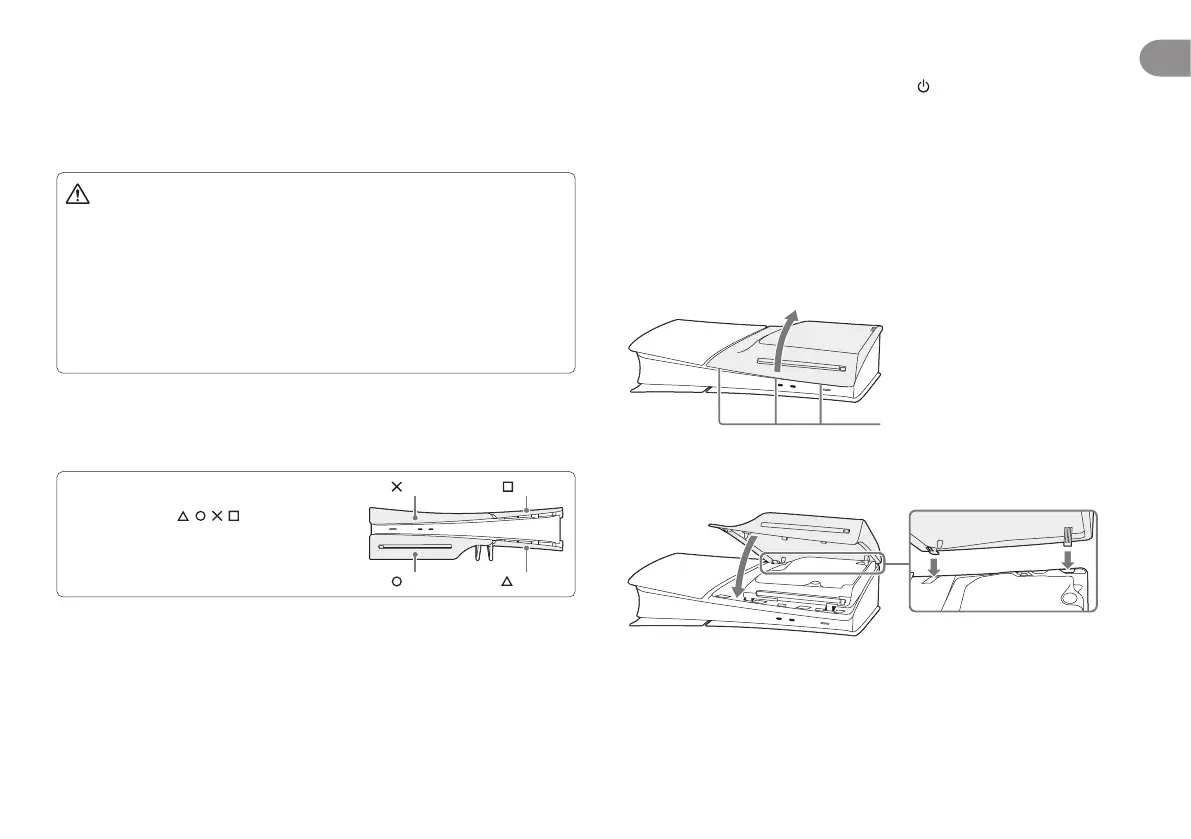
• Each cover has dierent shapes�
To ensure you attach the cover in the correct
position, use the
/ / / marks on the
inside of the cover as a guide (see illustration
on the right)�
• All covers can be removed and attached
in the same way�
cover
cover
cover
cover
1
Go to the control centre and select Power > Turn O PS5.
The screen goes blank, the power indicator flashes white, and then turns o�
2
Remove the AC power cord and cables, and then wait for the PS5
console to cool down.
The main unit of your console is hot immediately after use�
3
Place the console with the bottom facing up and the front side facing
you, and then remove the feet.
4
Remove the cover.
Slightly lift the cover away from the console to detach its clips and remove it�
5
Attach the cover.
Align the cover’s clips with the corresponding holes on the console and push
in until you hear a “click”�
6
Attach the feet, connect the AC power cord and cables, and then turn
on the power.
Clips



 To Next Page