24
Updating the system software
Updating the system software
Software updates may include security patches, new or
revised settings and features, and other items, which will
change your current operating system. It is recommended
that you always maintain your system to use the latest
version of the system software.
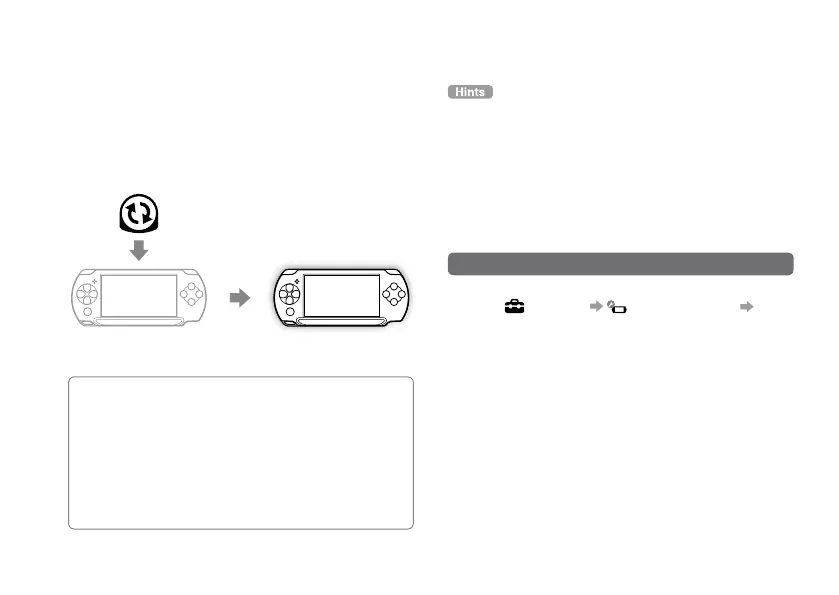
The system software is
updated.
Obtain update data.
Use the update data to overwrite the
existing system software.
Notice
During an update:
Do not remo
ve the Universal Media Disc.
Do not turn of
f the system.
Do not disconnect the
AC Adaptor.
If an update is cancelled before completion, the system
software may become damaged, and the system may require
servicing or exchange.
For the latest information on updates, visit
eu.playstation.com/psp
Depending on the softw
are title, you may not be able to play
without first updating the PSP
® system software.
After you ha
ve updated the system software, you cannot go
back to an earlier version.
Before starting, check that the battery is char
ged. You may not
be able to start an update if the battery charge level is low.
Checking the system software version
You can check system software version information by
selecting (Settings) (System Settings)
"System Information". The current version is displayed
in the "System Software" field.


 To Next Page