41
Additional Information
Compatible media
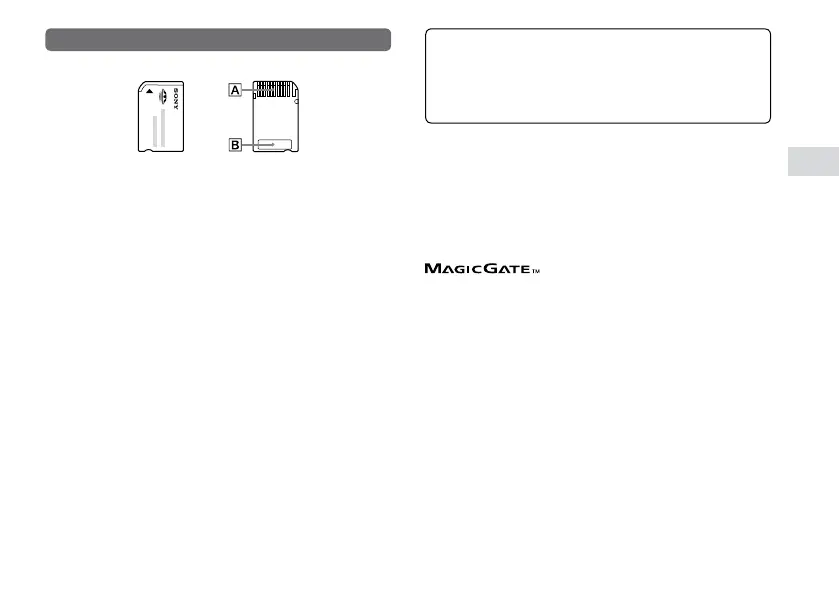
Memory Stick Duo
™
For best results, follow these guidelines:
Do not touch the connector area () with your hands or with
metal objects.
Do not press hard when writing on the memo area ().
Do not use or store a Memory Stick Duo™ in the follo
wing:
– Places subject to high temperatures, such as in a hot vehicle
– Locations exposed to direct sunlight
– Locations that are very humid or conducive to corrosion
When using Memory Stick Duo
™
media without an erasure
prevention switch, take care not to overwrite or delete data by
accident. If your Memory Stick Duo
™
media has an erasure
prevention switch, you can prevent data from being saved,
edited, or deleted by setting the switch in the LOCK position.
Recorded data
Do not use the Memory Stick Duo
™
in the following
ways, as doing so may result in data loss or corruption:
Removing the Memory Stick Duo
™
or turning off the system
while it is loading or saving data or being formatted.
Using it in a location that is e
xposed to static electricity or
electrical interference.
If, for any reason, software or data loss or corruption occurs,
it is usually not possible to recover the software or data. Sony
Computer Entertainment Inc. and its subsidiaries and
affiliates accept no liability for damages, costs or expenses
arising from software, data loss or corruption.
File size limitation
The specification of the file system used on Memory
Stick
™
media limits the size of files that can be recorded
or played to less than 4 GB per file.
MagicGate
™
is a term of copyright-protection
technology developed by Sony Corporation.


 To Next Page