15
GB
Using the PSP® system
Turning the system on and off
Turning the system on and off
Turning the system on
1
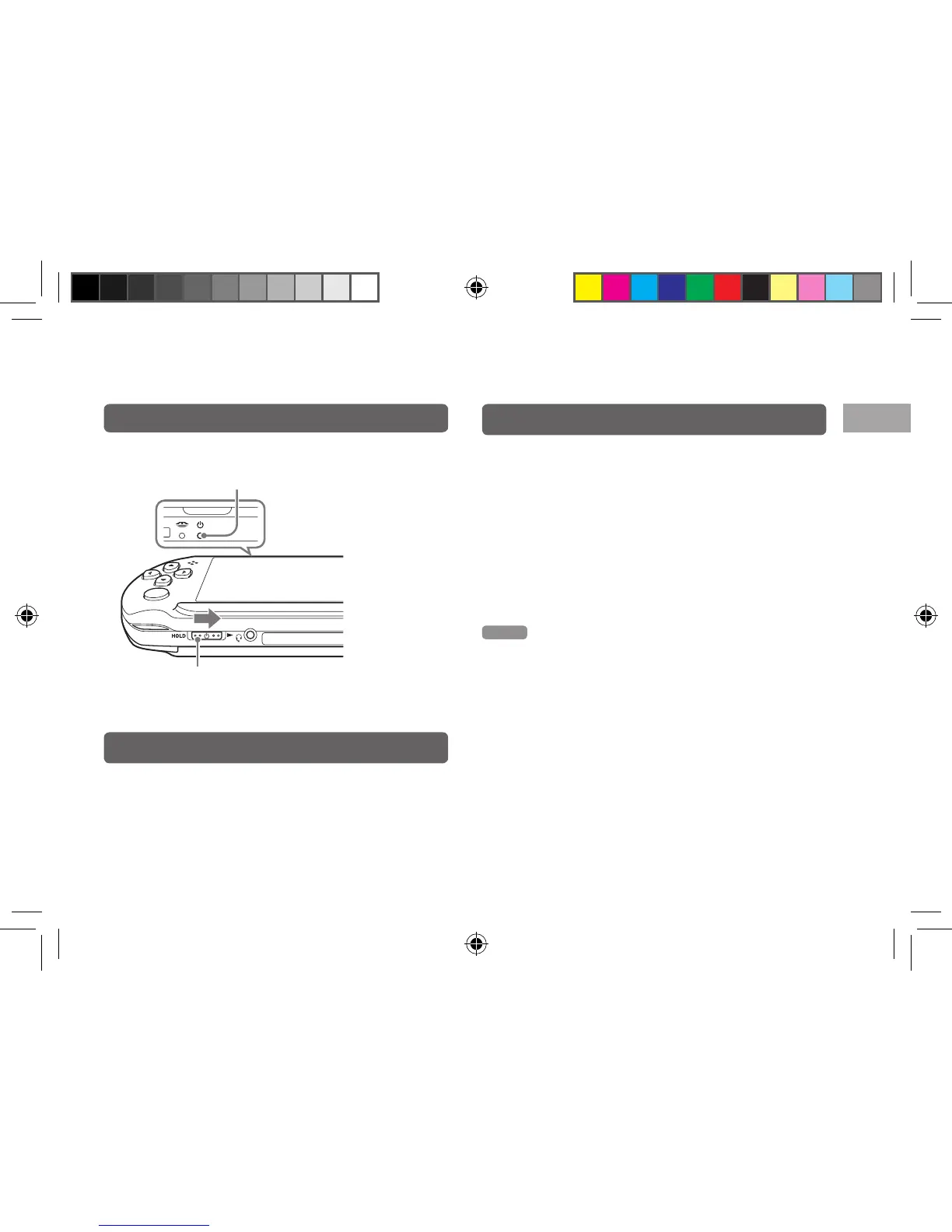
Slide the POWER/HOLD switch to the right.
The POWER indicator lights up in green.
Turning the system off
1
Slide and hold the POWER/HOLD switch to
the right. for more than three seconds.
The POWER indicator turns off.
Putting the system in sleep mode
You can pause the system while playing games or other
content. Playback begins from the point where the system
entered sleep mode.
1
Slide the POWER/HOLD switch to the right.
The POWER indicator turns off and the system enters
sleep mode.
Clearing sleep mode
Slide the POWER/HOLD switch to the right.
Hint
Some software may prevent the system from entering sleep mode.
POWER indicator
POWER/HOLD switch
12508 PSP E-1000_GB_MasterV2.indd 15 21/09/2011 16:49



 To Next Page