Need help?
Do you have a question about the Sony RCP-D50 and is the answer not in the manual?
Overview of the remote control panel, operating instructions, and safety warnings.
General warnings regarding fire, shock hazards, and proper usage.
Details FCC compliance for USA and EMC directives for Europe.
Highlights the panel's capabilities, including control arrangement, shooting operations, and scene files.
Describes the LCD touch panel, video display function, and status confirmation.
Details digital signal transmission and Memory Stick slot functionality.
Explains rack mounting options for the control panel.
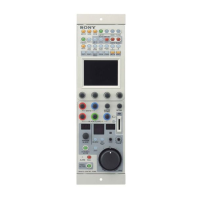
Identifies and describes primary buttons like MASTER/SLAVE, PREVIEW, and ASSIGN.
Details the WHITE, BLACK/FLARE, MASTER GAMMA, and DETAIL adjustment knobs.
Explains camera number/tally, ALARM, CALL, and PANEL ACTIVE indicators.
Locates the Memory Stick slot and its access lamp.
Covers MENU buttons, MONITOR button, and LCD/touch panel usage.
Describes BRIGHT and CONTRAST knobs for menu parameter adjustment.
Details the MASTER BLACK display, RELATIVE button, and control ring.
Explains IRIS/M.BLACK LINK, ACTIVE buttons, and IRIS lever.
Covers AUTO button, SENS knob, and COARSE knob for adjustments.
Details f-number display, EXT indicator, and Preview switch.
Details the MASTER BLACK display and manual control.
Explains IRIS RELATIVE, LINK, ACTIVE buttons, and IRIS control.
Covers AUTO button, SENS, and COARSE knobs for adjustments.
Details the f-number display and EXT indicator.
Describes the MONITOR, CCU/CAMERA, and EXT I/O connectors.
Provides instructions for mounting the control panel onto a console.
Explains how to navigate menus, select items, and adjust parameters.
Details selecting menus, submenus, and flipping pages.
Describes how to use the MONITOR button to view camera images.
Explains the default status display showing set values.
Describes the initial display and navigation of the Paint menu.
Details how to adjust parameters within the Paint menu.
Explains how submenus are displayed and navigated for complex settings.
Details function menu items for Operation mode on DXC-D50 series.
Details function menu items for SW mode on DXC-D35 series.
Describes settings for selecting monitor output signals (R, G, B, RGB, SEQ, ENC).
Explains how to manage scene files via the Scene File operation menu.
Lists specific paint menu items and their functions for DXC-D50 series cameras.
Details menu items for Operation and SW modes, including jump menus.
Lists functions for controlling camera lens and tripod pan/tilt.
Covers White Shading, Camera ID, Center Marker, Safety Zone, and Screen Mode.
Details File operations, Copy to Slaves, and RCP Config (Buzzer, LEDs, RE, VR Settings).
Lists specific paint menu items and their functions for DXC-D30/D35 series.
Covers Camera Config, Screen Mode, File, Scene Trans, and Copy to Slave.
Details RCP Config for Buzzer, LEDs, RE, VR Settings, and CAM No.
Lists specific paint menu items and their functions for DXC-637 series.
Details menu items for Operation and SW modes, including jump menus.
Lists functions for controlling camera lens and tripod pan/tilt.
Lists specific paint menu items and their functions for CCU-TX50.
Details menu items for Operation and SW modes, including jump menus.
Lists functions for controlling camera lens and tripod pan/tilt.
Covers Camera Config, Screen Mode, File, Scene Trans.
Details RCP Config for Buzzer, LEDs, RE, VR Settings, and CAM No.
General overview of setting the built-in clock and adjusting panel conditions.
Step-by-step guide to setting the date and time for scene file recording.
Procedure for adjusting the volume of call, touch, and panel buzzers.
Guide to adjusting the brightness of panel LEDs and indicators.
Explains how to change the functions assigned to the BLACK/FLARE knobs.
Details how to adjust the brightness and contrast of the LCD.
Procedure for assigning specific functions to the ASSIGN button.
Steps to set a security code for accessing Engineer mode.
Procedure to set a security code for Panel Active Lock.
Details setting items storable in scene and setup files for various cameras.
Step-by-step guide for storing scene files in the unit's memory.
Procedure for loading saved scene files into the camera.
Transferring registered scene files from camera to Memory Stick.
Transferring scene files from Memory Stick back to the camera.
Guide for storing camera settings as setup files.
Procedure for loading saved setup files into the camera.
How to automatically or manually select the skin gate area.
Procedure for lowering detail level within the skin gate area.
Procedure for adjusting saturation and hue of the skin gate area.
Describes CCU-TX7 connections and setting master/slave units.
Adjusting iris and master black on multiple cameras simultaneously.
Copying settings from master unit to slave units.
Explains how one RCP unit can control multiple camera adjustments.
Procedure for enabling command link for specific functions.
Instructions for physically inserting and removing Memory Sticks.
Information on Memory Stick types and MagicGate technology.
Explains the status indications of the Memory Stick access lamp.
Precautions to prevent image data damage and terminal contamination.
Advice on Memory Stick compatibility and storage conditions.
Details power requirements, consumption, dimensions, and operating temperature.
Lists the types of connectors available on the unit.
Lists supplied accessories and optional items.
 General
| Type | Remote Control Panel |
|---|---|
| Display | LCD |
| Storage temperature | -20 °C to +60 °C (-4 °F to +140 °F) |
| Connectors | RJ-45 (Ethernet) |
| Operating temperature | 40 °C (104 °F) |

 To Next Page