32
Menu Configuration and Basic Menu Operations
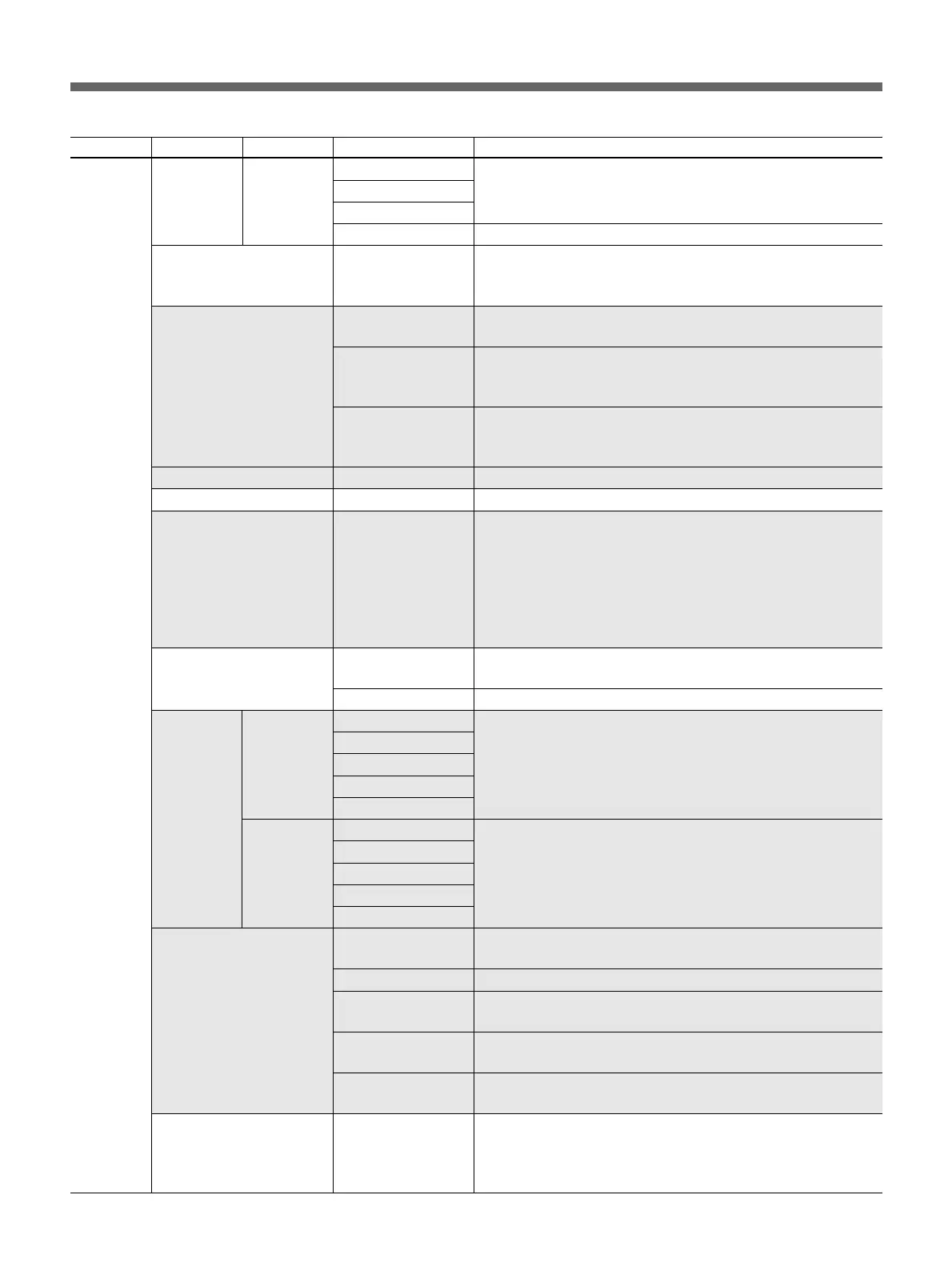
Menu 2ndary menu Submenu Control item Function
RCP Config RCP LED Bright • Switch To set the brightness of respective LEDs
(cont.) Adjusting
• Tally
(cont.)
• Other
• Master To set the brightness of the all LEDs of the unit
RE Setting BLACK/FLARE To select the function for the BLACK/FLARE knob
Black: Black balance adjustment
Flare: Flare balance adjustment
VR Setting VR STD Mode To select the initial settings for IRIS or MASTER BLACK
Adjustment mode: Absolute or Relative
VR Rel. Scale IRIS VR
To select the response rate of the IRIS knob (relative-value
adjustment rates: 1/1, 1/2, and 1/4, where 1/1 is the quickest
response position)
M. Black VR (Only available for RCP-D50) To select the response rate of the
MASTER BLACK knob (relative-value adjustment rates: 1/1, 1/2,
and 1/4, where 1/1 is the quickest response position)
Information To display the software version of the unit
Cable Comp Cable Length To set the length of the remote cable (5 m/25 m/50 m)
SW Setting • SW Assign/Sel To allocate a function to the ASSIGN button
No Assign: No assignment
Black/Flare: Switching the function of the BLACK/FLARE knobs
Black Auto: ON/OFF of the auto black
ATW: ON/OFF of the auto tracing white balance
TLCS: ON/OFF of the total level control function
DynaLatitude: ON/OFF of the DynaLatitude function
CAM No. CAM ID->No. To switch the display of the camera number/tally indication of the
unit between camera ID and camera number
• No. To select the camera number to be displayed on the RCP
Date/Time Date • Year Date adjustment of the clock built into the unit
Set • Month
• Day
Set
Cancel
Time • Hour Time adjustment of the clock built into the unit
• Minute
• Second
Set
Cancel
Comm Link Gain To turn ON/OFF command link operation (activation of several
cameras at the same time) of the gain
Shutter To turn ON/OFF command link operation of shutter settings
R/B White To turn ON/OFF command link operation of the white R/B
adjustment
R/B Black To turn ON/OFF command link operation of the black R/B
adjustment
R/G/B Flare To turn ON/OFF command link operation of the flare R/G/B
adjustment
Comm Type Protocol Type
a)
To set the connection mode
P Type 2: When connected to DXC-D35, DXC-D50, CCU-TX7,
CCU-D50, DSR-300/370/390/500/570
P Type 7: When connected to CCU-TX50
a) Be sure to power off the camera system and then power it on again after changing the “Protocol Type” setting.


 To Next Page